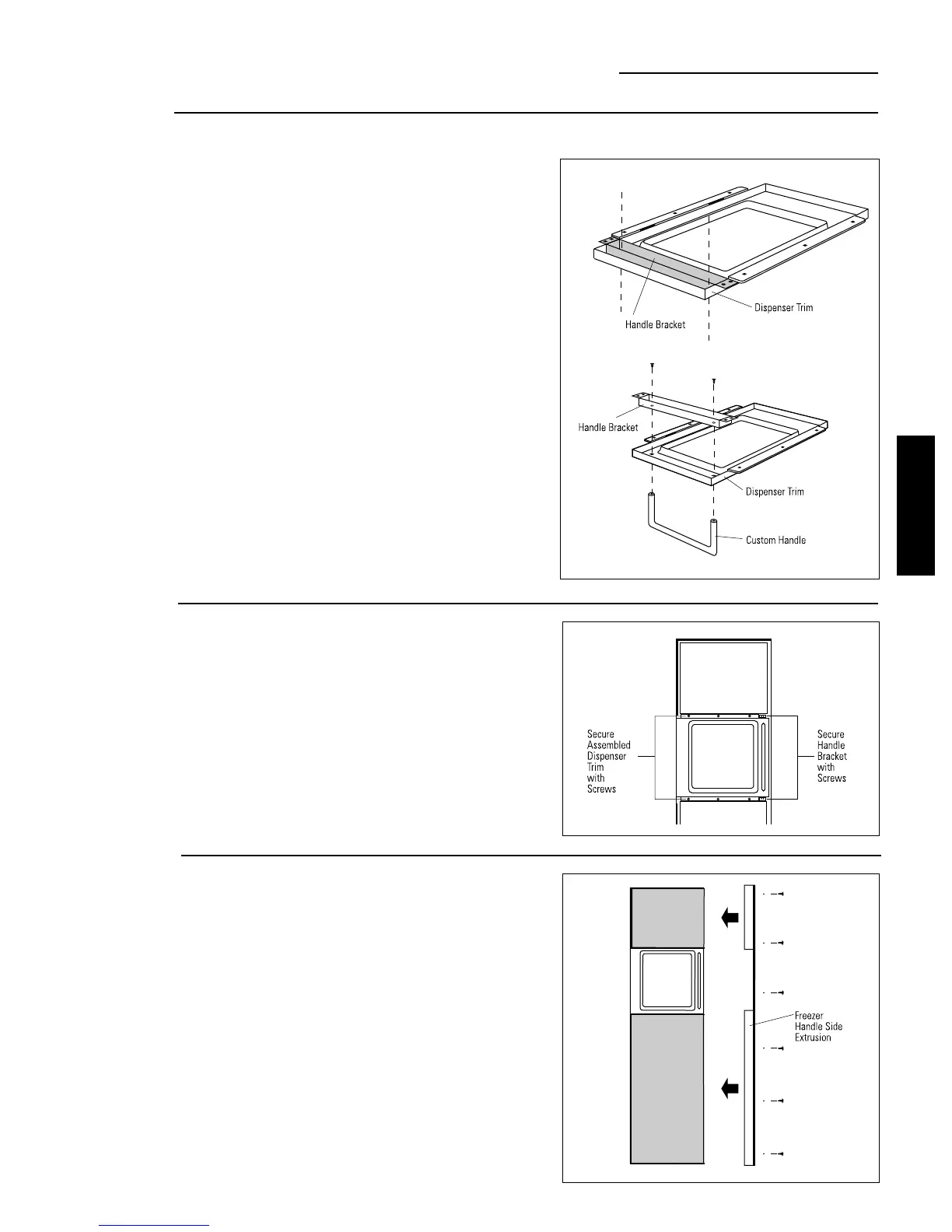
Option 2 Installation
Step 4
Install
custom handle
Step 5
Mount
assembled
dispenser trim
• Drill clearance holes through the handle bracket and
the dispenser trim.
• Install screw(s) long enough to pass through the
handle bracket, dispenser trim and into the
custom handle.
Note:
The custom handle must
be installed against the handle
bracket. The custom handle
cannot exceed 11-3/4" length.
Caution:
The handle bracket
must be secured to the steel
door. If it is not secured
properly, the dispenser trim will
pull away from the door.
• Mount assembled dispenser trim with handle onto
the door.
• Drive 2 screws through the top and bottom of the
handle bracket into the steel door.
• Re-install the door panel trim above and below
dispenser using original screws.
• Slide decorator panels into the trim, top and bottom.
• Slide freezer door extrusion in between panels and
steel door. Secure with screws.
• To install fresh food handle follow the same procedure
as shown in Option 1.
Step 6
Install
custom handle
extrusion
ZKH1 Trim Kit
Custom Handles with 1/4" Panels
25
ZKH1 INSTALLATION
INSTRUCTIONS








 To Next Page