EasyManua.ls Logo

Monster Power HTS1000 - User Manual

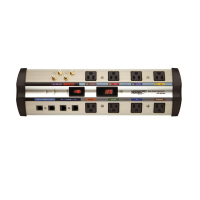
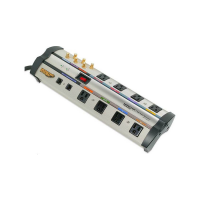
Monster Power HTS1000
44 pages
Print Icon
To Next Page IconTo Next Page
Loading...
®
Home Theatre
Reference
PowerCenter
HTS 1000 MKII
Owner’s Manual
Pour cinéma maison
PowerCenter
HTS 1000 MKII
deférence
Guide de l’Utilisateur

Questions and Answers

  • E
    Edward MorrisonJul 30, 2025
    How to troubleshoot Monster Power HTS1000 if it is not receiving power?
    • Z
      Zachary KingJul 30, 2025
      If your Monster Power AC Power Distribution PowerCenter isn't receiving power, first ensure the PowerCenter switch is turned on and that it's plugged into a properly grounded 120V wall outlet. In some cases, a wall switch near the outlet might need to be activated. Also, too many connected devices might be overloading the system, tripping the thermal circuit breaker. If this occurs, press the Thermal Circuit Breaker button to reset it, waiting 10 minutes before trying again. If the breaker continues to trip, consider moving some components to another PowerCenter, as you might be drawing too much current.
  • J
    Jason PachecoAug 9, 2025
    What to do if a component is not receiving power from Monster Power HTS1000 AC Power Distribution?
    • J
      Jocelyn WhiteAug 9, 2025
      If a component connected to your Monster Power AC Power Distribution isn't receiving power, ensure the PowerCenter is turned on. The component might be plugged into a switched outlet, and the PowerCenter needs to be on for it to receive power. Alternatively, plug the component into an unswitched outlet. In some cases, the component itself needs to be switched on to receive power from the PowerCenter when plugged into a switched outlet, so make sure component power is also switched On.
  • B
    Brittany JonesAug 19, 2025
    Why do speakers emit a humming or buzzing noise with Monster Power HTS1000?
    • D
      Daniel CarrAug 19, 2025
      If your speakers are emitting a humming or buzzing noise when connected to your Monster Power AC Power Distribution, it might be due to the PowerCenter sharing AC power with improperly grounded equipment. Try connecting your PowerCenter to a dedicated outlet. Alternatively, unplug components one by one to see if the noise stops; if a component is found to be improperly grounded, attach a copper wire from its chassis to the PowerCenter's grounding post.

Summary

Important Safety Information

Power Sources

Safety warnings regarding power outlet compatibility and source identification.

Grounding and Polarization

Ensures proper three-wire grounding for safety and component protection.

Liquid: Avoiding Electrical Shocks

Precautions against operating the unit with spilled liquid or near water.

Power Cord Safety

Guidelines for routing AC power cords and handling damaged cords.

Storm Precautions

Recommendation to disconnect the unit during lightning storms.

No User Serviceable Parts Inside

Warning against opening the unit; consult warranty for repair.

Exposure To Heat

Caution against exposing the PowerCenter to direct sunlight or heat sources.

Proper Cleaning

Instructions for cleaning the unit with a dry dusting method.

Proper Grounding and Installation

Proper Grounding

Requirement for a properly grounded outlet for safety and equipment protection.

Proper Power and Protection

Ensuring all lines (AC, coax, phone) are connected to the PowerCenter.

Proper Protection and the Limited Connected Equipment Warranty

Warranty invalidity if components are not properly protected by the PowerCenter.

A Note From The Head Monster

Monsters Patented Clean Power Stages

The Minds Behind the Monster PowerCenter Design

Richard Marsh

Expert in AC power and home theater systems, developed Clean Power circuitry.

Demian Martin

Specialist in complex AC power solutions and high-end audio design.

Noel Lee

Founder of Monster Cable, driving force behind Monster Power solutions.

Monster HTS 1000 MKII PowerCenter Features

ON;OFF Switch

Controls power to switched outlets, indicated by an illuminated switch.

GROUND OK Indicator

Confirms the wall outlet is properly grounded.

PROTECTION ON Indicator

Indicates that the unit's internal surge protection is active.

Audio Filter (Switched Outlets)

Filters AC line noise for audio components in switched outlets.

Telephone;Network Ethernet Input;Output

Provides surge protection for phone and network lines.

Video Interference Reduction Filter (Unswitched Outlets)

Filters interference for video components in unswitched outlets.

Cable;Satellite;Antenna Coaxial Connection

Connects and protects coaxial cables from surges.

Remote AC;DC Input Jack

Allows remote turn on/off of switched outlets via a control component.

Hook-Up Guide

Video Outlet (Unswitched) Hook-up

Connecting video components to unswitched outlets for interference reduction.

Audio Outlet (Switched) Hook-up

Connecting audio components to switched outlets for interference reduction.

Coaxial Connections Hook-up

Connecting and protecting coaxial cables from surges.

Phone;Network Connections Hook-Up

Connecting and protecting phone/Ethernet lines from surges.

Remote AC;DC In Control Hook-up

Connecting a remote trigger for automatic on/off control of switched outlets.

Troubleshooting

Specifications

Monster Power HTS1000 Specifications

General IconGeneral
Input Voltage120V
Output Voltage120V
Maximum Current15A
Frequency60Hz
Number of Outlets8
Surge ProtectionYes
FilteringYes
Cord Length8 ft

Related product manuals