17
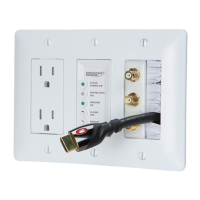
HTS1000/2000 FEATURES
NUMBERS REFER TO DRAWINGS ON PAGES 15-16
INDEX DRAWINGS
1. ON/OFF Switch: This switch turns the PowerCenter On and Off. The switch lights up when turned to the “On”
position, providing power to components plugged into the Switched outlets. Turning the switch to the “Off” position
shuts off power to Switched outlets. Components plugged into Unswitched outlets still receive power, however,
provided the PowerCenter is plugged into a 120V outlet.
2. Ground OK: When this LED is On, the PowerCenter is plugged into a properly grounded 120V AC power outlet.
If the LED is Off, unplug the PowerCenter immediately. Monster Cable
®
is not responsible for equipment damage
due to improper grounding of your home’s outlets.
3. Protection On: When this LED is On, Monster Power Surge Protection Circuitry is functioning properly. If the LED
is off, Monster Power Surge Protection Circuitry has malfunctioned. If the light is off when properly connected to
a 120V AC outlet, unplug the PowerCenter immediately. See warranty information for details on how to return
damaged equipment to the manufacturer (page 27).
4. Thermal Circuit Breaker: Protects the PowerCenter’s filters from power overload.
5. CATV Coaxial Input/Output: The input connects the coaxial cable from your cable TV company. The output
connects your Monster Video
®
cable to the input of your TV or VCR.
6. Satellite Coaxial Input/Output: The input connects the coaxial cable from your TV Antenna. The output
connects the coaxial cable to input of your TV or VCR (or signal splitter).


 To Next Page
 Loading...