18 | REMOTE CONTROL
MUTEMUTE
MUSICMUSIC
MOVIEMOVIE
TREB+TREB+
TREB-TREB-
NEWSNEWS
3D3D
BASS+BASS+
BASS-BASS-
PPAIRAIR INPUINPUTT
VOL+VOL+
VOL-VOL-
RESERESETT
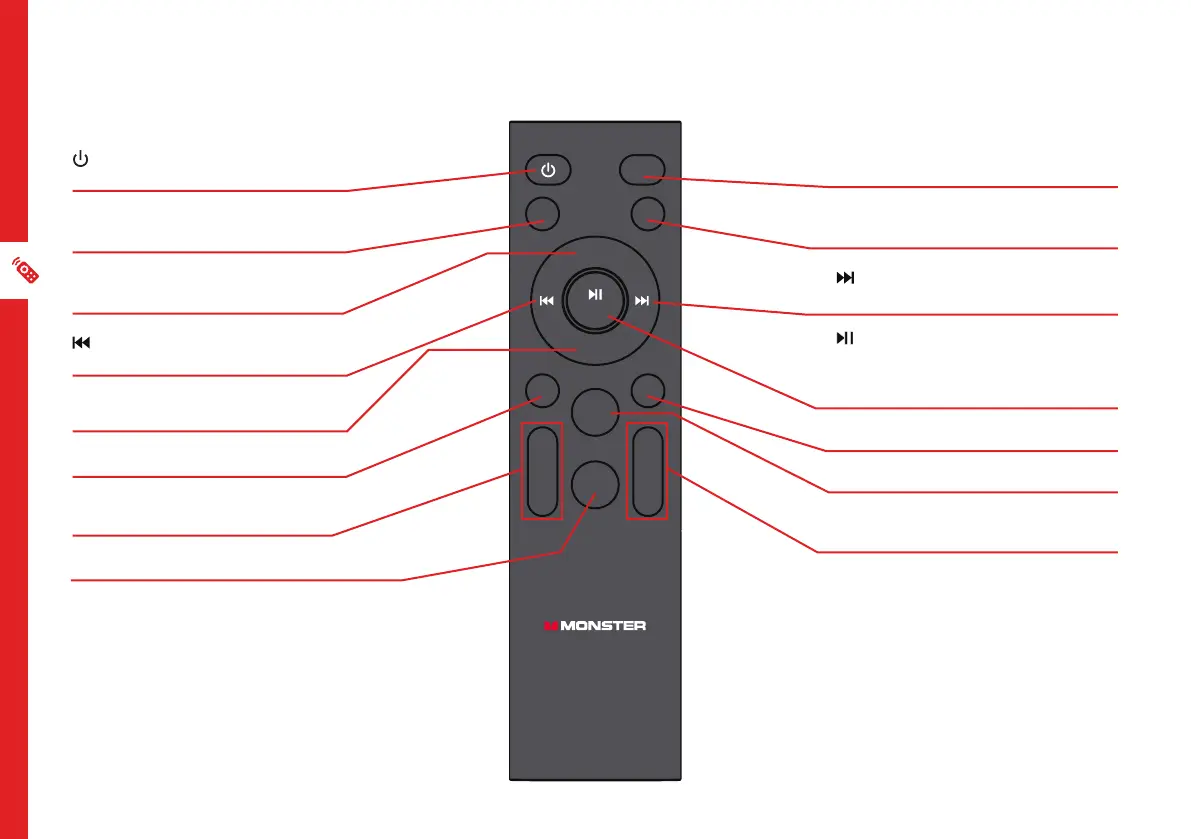
Remote Overview
POWER: Switch the soundbar to
On or Standby
PAIR: Press and hold to connect or
disconnect the Bluetooth device
VOL+ : Press to increase the
volume level
: Press to play the previous song
(only for USB and Bluetooth mode)
VOL- : Press to decrease the
volume level
MUSIC : Select the music EQ effect
TREB +/TREB - : Turn the treble
up/down
3D : Turn 3D EQ effect on/off
MUTE: Press to mute. Press again
to unmute
INPUT : Press to change between
input modes
: Press to play the next song
(only for USB and Bluetooth mode)
/ RESET : Press to play/pause
(only for USB and Bluetooth
mode). Press and hold to reset to
factory default settings
MOVIE : Select the movie EQ effect
NEWS : Select the news EQ effect
BASS +/BASS - : Turn the bass up/
down


 To Next Page