34
EN
Adjustable feet
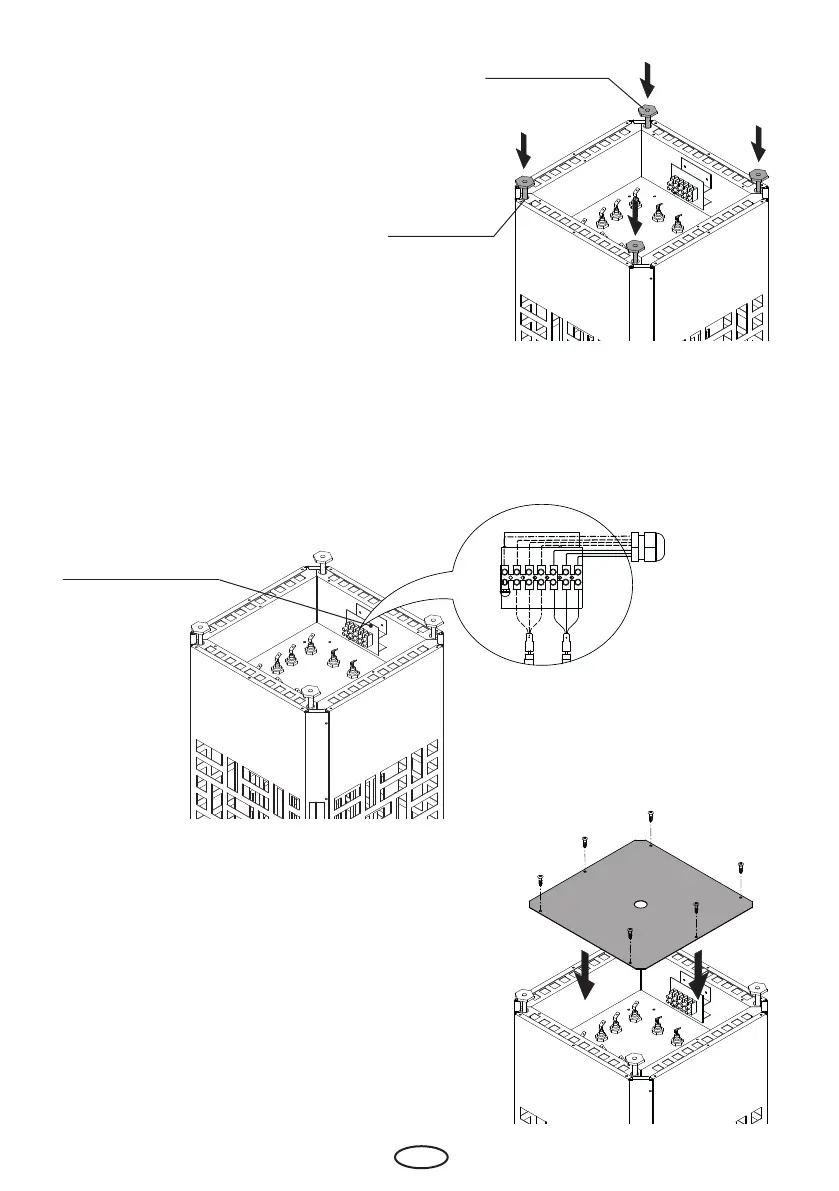
Mounting of feet
• Remove the enclosed cover of the terminal
box
• Screw in the supplied feet in the corres-
ponding threaded bushes and secure them
with the counter nuts (Fig. 4).
• Make sure that all wires are properly
secured in the terminals.
• Close the terminal box with cover panel
using the screws. Secure the cable with
the cable gland.
terminal ban
Fig. 5
Fig. 4
Connect the cable(s)
• Pull the connecting cable(s) through the opening(s) in the terminal box cover panel with
tted cable gland(s).
• Make connections as per connection diagram (Fig. 5)
• Standard connection diagram is attached on the inner side of the cover panel. Pay attention
to the special connection scheme by 230V 1N connection..
threaded feet
mounts
Fig. 6



 To Next Page