Precautions
*Please read carefully before proceeding*
Interference with other electrical devices and Cleaning:
Radios and televisions placed nearby may experience
reception interference.
Operate this unit at a suitable distance from radios
and televisions.
Clean only with a soft, dry cloth.
Main Features
Connections:
Always turn off the power and all other equipment before
connecting or disconnecting. This will help prevent
malfunction and damage to any of the devices. Make sure
to unplug all connection cables and power cords before
moving this unit.
Power Supply:
Please connect the designated AC adapter to an AC outlet
of the correct voltage. Please be sure to use only an AC
adapter which supplies 9V DC(±10%), , center
negative. Unplug the AC power adapter when not in use or
during electrical storms.
Handling:
Do not apply excessive force to the switches or controls.
Do not let paper, metal, or other objects into this unit.
Take care not to drop the unit, and do not subject it to shock
or excessive pressure.
FCC certification
This device complies with Part 15 of the FCC Rules.
Operation is subject to the following two conditions:
This device may not cause harmful interference.
This device must accept any interference received, including
interference that may cause undesired operation.
Location:
To avoid deformation, discoloration, or other serious
damage,do not expose this unit to the following conditions:
Direct sunlight
Magnetic fields
Excessively dusty or dirty location
Strong vibration or shock
Heat sources
High humidity or moisture
Extreme temperature or humidity
Pitch Shifting and Harmony pedal
Accurate Pitch Shifting
> Optional dry signal for harmonization
Customizable pitch adjustment for -OCT/+OCT
3 modes for the expression pedal operation SUB / UP / S + U
Includes MOOER’s unique pressure sensing technology
Supports 9V battery power
(ON)
Instructions
Connect the power supply to DCIN, Connect your
instrument to INPUT, Connect OUTPUT to your amplifier
or next effects pedal’s input
Select the desired pitch range (SUB / UP / S + U)
Adjust the pitch of -OCT and + OCT
Select your desired activation method. SENSOR / SWITCH
SENSOR: Place your foot on the PRESSURE SENSOR PADS
activate the effect. Remove your foot to deactivate the effect
(OFF)
SWITCH: Place your foot on the pedestal and put it in “toe
down” position. Apply slight downward pressure to activate
the effect. Follow the same method to deactivate the effect.
(ON/OFF)
Note: For best results, it is recommended that Pitch Step be placed
first in the signal chain.

 Need help?
 General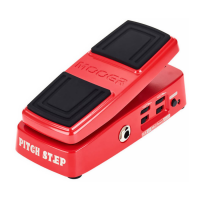

 To Next Page