Need help?
Do you have a question about the Mooer GE150 and is the answer not in the manual?
Connect the designated AC adapter to an AC outlet of the correct voltage.
Always turn off power before connecting/disconnecting to prevent malfunction or damage.
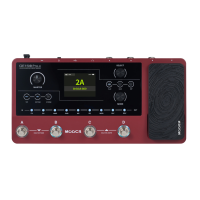
Lists 55 amp models, 151 effects, 26 IR slots, 200 presets, Tap Tempo, Expression Pedal, USB, Looper, aux input, and drum rhythms.
Adjusts the master volume output of the GE150.
Switch presets, activate TUNER or LOOPER functions.
Controls parameters and functions in real-time.
1/4" mono jack for connecting your instrument.
Type B USB port for PC connectivity (recording, updates, editing).
Micro USB port for smartphone/tablet direct recording.
9V power supply input.
Connect guitar, GE150, and power supply.
Switch presets using footswitches or the VALUE knob.
Activating or bypassing individual effect blocks.
Adjusting parameters of effects using MODE and VALUE knobs.
Adjusts the overall output volume using the MASTER knob.
Set expression pedal to control volume.
Set expression pedal to control Wah effect position.
Connect to PC/MAC for recording, updates, and preset editing via USB.
Details effect blocks, effects count, presets, inputs/outputs, sampling rate, dynamic range, IR format, power, dimensions, weight, and accessories.
 General
| Looper | 80 seconds |
|---|---|
| Headphone Output | Yes |
| Aux Input | Yes |
| Effects | 151 |
| Amp Models | 55 |
| IR Loader | Yes |
| Drum Machine | Yes |
| Display | LCD |
| USB | Yes |
| Power Supply | 9V DC |
| Presets | 200 |


 To Next Page