EasyManua.ls Logo

Mooer Phaser Player - User Manual

Mooer Phaser Player
2 pages
Print Icon
To Next Page IconTo Next Page
Loading...
Main Features
Over view
Precautions
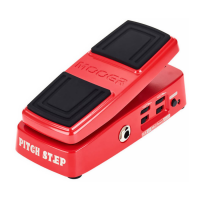
Phaser Player is a high quality Phaser with 3 different
tones. Built into a convenient mini expression pedal
for easy, on the fly, speed control. It's equipped with
MOOER's unique pressure sensing footswitch circuit
and has 3 different methods of activation.
Power Supply
Connections
Always turn off the power of this and all other equipment
before connecting or disconnecting, this will help prevent
malfunction and / or damage to other devices. Also make
sure to disconnect all connection cables and the power cord
before moving this unit.
Cleaning
Clean only with a soft, dry cloth. If necessary, slightly moisten
the cloth. Do not use abrasive cleanser, cleaning alcohol,
paint thinners, wax, solvents, cleaning fluids, or chemical-
impregnated wiping cloths.
Interference with other electrical devices
Radios and televisions placed nearby may experience reception
interference. Operate this unit at a suitable distance from
radios and televisions.
Location
To avoid deformation, discoloration, or other serious damage,
do not expose this unit to the following conditions:
Direct sunlight
Magnetic fields
Heat sources
Strong vibrations or shocks
Excessive dusty or dirty location
Extreme temperature or humidity
High humidity or moisture
This device complies with Part 15 of the FCC Rules. Operation
is subject to the following two conditions:
This device may not cause harmful interference.
This device must accept any interference received, including
interference that may cause undesired operation.
FCC certification
Please Read Carefully Before Proceeding
Please connect the designated AC adapter to an AC outlet
of the correct voltage. Please be sure to use only an AC
adapter which supplies 9V DC(±10%), , center
negative. Unplug the AC power adapter when not in use or
during electrical storms.
Three different Phaser types
Expression pedal controls rate of Phase filter
Equipped with MOOER's unique pressure
sensing footswitch
TrueBypass switching
Rugged metal housing
Expression Phaser Pedal
Question and Answer IconNeed help?

Do you have a question about the Mooer Phaser Player and is the answer not in the manual?

Summary

Precautions

Power Supply

Details correct AC adapter connection, voltage, polarity, and unplugging safety.

Connections

Advises turning off power before connecting/disconnecting to prevent damage.

Cleaning

Recommends using a soft, dry cloth and avoiding abrasive or chemical cleaners.

Interference with electrical devices

Warns of potential reception interference with radios/TVs and advises distance.

Location

Lists conditions like direct sunlight, extreme temps, humidity, and vibrations to avoid.

FCC certification

States compliance with FCC Rules, Part 15, regarding interference.

Product Overview

Key Features

Highlights three Phaser types, expression pedal control, pressure sensing footswitch, TrueBypass, and rugged housing.

Pedal Layout

Component Identification

Details the functions of LED, Input/Output jacks, DC power jack, extension rings, and pressure sensing pads.

Expression Pedal Function

Explains how the expression pedal controls rate and filter frequency.

Modes and Switching

Switching Modes

Describes three distinct methods for switching the effect on and off.

Changing Switching Mode

Provides a step-by-step guide to cycle through the three switching modes.

Phaser Modes

Explains the three different Phaser modes and how to select them.

Changing Phaser Mode

Details the procedure to switch between the three available Phaser modes.

Specifications

Technical Details

Lists input/output impedance, power requirements, current draw, dimensions, and weight.

Mooer Phaser Player Specifications

General IconGeneral
True BypassYes
TypePhaser
ControlsFeedback
Power Supply9V DC (Negative Center)
Dimensions93.5mm(D) x 42mm(W) x 52mm(H)

Related product manuals