Pedal layout Modes and Switching
Part No:620010617
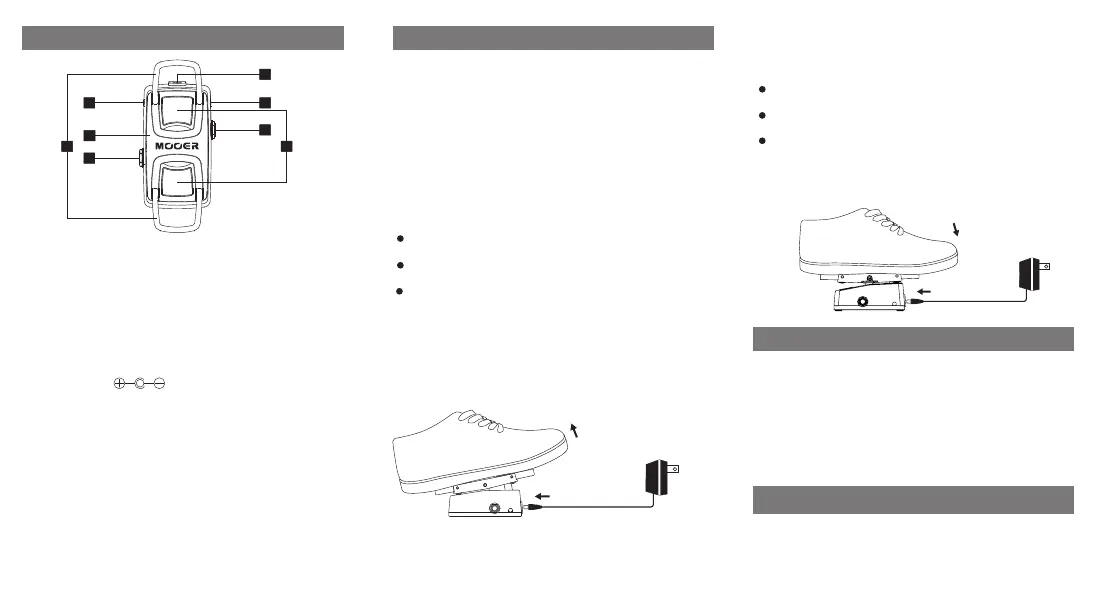
1. LED:
Indicates the on/off status of the effect pedal
2. Input jack :
1/4” audio jack for connecting to the input
device or instrument.
3. Output jack :
1/4” audio jack, effect output for connection
to amp or other devices
4. DC in power jack:
Input for power supply, use a 9V DC regulated
power supply , center pin negative.
5. Pedal extension rings:
Can be extended to increase pedestal surface
area and increase comfort
6. Pressure sensing pads:
Activates the effect by detecting the presence
of your foot. Front sensing pad is used to change
Phaser mode. Rear sensing pad is used to change
switching mode.
7. Expression Pedal:
Controls the rate of the phaser effectin mode 1&2.
Toe down increases the rate and heel down decreases
the rate. Adjusts the filter frequency in mode 3.
PHASER MODES
The PH WAH has three different Phaser modes, each with a
different sound.
To change Phaser mode:
Press and hold the toe pressure sensing pad
while the pedal is connected to power
Disconnect the power whilst continuing to hold
the sensing pad
Reconnect power
The LED's will flash BLUE to confirm the mode has changed.
Flashing once means mode 1, flashing twice means mode 2,
flashing three times means mode 3. Release the pressure
sensing pad to resume operation.
The LED's will flash RED to confirm the mode has changed.
Flashing once means mode
1, flashing twice means mode
2, flashing three times means mode
3. Release the pressure sensing pad to resume operation.
SWITCHING MODES
PH WAH has 3 different types of switching.
1.Touch the pressure sensing pads with your foot
to turn on the effect. Release your foot from the
pedal to turn off the effect
2.Double tap the pressure sensing pads to turn on
the effect. The effect will remain on untill you
double tap the pressure sensing pads for a second time
3.In this switching mode you can use both
techniques mentioned above for switching the
effect on and off
To change switching mode:
Press and hold the heel pressure sensing pad
while the pedal is connected to power
Disconnect the power whilst continuing to hold
the sensing pad
Reconnect power
*Notes:Any specification’s update will not be amended in
this manual.
Input:1/4” mono audio jack.(Impedance: 1M Ohms)
Output:1/4” mono audio jack(Impedance: 100 Ohms)
Power requirements: AC adapter 9V DC , center negative.
Highly recommend to use Mooer Micro Power.
Current Draw:130mA
Dimensions:128mm(D) x 55mm(W) x 48mm(H)
Weight:460g
Accessories:Owner ’s Manual
2
1
3
4
5
6
1
7
Specifications



 To Previous Page