Default: unlimited
Optional: 1~99
EXAMPLE: User set 50, then the camera will only send the first 50 pictures each day. All the rest
of the photos will be stored on your SD card in the camera
As some settings can be changed remotely through the app, these settings determine when the
camera accepts those commands
New settings are accepted next time the camera is triggered by the
PIR
Accepts commands at any time.
This setting requires the camera to continually check for new
commands and drains the batteries very quickly.
Not recommended unless using mains power adapter.
Set to ON and set time to receive daily reports from Camera via SMS at the set time
Day: Month: Year
Hour: Minute: Second
Note: Please ensure camera date/time is correct to ensure all functions
work as expected.
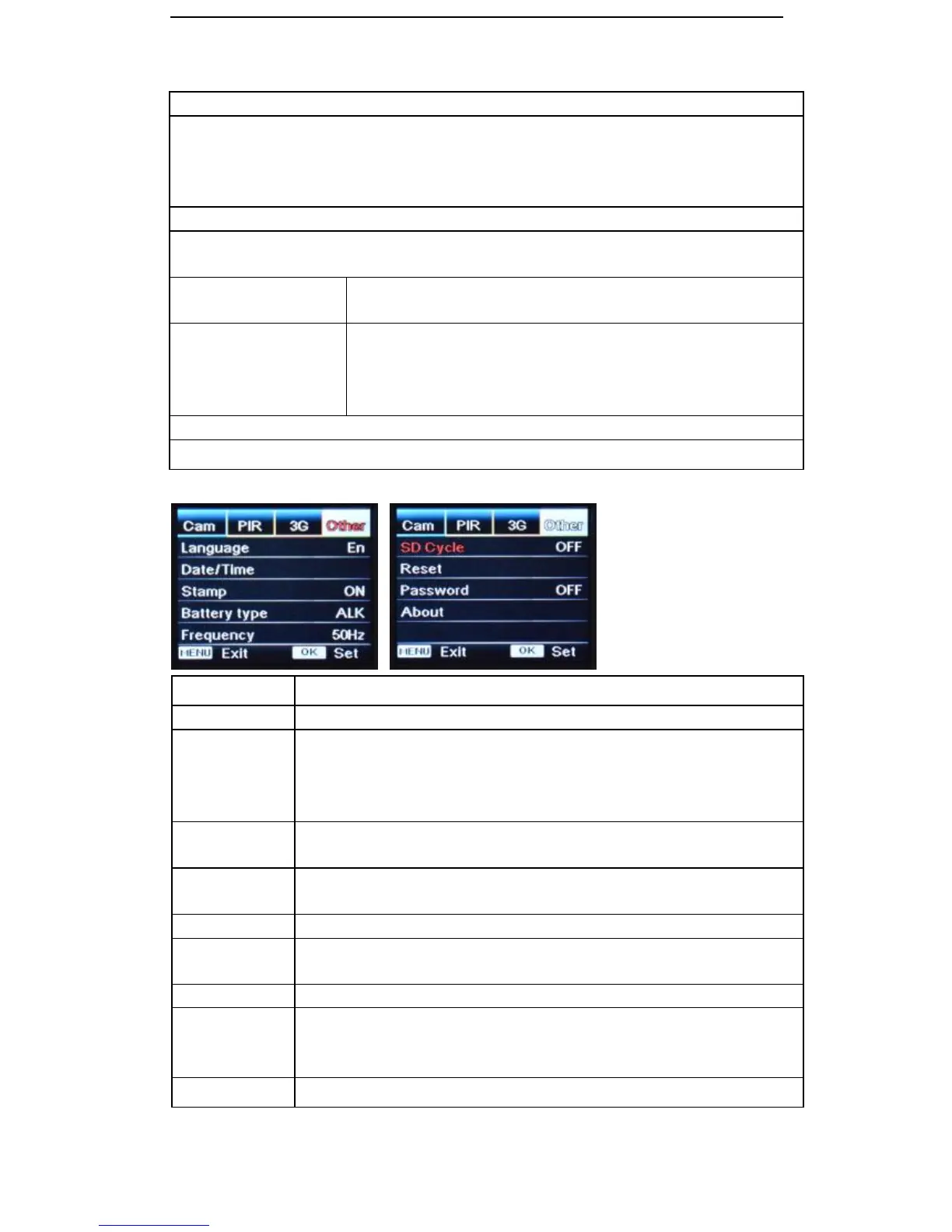
Imprints the camera ID, moon phase, temperature, date, and time on each
photo
Alkaline or NI-MH / Lithium
Choose correct battery type used in camera for better performance.
50Hz, 60Hz: Improper setting may cause camera screen flicker
Select “ON”, and press “OK”, the camera will continue to record photos/videos
once SD card is full by deleting earliest photos or video clips
Select “Yes” to reset camera back to factory default settings
Select “ON”, press “OK”, to enable password protection for your camera.
Use ←, ↑, →, ↓, arrows to set password. If set to “ON”, password will be
required on each startup of camera.
Shows firmware version of camera


 To Next Page