Page 4
Page 5
Page 4
4
Page 4
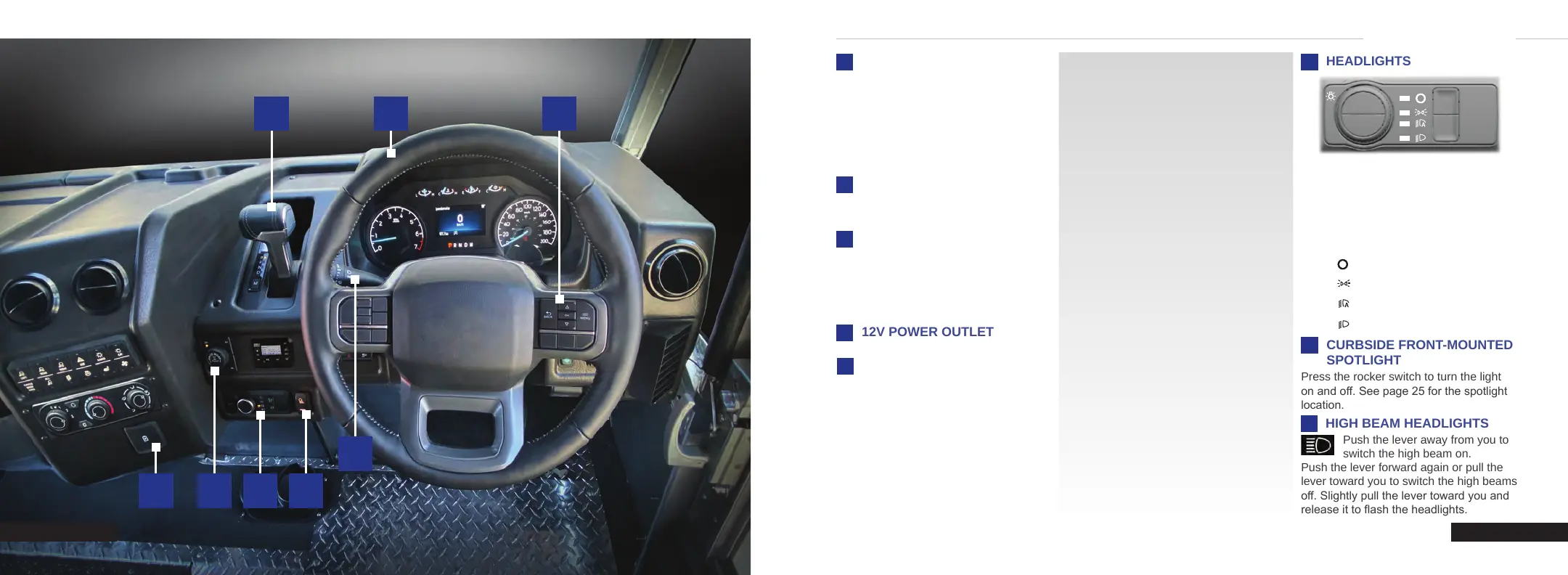
INSTRUMENT PANEL
GEAR SHIFT
The gear shift system features a manual
shift mode. The manual shift mode can
be selected by pressing the (M) button
on the shifter, then using the (+) and (-)
switches on the shifter lever.
NOTE: Your vehicle must be in drive (D)
to activate manual mode.
STEERING WHEEL
See page 13 for details on adjusting the
steering wheel.
1
2
1 2
3
8
7654
4
Page 1
FOUR-WHEEL DRIVE (if equipped)
The four-wheel drive system is designed
to continuously monitor and adjust power
delivery to the front and rear wheels to
optimize traction. The system is designed
to control and prevent wheel slip.
2H
Two-Wheel High - Standard for
on-road driving
4H
Four-Wheel High - Locked
four-wheel drive operation
for use in o-road or winter
conditions. Not for use on dry
pavement.
4L
Four-Wheel Low - Locked
four-wheel drive with increased
torque multiplication. For
o-road conditions only, such
as deep sand, steep slopes, or
pulling heavy objects.
3
5
6
Lamps o.
Parking lamps on.
Auto lamps on.
Headlights on.
CURBSIDE FRONT-MOUNTED
SPOTLIGHT
Press the rocker switch to turn the light
on and o. See page 25 for the spotlight
location.
HIGH BEAM HEADLIGHTS
Push the lever away from you to
switch the high beam on.
Push the lever forward again or pull the
lever toward you to switch the high beams
o. Slightly pull the lever toward you and
release it to ash the headlights.
7
4
8
Rotate the control to make a selection.
Note: The lighting control defaults to
auto lamps every time you switch your
vehicle on.
Note: Daytime running lamps are activated
when the shift is out of park, regardless of
the headlight selected.
Page 2
INSTRUMENT CLUSTER
DISPLAY CONTROLS
Monitor and control important vehicle
information and features through the
instrument cluster display. See page 11
for more details.
C250 INSTRUMENT PANEL


 To Next Page