Page 6
Page 7
Page 6
Page 6
INSTRUMENT PANEL
1
2
3
6
Page 3
4
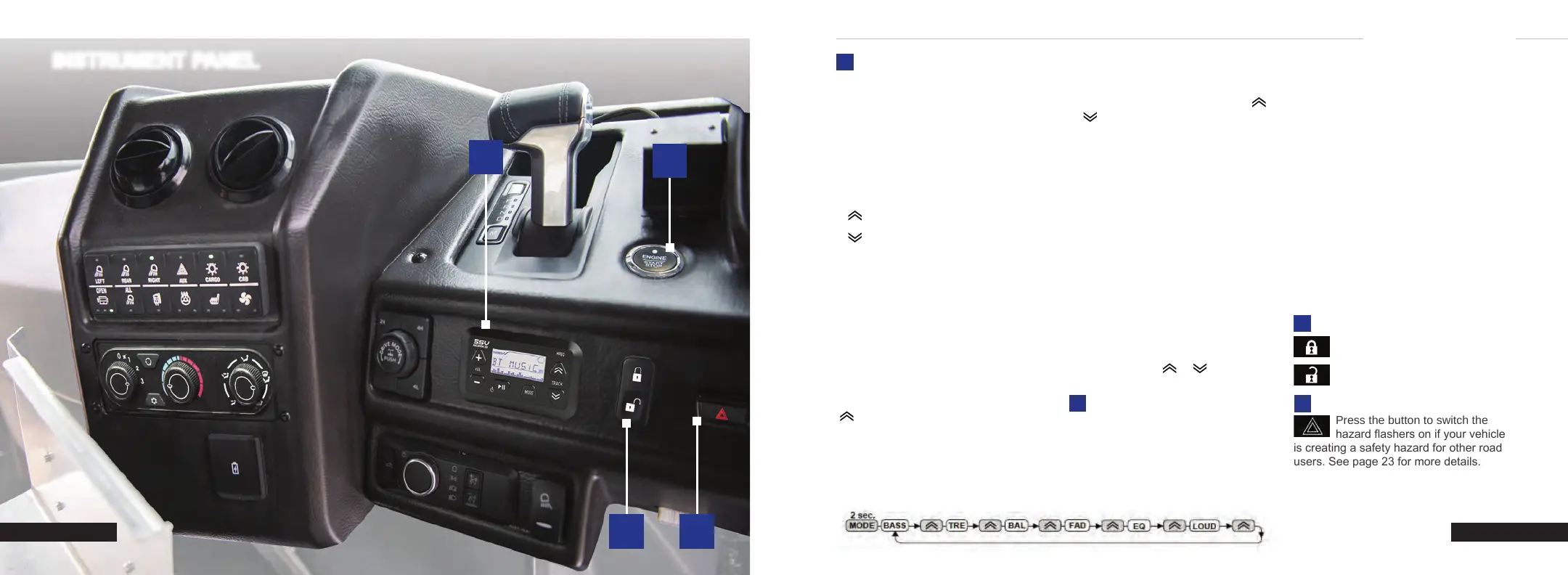
With the transmission in park (P), press
the brake pedal and press the push button
ignition switch. An indicator light on the
button illuminates when the ignition is on
and when the engine starts.
Mode Sources: Press the MODE button
to switch between AUX, FM, AM, and
Bluetooth (BT MUSIC).
Automatic Station Search: Press
or to start automatic station search.
The search stops when a station is found.
(+)
(-)
Volume Up/Down
►II
Play/Pause
Power On/O
Mute
MODE
Audio Source
Audio Settings
Track Forward/Back
Station Forward/Back
Menu Settings Up/Down
Power On/O: Press ►II to power on.
Press and hold ►II to power o.
Volume: Press the VOL (+) or (-) button
to increase or decrease the volume.
Mute On/O: Press ►II briey to mute
the sound. Press ►II again to un-mute the
sound.
Mode Settings (Bass/Treble/Balance/
Fader/EQ/Loudness): Press the MODE
button for two seconds and then press the
button until the function you want is
shown on the display (see below). Press
VOL (+) (-) to change the settings of the
menu item displayed.
RADIO
GENERAL RADIO OPERATIONS
BLUETOOTH AUDIO STREAMING
1. Open the Bluetooth setup program
on the mobile device and activate the
Bluetooth feature.
2. The device will show up as “SSV”.
Select this device and enter passkey:
OOOO
3. After successfully pairing, a Bluetooth
logo will appear on the phone menu
screen and show “CONNECT”
“BT MUSIC” on the device LCD display.
Stop Playback: Press ►II briey to pause
the music. Press the button again to
continue playback.
Skip Track: Press or to play the
previous/next song.
PUSH BUTTON IGNITION
SWITCH
STARTING THE ENGINE
When the ignition is on or in accessory
mode, press the push button ignition
switch once without your foot on the brake
pedal.
SWITCHING THE IGNITION OFF
When the ignition is o, press the push
button ignition switch once without your
foot on the brake pedal.
All electrical circuits and accessories are
operational and the warning lamps and
indicators illuminate.
Note: Your vehicle has a battery saver
feature that shuts your vehicle o when it
detects a certain amount of battery drain,
or after approximately 30 minutes of
inactivity in accessory mode.
SWITCHING THE IGNITION TO
ACCESSORY MODE
1
Press the button to lock all cab
doors.
Press the button to unlock all cab
doors.
DOOR LOCK SWITCH
2
3
HAZARD LIGHT SWITCH
4
Press the button to switch the
hazard ashers on if your vehicle
is creating a safety hazard for other road
users. See page 23 for more details.
Page 4
C250 INSTRUMENT PANEL


 To Next Page
 Loading...