Page 8
Page 9
Page 8
Page 8
INSTRUMENT PANEL
1 2
8
Page 5
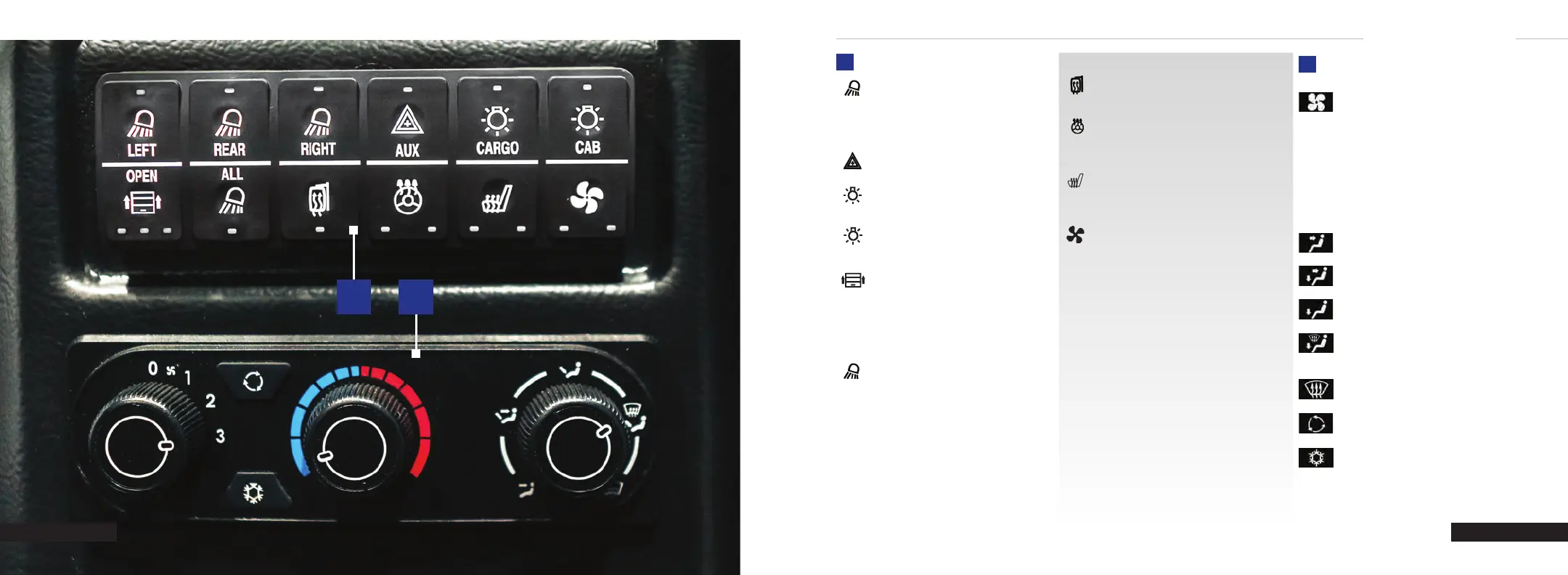
CAB CONTROLS
LEFT/
REAR/
RIGHT
Left/Rear/Right Roll-Up Door Lights
Press to toggle on or o. The lights
will automatically turn on when the
associated door is opened and will turn
o after a short delay once the door is
closed.
AUX
Auxiliary Lights - Press to toggle
auxiliary asher lights.
CARGO
Cargo Light - Press to toggle the cargo
dome light. The light also automatically
turns on when a roll-up door is opened.
CAB
Cab Lights - Press to toggle the cab
dome lights.
OPEN
Cargo Door Open - Indicates when
a cargo door is open. Long press the
button to adjust the brightness of the
cab control display.
First Light - Roadside roll-up door
Second Light - Rear roll-up door
Third Light - Curbside roll-up door
ALL
All Exterior Lights - Press to
simultaneously toggle all three exterior
roll-up door lights.
Heated Mirror - Press to toggle the
heated mirror control. Will turn o
automatically after a timer expires.
Heated Steering Wheel - Press to toggle
between high and low control heating of
the steering wheel. This setting is
remembered after vehicle shutdown.
Heated Seat - Press to toggle between
high and low control heating of the driver
seat. This setting is remembered after
vehicle shutdown.
Cab Fan - Press to toggle between high
and low power to the cab fan. This setting
is remembered after vehicle shutdown.
SETTING THE BLOWER MOTOR SPEED
Turn the control switch between 0,
1, 2, and 3 to select the blower
motor speed.
SETTING THE TEMPERATURE
Turn the temperature control to the left for
cooler temperature settings.
Turn the temperature control to the right for
warmer temperature settings.
DIRECTING THE FLOW OF AIR
Select to turn the instrument panel
air vents on.
Select to turn the instrument panel
and footwell air vents on.
Select to turn the footwell air vents
on.
Select to turn air recirculation on.
Select to turn footwell and defrost air
vents on.
Select to turn the defrost air
vents on.
CLIMATE CONTROLS
C250 INSTRUMENT PANEL
Select to turn the air conditioning
on and o.
1
2
Page 6
CAB CONTROLS (cont.)


 To Next Page
 Loading...