User Guide Instructions for Use
SSE-0000101061-03
Morpho Document - Reproduction and Disclosure Prohibited.
SECTION 5
INSTRUCTIONS FOR USE
1. Scanning cards
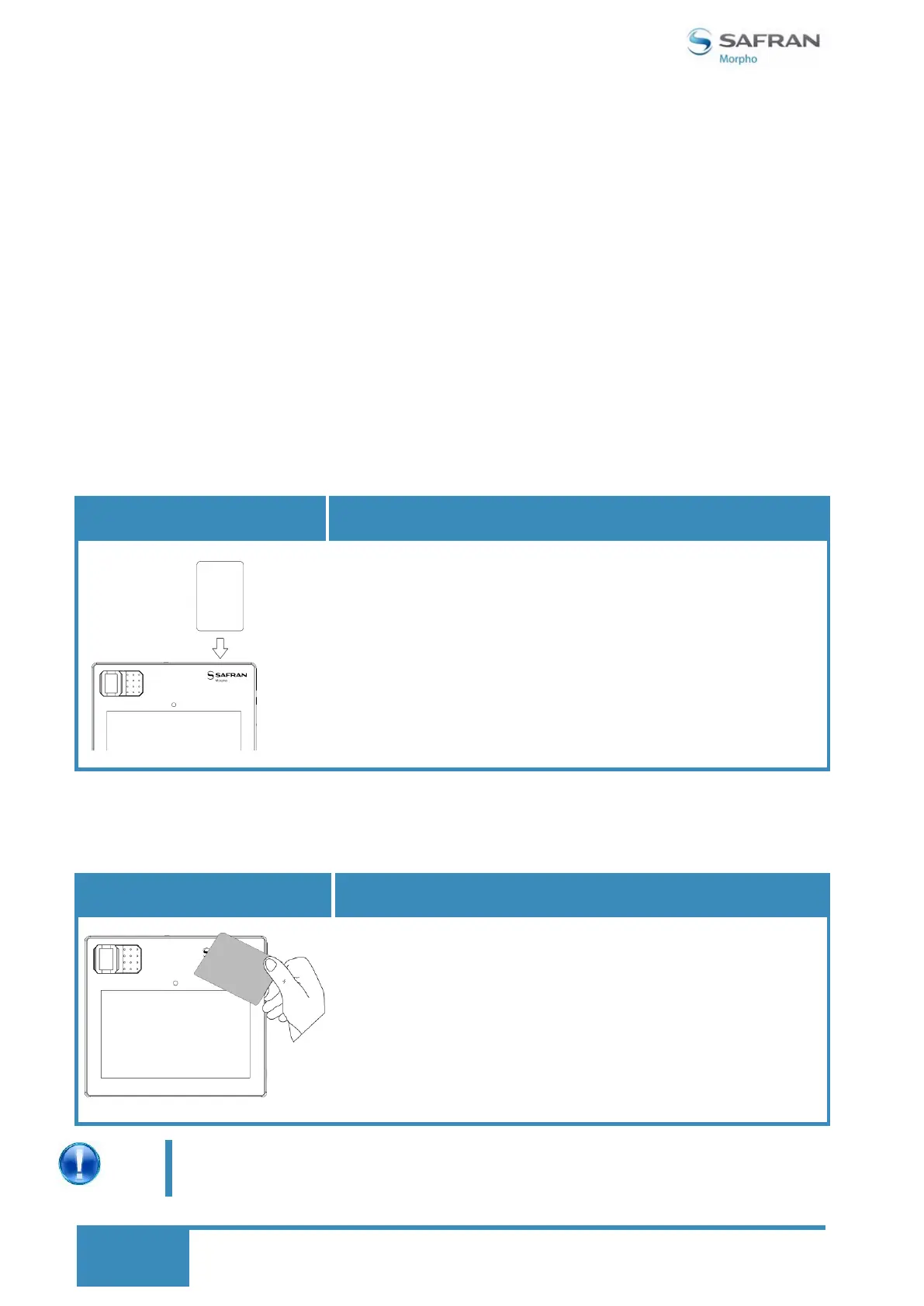
Contact Smartcard Reader: To scan the card through smart card proceeds as follows:
Insert the card horizontally with the metal chip facing
inside and leave in position throughout the process.
2. Contactless scanning
Contactless: To scan the card through contactless, proceed as follows:
Flash the card on or closer to SAFRAN Morpho logo.
Note: The types of NFC tags which can be read by the
contactless sensor are given below.
1) Type 1 & 2 (based on ISO/IEC 14443-A)
2) Type 3 (based on JIS 6319-4, FeliCa)
3) Type 4 ( based on ISO/IEC 14443 standard series,
Comm Interface A or B)
Contactless card reader antenna is located below the product logo on
the front face of your device. Flashing electronic document in this area
will yield best results.


 To Next Page