User Guide Getting Started
SSE-0000101061-03
Morpho Document - Reproduction and Disclosure Prohibited.
4. Touch Screen
The touch screen is a 7" capacitive touch
screen. In appropriate applications, one
can use up to five fingers at the same
time to interact with your device.
Its brightness can be modified in Settings
Display Brightness as well as the
Sleeping timeout. Use the best
configuration in order to save the
battery.
The touch screen is equipped with a screen guard protecting
the screen from scratches and marks. In case the screen guard
is damaged, please contact Morpho support for the
replacement of screen guard.
5. Installing Modules
SIM CARD:
Turn the device OFF pressing the “POWER” key until a dialog box appears asking the authorization
to Power Off.
Put the device screen down on a flat and clean surface like a white sheet of paper or a soft and
clean tissue.
Open the SD and SIM Card Cover at the rear.
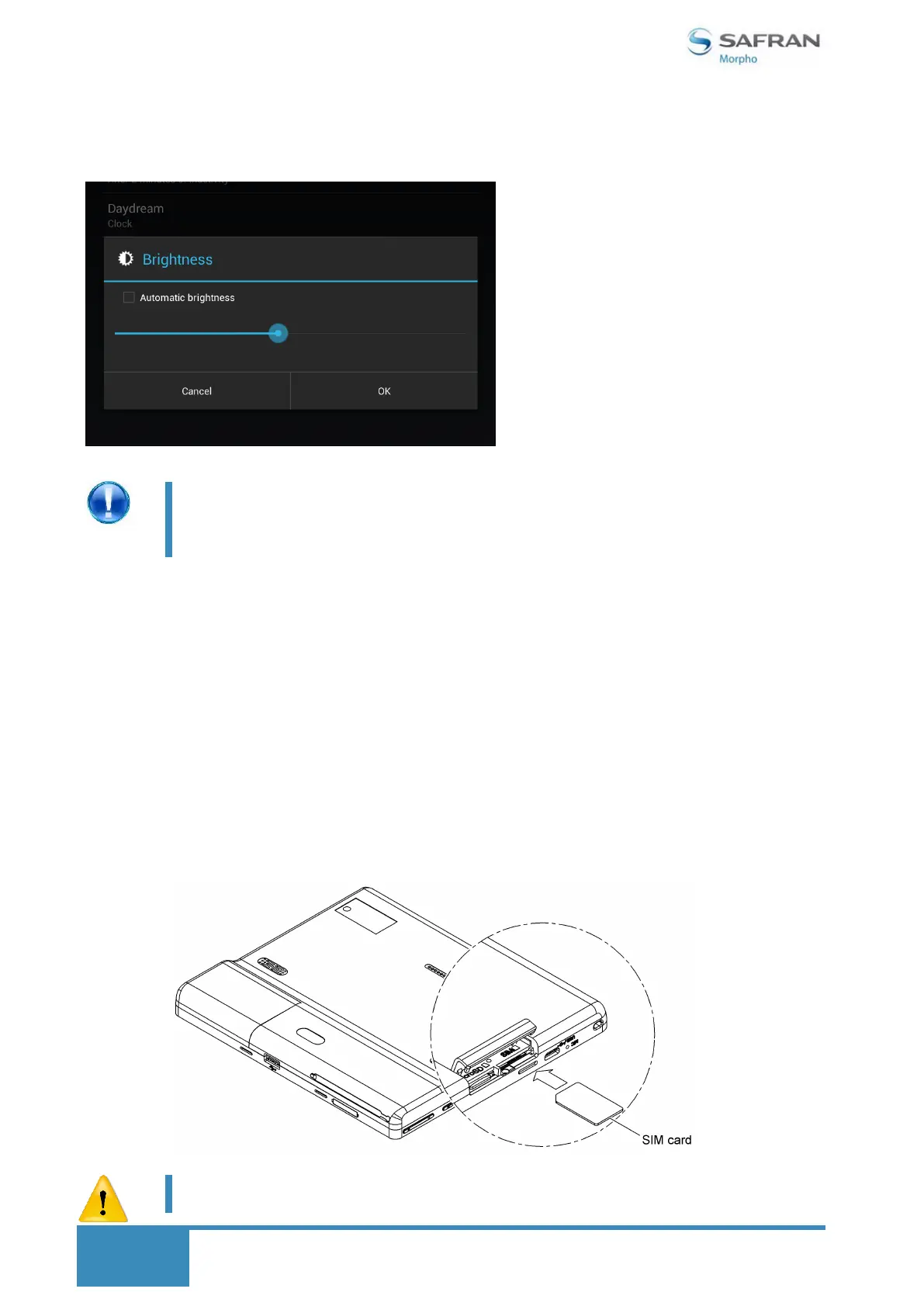
Introduce the SIM card with the golden contacts down, and as shown on the figure below.
The USB cable should be removed from the device during installing
modules


 To Next Page