6
1
2
3
4
5
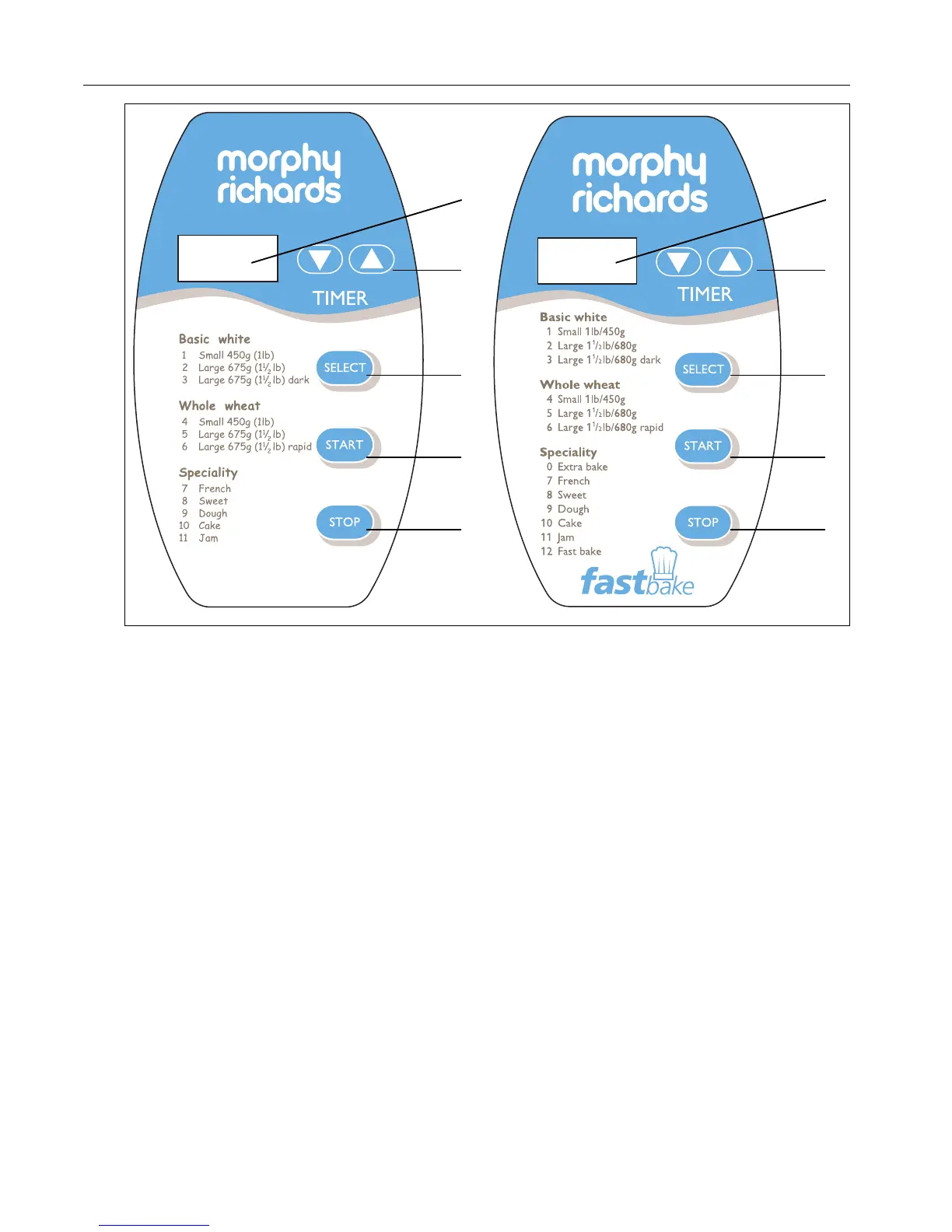
Control panel settings & functions
NOTE: When using the touchpad controls, be sure
to press the pad until you hear a beep.
1 Display window
• Shows the setting number you have selected for a
particular recipe and shows delayed time, if selected.
• Shows minute-by-minute baking time countdown.
2 Timer set
Use when setting the TIMER to delay baking.
• Shows ▲ and ▼ arrows.
• Arrows will move time up or down in 10-minute
increments.
3 Select
Press to select the setting of your choice, 1 to 11
eg Setting 1 for white Small, 2 for large, 3 for large
dark, 4 for small wholemeal, etc. The selected
setting automatically assigns the time needed to
complete the process.
4 Start
Press to start operation or begin timer countdown
for delayed completion.
5 Stop
Press and hold until you hear a beep to stop
operation or cancel a timer setting. (Note: Do not
press ‘STOP’ when you are just checking the
progress of your bread).
D
1
2
3
4
5



 To Next Page