14
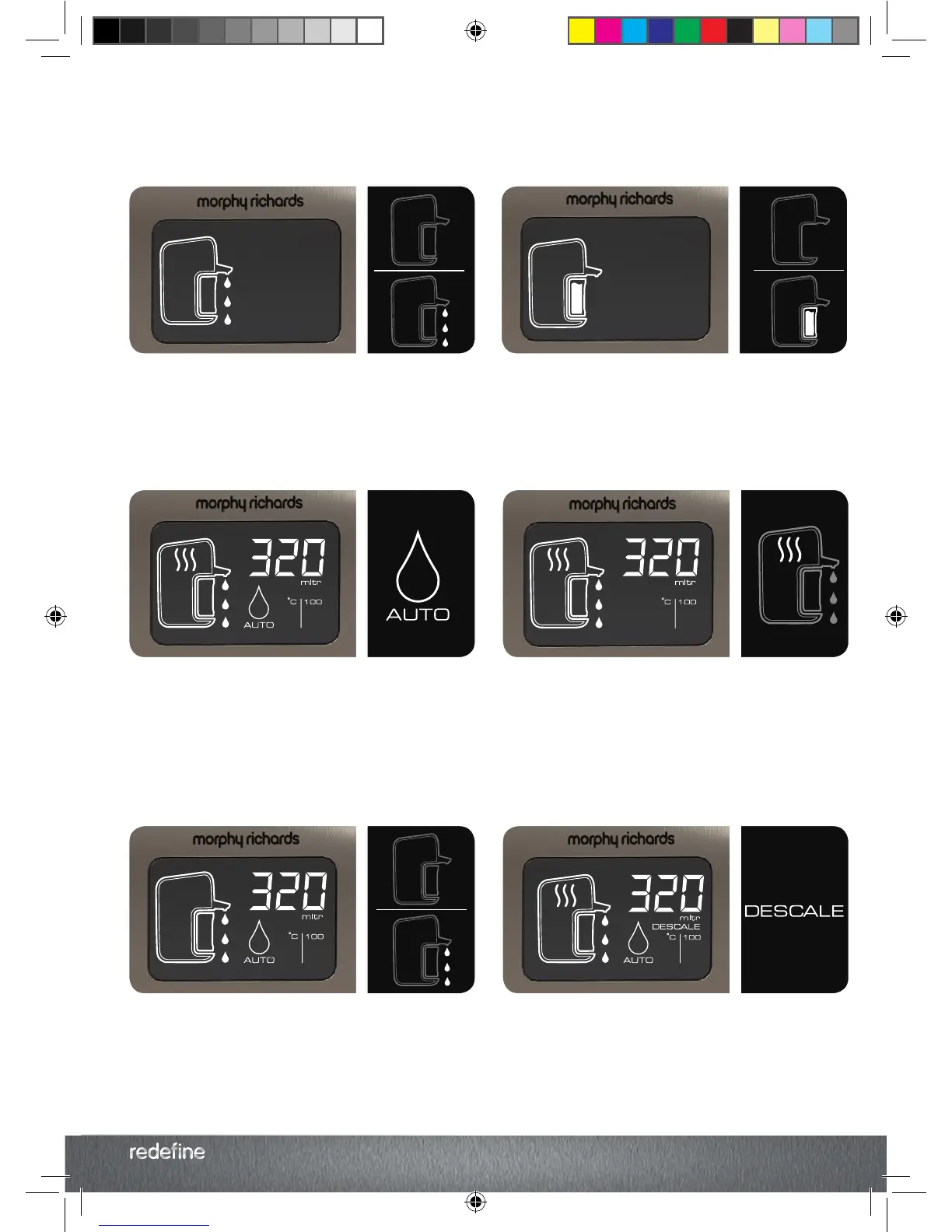
Below are some of the icons that may highlight
during use, and their meaning. Refer to the
instruction book for more information on the
settings.
Heat Icon
In manual dispense mode, after heating the water the
Heat Icon (11) remains lit.
The Boil Icon remains lit while the water is within 5
o
C
of the desired temperature. If the water drops more
than 5
o
C then the icon will extinguish, the Start Stop
Button will illuminate and the water can be reheated
by pressing the Start/Stop Button (1).
Auto Dispense
The Auto Dispense (14) Icon is lit after heating.
Volumes between 150-600ml will be automatically
dispensed unless deselected by pressing the Dispense
Button (5). Volumes above 600ml cannot automatically
be dispensed.
Descale
The Descale Icon (16) is lit.
Your Hot water Dispenser needs descaling. Follow the
instructions under ‘Descaling’ to descale the heating
chamber (page 10).
Water Still to Dispense
After heating or being woken from standby, the
Dispense Icon (13) is flashing.
There is still water remaining in the heating chamber.
Either reheat or dispense water before next use.
Water Tank
The Water Tank Icon (12) is flashing.
The Water Tank (7) is either empty or not properly fitted.
Fill the Water Tank and ensure the Water Tank is
securely fitted to the Main Unit (23).
Reset
After the Hot Water Dispenser has been switched on,
The Dispense Icon (13) and the Dispense Button (5) are
flashing.
The system needs to be reset before use. Follow the
instructions under ‘Resetting the System’ (page 4).
LCD Display
Glossary
KT131004 MUK REV1.indd 18 18/02/2015 10:34


 To Next Page