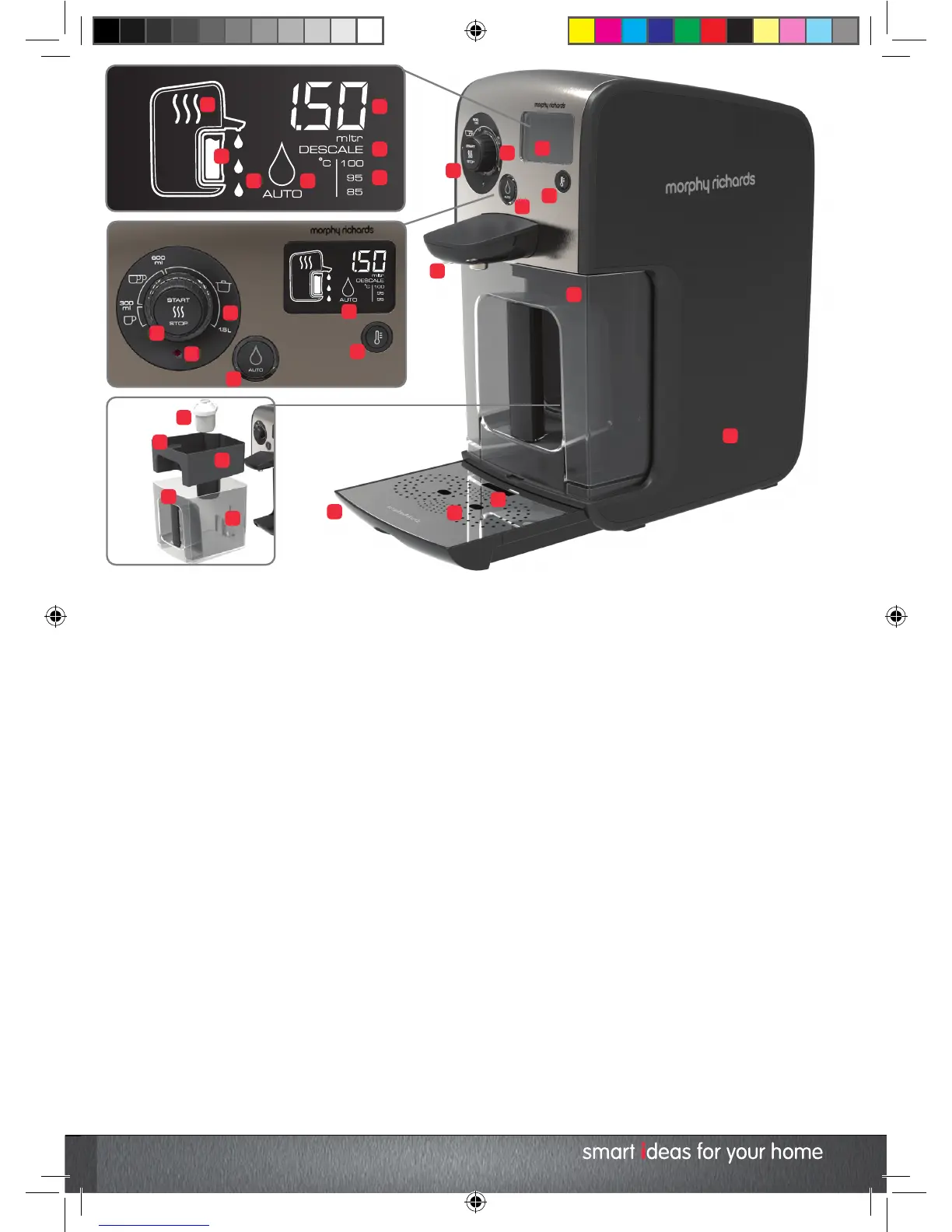
1 Start / Stop Button
Starts and pauses the heating process. Can also be
used to pause dispense while in progress and put the
Hot Water Dispenser into standby mode.
2 Water Volume Dial
Controls the volume of water to be heated and
dispensed. Volume is displayed on the LCD screen (15).
3 LCD Screen
Displays volumes, temperatures, functions, and
warnings.
4 Temperature Button
Adjusts the temperature of dispensed water, turns
sounds on and off.
5 Dispense Button
Switches the Auto Dispense feature on and off.
6 Dispense Nozzles
7 Water tank
Contains the BRITA MAXTRA Cartridge 19, BRITA Memo
20 and BRITA Hopper 21.
8 Drip Tray
9 Drip Tray Cover
10 Drip Tray Indicator
‘Full’ icon indicates when the Drip Tray needs to be
emptied.
11 Heat Icon
Displays when the heat cycle is in process.
12 Water Tank Icon
Displays when the tank needs to be refilled.
13 Dispense Icon
Displays when water is ready for dispense.
14 Auto Dispense Icon
Displays when the auto dispense feature is enabled.
15 Dispense Volume Display
Displays the volume of water to be heated and
dispensed.
16 Descale Icon
Displays when the Hot Water Dispenser requires
descaling.
17 Temperature Icon
Displays the temperature the water will be heated to
prior to dispense.
18 Standby Light
19 BRITA MAXTRA Cartridge
20 BRITA MEMO
Monitors the life of the MAXTRA Cartridge.
21 BRITA Hopper
22 Water Level Sensor
23 Main Unit
KT131004 MUK REV1.indd 6 18/02/2015 10:34


 To Next Page