5
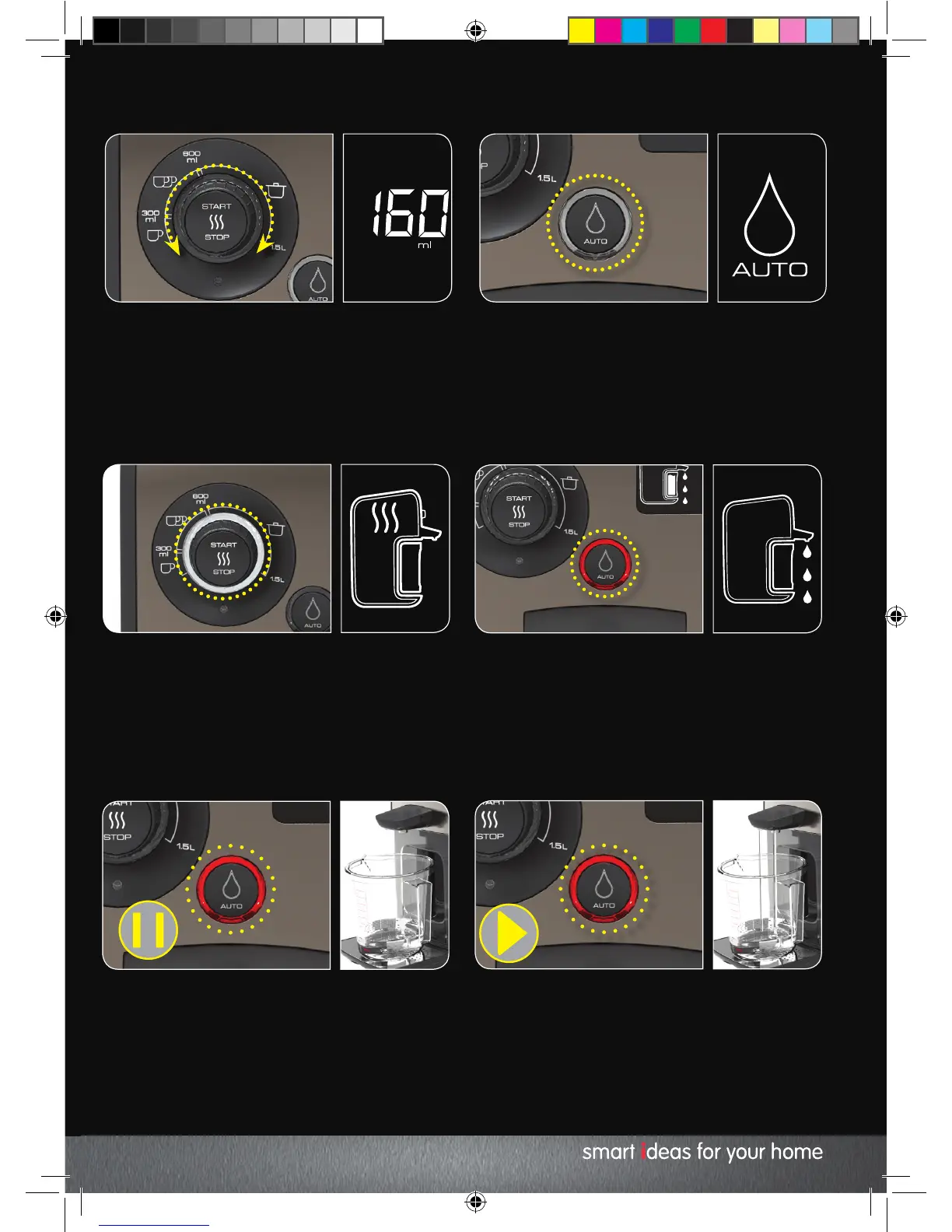
Turn the Water Volume Dial (2) to adjust the
Dispense Volume (15). Your Hot Water Dispenser
can heat between 150ml to 1.5L of water per cycle.
6
You can automatically dispense volumes of water
at 600ml and below. To turn this feature on or off,
press the Dispense Button (5). This function cannot
be selected for volumes over 600ml. These must
be dispensed manually.
9
To pause the water flow whilst dispensing, press
either the Start/Stop or the Dispense Button. 10
To resume the water flow, press the Dispense
Button again. It is recommended to dispense
any remaining water to enable your Hot Water
Dispenser to enter standby mode.
NOTE: You must dispense all water heated
before you can start the heating cycle again.
7
Press the Start / Stop Button (1) to begin heating.
Your Hot Water Dispenser will sound and the heat
cycle will begin. Once started, the volume and
temperature can only be changed during the first
few seconds of the heating cycle.
8
Once ready your Hot Water Dispenser will sound.
The hot water will be dispensed automatically. If
the manual dispense function has been selected,
press the Dispense Button (5) to begin dispensing.
KT131004 MUK REV1.indd 11 18/02/2015 10:34


 To Next Page