EN
15
THE VARIOUS FUNCTION AND POSSIBILITIES
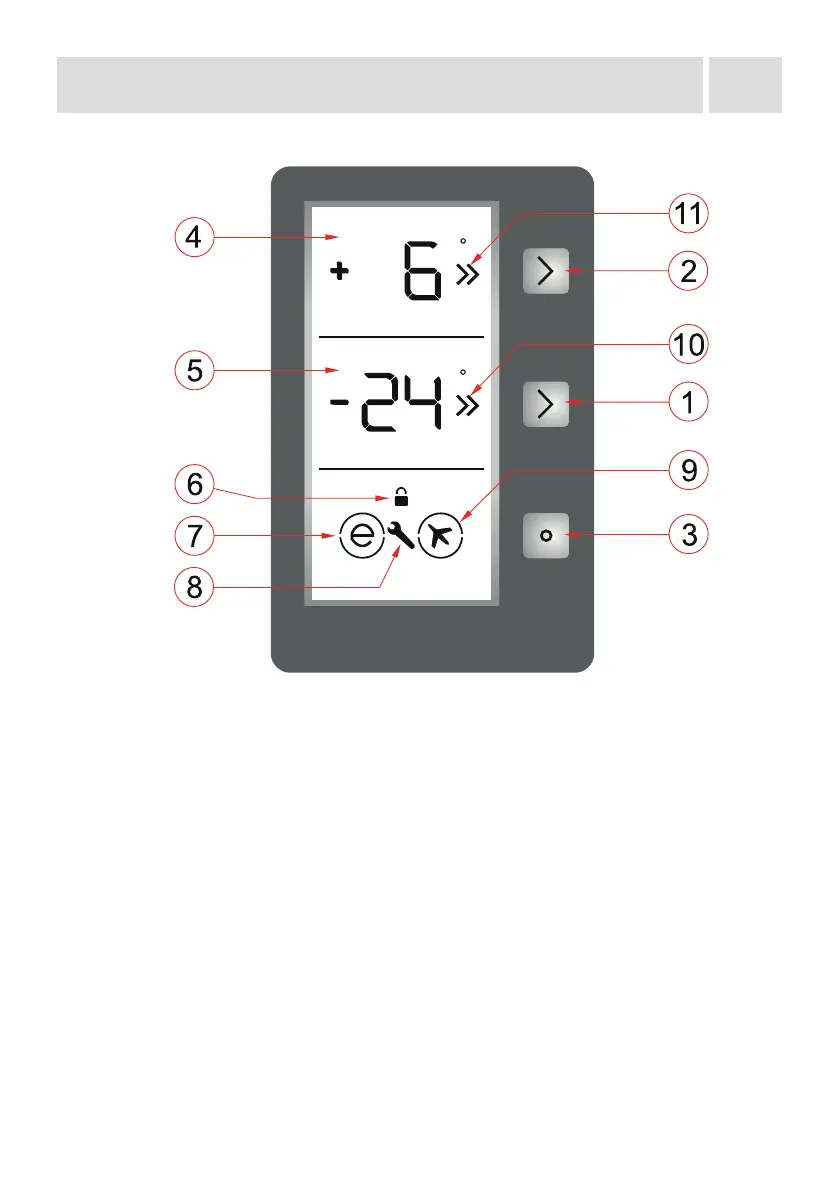
Display and control panel
Use of control panel
1. It enables the setting of the freezer to be modied and super freeze mode to be
activated, if desired. The Freezer may be set to -16, -18, -20, -22, -24 °C, SF.
2. It enables the setting of the cooler to be modied and super cool
mode to be activated, if desired. The Cooler may be set to 8, 6, 5, 4,
2 °C, SC.
3. It enables the dierent modes (economy, holiday…) to be activated if desired.
4. Cooler set value screen.
5. Freezer set value screen.
6. Child-lock symbol.
7. Economy mode symbol.
8. Alarm symbol.
9. Holiday mode symbol.
10. Super freeze indicator.
11. Super cooling indicator.
c
c
DEMO
Lighting (If available)
When the product is plugged in for the rst time, the interior lights may turn on 1 minute
late due to opening tests.


 To Next Page