EN
18
THE VARIOUS FUNCTION AND POSSIBILITIES
c
c
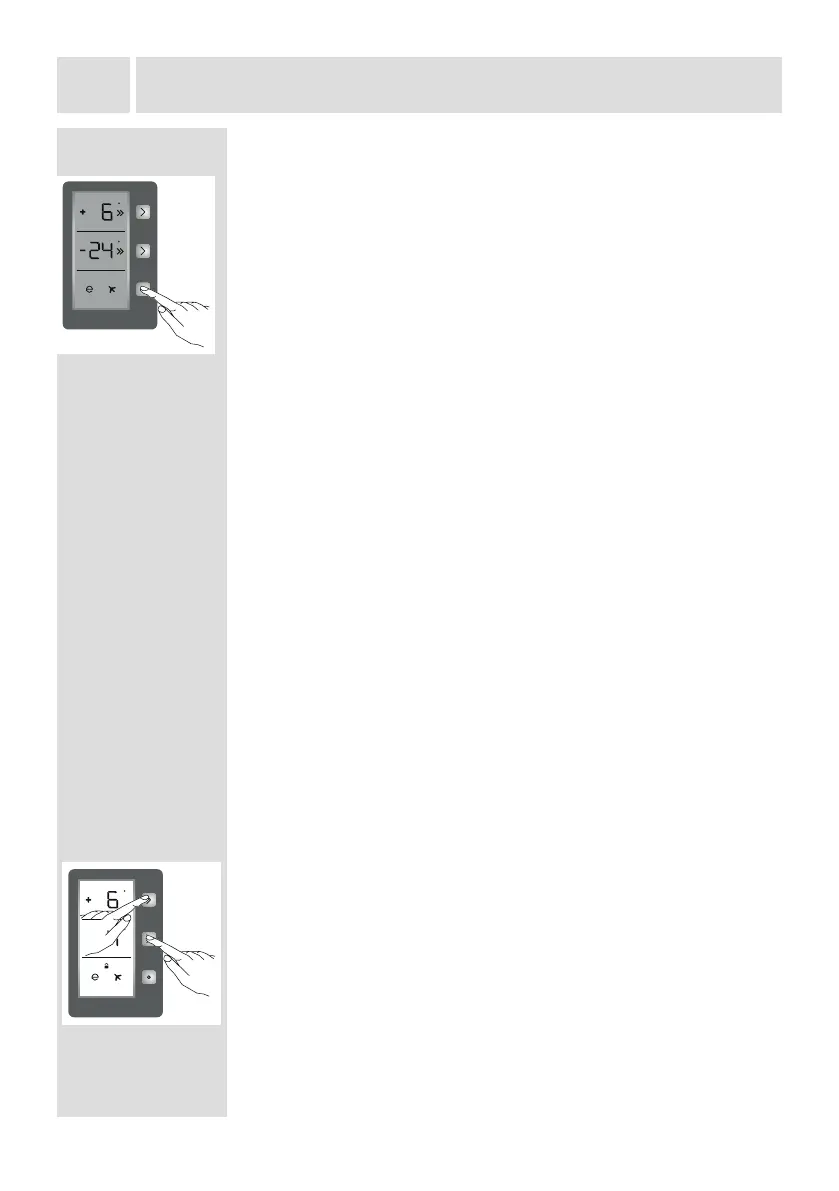
Screen saver mode
How to use?
• This mode will be activated when you press the mode button for
5 seconds.
• If no button is pressed within 5 seconds when the mode is active,
the lights of the control panel will go out.
• If you press any button when the lights of control panel are o,
the current settings will appear on the screen, and then you can
maket the adjustment you want. If you do not cancel the screen
saver mode or press any button within 5 seconds, the control
panel will go o again.
• To cancel screen saver mode, press the mode button for 5
seconds again.
• When screen saver mode is active, you can also activate child
lock.
• If you do not press any button for 5 seconds after activating child
lock, the lights of the control panel will go o. Then, you can view
the previous settings and that child lock is active by pressing any
button.You can cancel child lock as described in the instructions
for that mode.
Light cancelling mode
When would it be used?
• Select this mode if you want to cancel the cooler lights.
• This mode is selected by pressing the freezer, cooler or mode
buttons or by opening and closing one of the doors 3 times. From
then on, the lights will not come on until the mode is cancelled
(or after 24 hours).
• If you want to cancel this mode, repeat the same process. This
mode will automatically cancel itself after 24 hours.
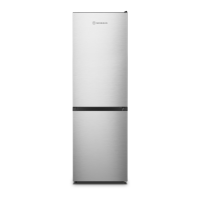
Function of Child lock
When would it be used?
Child lock is available on the appliance to prevent children from
playing with the buttons and changing the settings you have
made.
Activating Child Lock
Simultaneously press the Freezer and Cooler buttons for 5
seconds.
Deactivating Child Lock
Simultaneously press the Freezer and Cooler buttons for 5
seconds.
Note: Child lock will also be deactivated if the electricity supply is
interrupted or the fridge is unplugged.
c
c


 To Next Page