EN
17
THE VARIOUS FUNCTION AND POSSIBILITIES
c
• Holiday Mode can be selected after cancelling the Economy
Mode. The selected mode is activated.
• To cancel, press the Mode Button.
Holiday mode
How would it be used?
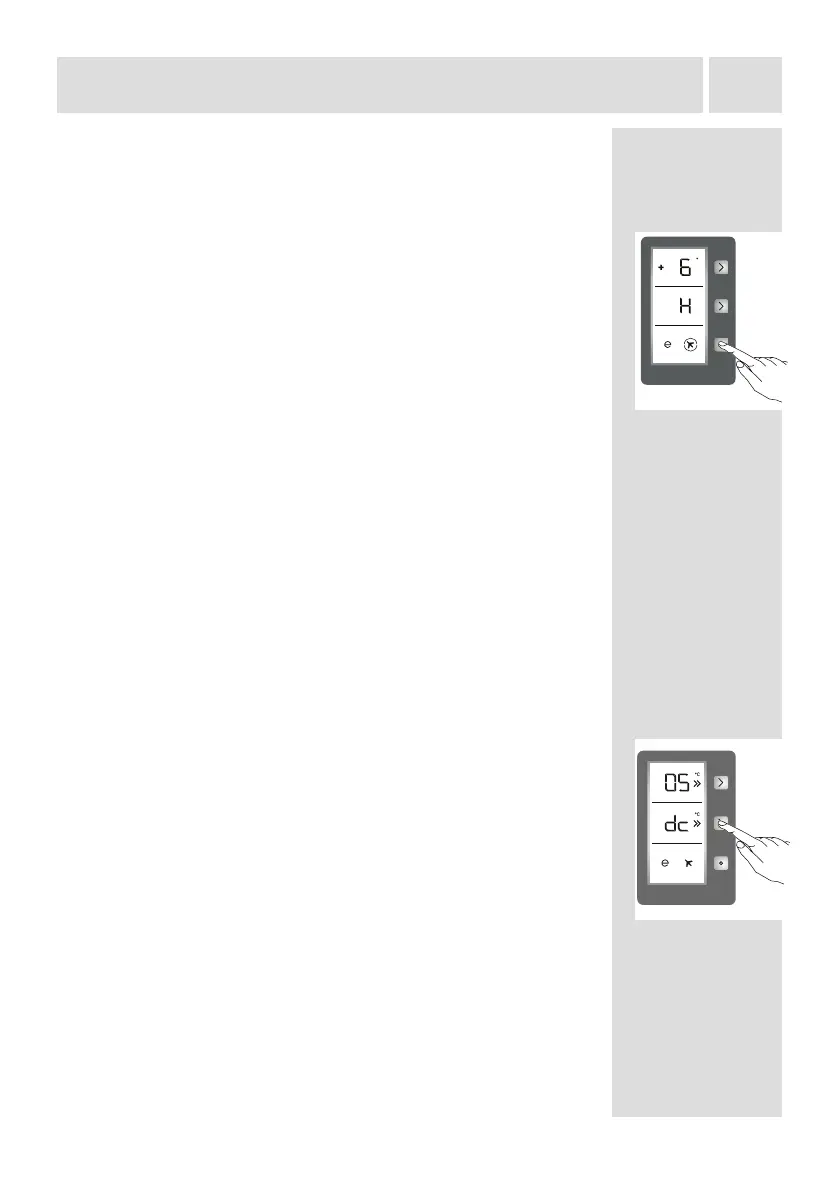
• Push the Mode Button until a circle appears around the plane
symbol.
• If no button is pressed for 1 sec, the mode will be set. The Circle
will blink 3 times and the buzzer wil beep twice.
• The Freezer temperature segment will show “H”.
• The Circle of the plane symbol and H will be illuminated until the
mode nishes.
During this mode:
• The Freezer may be adjusted. When Holiday Mode is cancelled,
the selected setting values will remain.
• The Cooler may be adjusted. When Holiday Mode is cancelled,
the selected setting values will remain.
• Super Cool and Super Freeze Modes can be selected. Holiday
Mode is automatically cancelled and the selected mode is
activated.
• Economy Mode can be selected after cancelling the Holiday
Mode. Then, the selected mode is activated.
• To cancel, press the Mode Button.
Drink cool mode
When would it be used?
This mode is used to cool the drinks within adjustable time.
How would it be used?
• Press the freezer button for 3 seconds.
• "dc" will be seen on freezer screen and 05 blinks on the cooler
screen.
• Press the cooler button to adjust the time (05 - 10 - 15 - 20 - 25
- 30 minutes).
• When you select the time the numbers will blink 3 times on
screen and the buzzer will sound twice.
• If no button is pressed within 2 seconds the time will be set.
• The countdown starts from the adjusted time minute by minute.
• The remaining time blinks on the screen.
• To cancel this mode, press the freezer set button for 3 seconds.


 To Next Page