H3+
™
DIGITAL HOLTER RECORDER
Ref: 9503-165-02-ENG Rev H1
To Begin a Session
1.
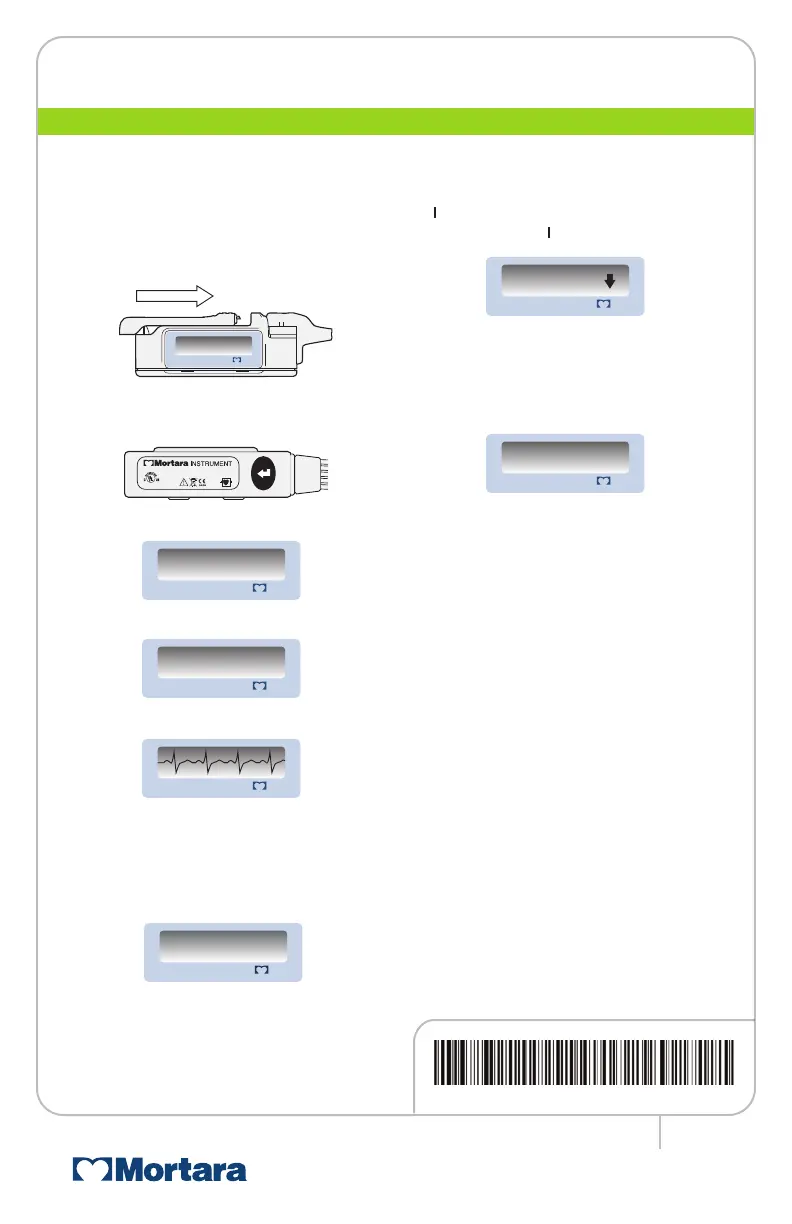
Attach the patient cable to the H3+.
2.
Remove the battery door of the H3+,
insert a new AAA battery, and close the
battery door.
3.
Press the Enter button to move
through the menu displays.
•
Verify the current time setting.
•
Verify the ID number.
•
Verify the ECG signal quality.
Note: Waveform is shown at 4 mm/mV gain to
allow full representation of ECG.
4.
To begin recording, press and hold the
Enter button for a period of 3 seconds.
An R indicates Recording Mode.
Entering Optional Diary Events
To mark an event, press the Enter button.
A
▼ indicates that a new event cannot be
entered while the
▼ is displayed.
End of Recording
When the recording period has ended,
the ID is displayed in reversed color
indicating that the H3+ memory is full.
1.
Remove the battery door.
2.
Remove the battery and dispose
of properly.
3.
Replace the battery door.
4.
Remove the patient cable from
the recorder.
5.
H3+ recorded data is ready to be
transferred through connection of
the USB cable.
Ending a Recording Early
The in-progress recording can be ended
before the set duration is reached.
1.
Remove the battery door.
2.
Remove the battery.
3.
Reinsert battery to display the ID in
reversed color.
4.
Replace the battery door.
www.mortara.com
ISO 13485 CERTIFIED
H3+
™
and Mortara
®
are trademarks or registered trademarks of
Mortara Instrument, Inc.
2015-12
M
il wa u ke e, W I U SA
Medica l Equipment
Model: H3+
UL6 060 1-1 ,I EC6 060 1-1 ,
CAN /CSA C2 2.2 No. 60 1.1,
IEC 606 01- 2- 47
5P3 5
H3
+
ID: 01234567890
12345678901234
H3
+
ID: 01234567890
12345678901234
9503-165-02-ENG Rev H1
to come



 To Previous Page