Select
press for tonight
hold for immediate
S
alt
Set
L
evel
U
se
Water
Morton
®
Water Softener Installation & Operation Manual 13
Programming the Water Softener
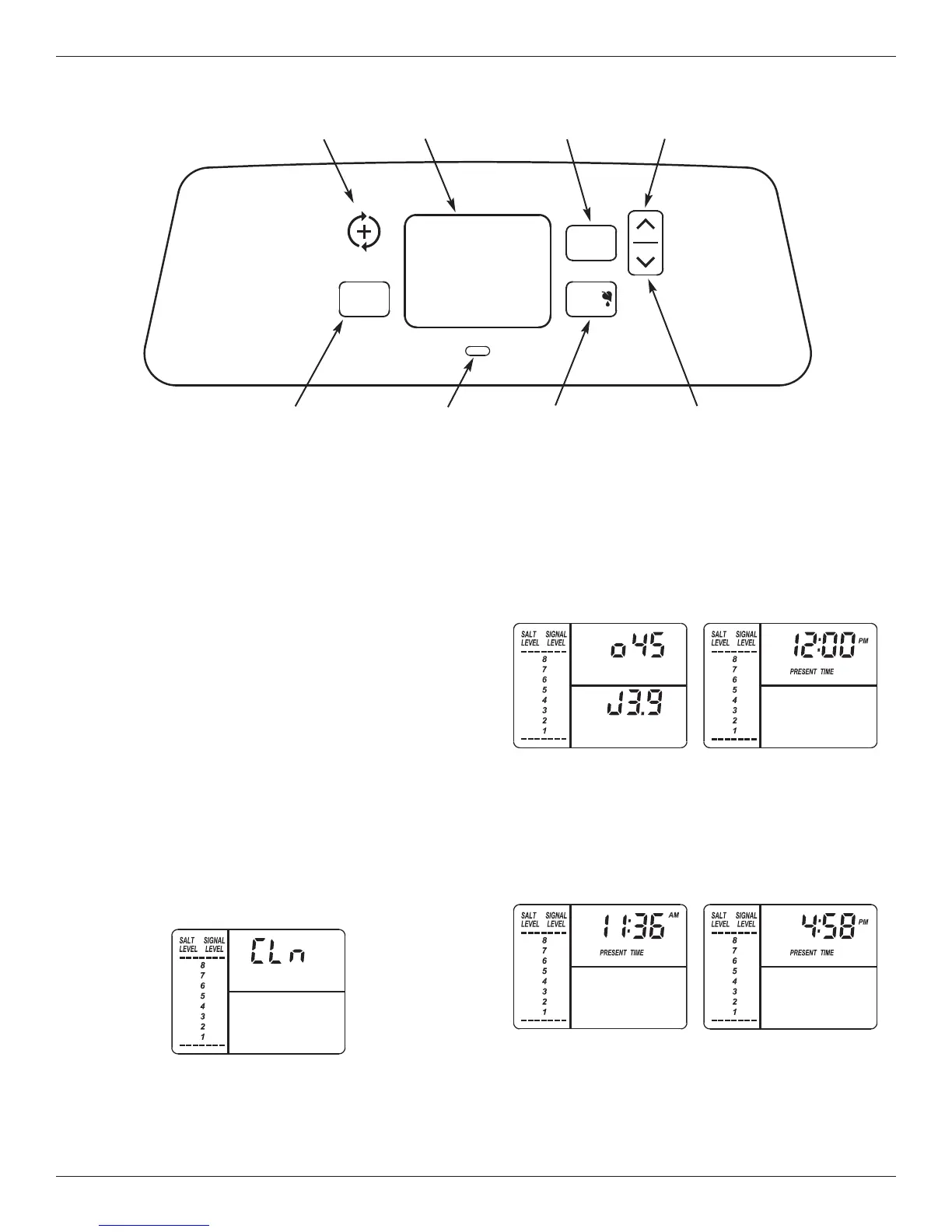
SET SALT LEVEL button
DOWN button
WATER USE button
Display
U
P buttonREGENERATION button
SELECT button
FIG. 16
STATUS LIGHT
(see below)
Status Light
When the Morton Water Softener is connected to
electrical power, the status light on the control panel
will be on or flashing, as follows:
= Light on steady (not flashing) - The system has
power applied and does not require any attention.
= Light flashing rapidly, with “PRESENT TIME”
shown in the display and the clock flashing slowly -
The present time needs to be set, either during ini-
tial start up or after a long power outage. See “Set
Present Time of Day”, at right.
= Light flashing slowly, along with the salt level indi-
cators in the display - The salt monitor system indi-
cates a low salt level and needs to be set. See
“Salt Monitor System” on Page 15.
= Light flashing rapidly, with “Err” shown in the dis-
play - The electronic self-diagnostics have detected
a problem. See “Troubleshooting” on Page 21.
= Light flashing slowly, with “CLn” flashing in the dis-
play (See Fig. 17) - Four months have elapsed on
the system’s timer since start up or the last reset.
Step 1. Set Present Time of Day
If the words “PRESENT TIME" do not show in the dis-
play, press the SELECT button a few times until they
do.
1. Press the r UP or s DOWN buttons to set the
present time. Up moves the display ahead; down
sets the time back. Be sure AM or PM is correct.
continued on next page
FIG. 18
FIG. 19
FIG. 17
This is a reminder to use Morton
®
MWSC Water
Softener Cleanser three times a year. To reset the
timer, press any button on the control panel and
“CLn” will disappear. The light will stop flashing,
unless the system is also low on salt (see above).
Program the Softener
When the power supply is plugged into the electrical
outlet, the model code (o45) and a software version
number (example: J3.9), are briefly shown in the dis-
play. Then the words “PRESENT TIME” appear and
12:00 PM begins to flash.


 To Next Page