TIME
GALLONS
LITERS
20
Mortonr Water Softener Installation & Operation Manual
MORTON WATER SOFTENER FEATURES AND SETTINGS, continued
setting: MODEL CODE, 12 OR 24 HOUR CLOCK, AND GALLONS OR LITERS MEASURE . . .
NOTE: The model code is factory set at assembly and testing. The hour clock and water measure have factory
set default values. The defaults are: 12 or 24 hour clock -- 12; Gallons or liters measure -- gallons. The model
code should never require resetting, but to check, or to set if previously omitted, read below. The defaults suit
most installations. However, to make a change, read and do the following.
MODEL CODE: The electronic contro l must have
the right model code set to operate the softener cor-
rectly. The correct model code for model MSD45E
is A 45.
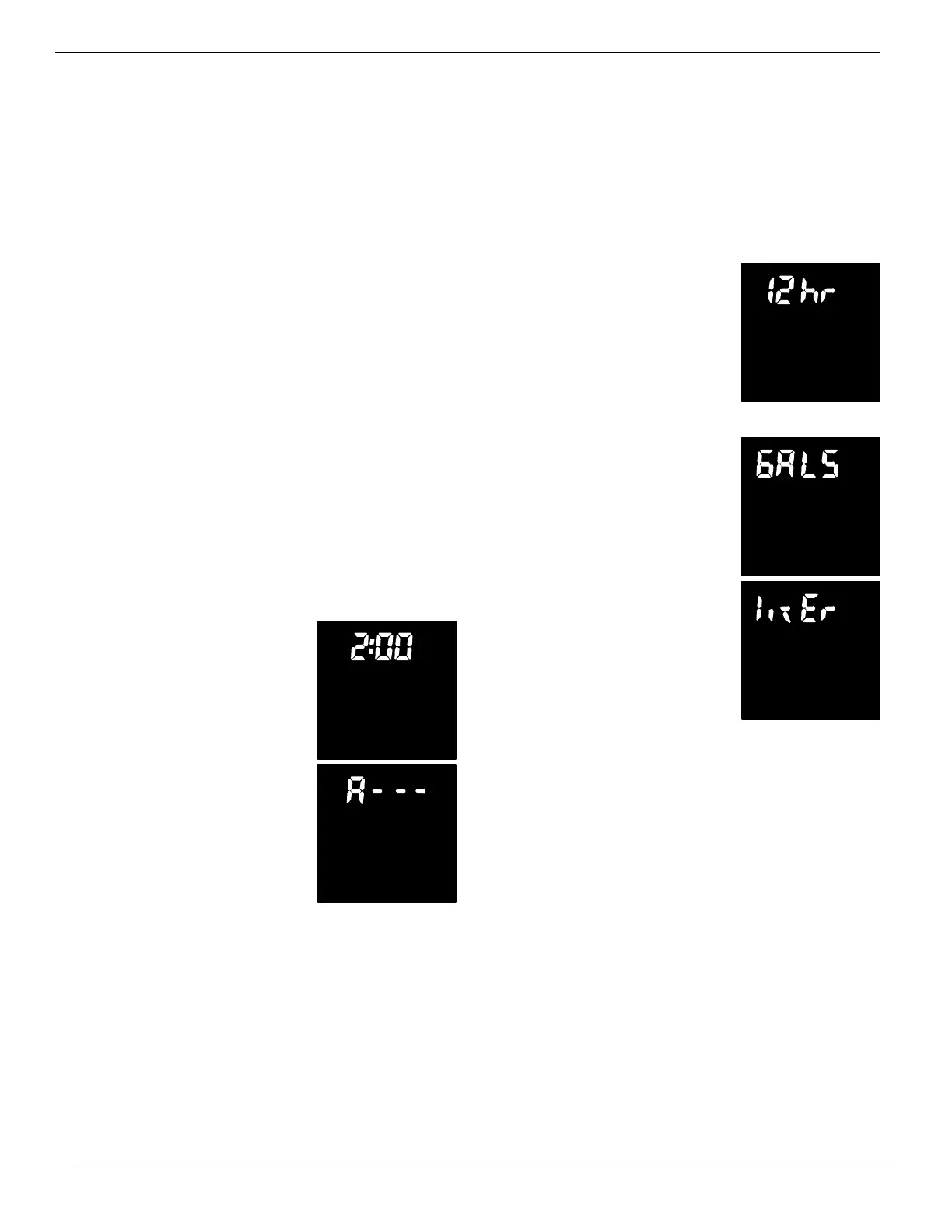
If A---is flashing in the display, do steps 2, 3, 5
and 7.
To check for the correct code setting, and to reset
if needed, do steps 1, 2, 3, 5 and 7.
12 OR 24 HOUR CLOCK: With 12 hr set, all time
displays are in standard clock time, 12:00AM to
11:59PM. If 24 hr is set, time displays are in military
time ... 0100 (1:00AM) to 0000 (midnight). To change
from the 12 hr setting, do steps 1, 3, 4, 5, and 7.
GALLONS OR LITERS MEASURE: All water flow
rate and usage displa ys are in gallons with the de-
fault GALS setting. If reset to litErs, the same dis-
plays are shown in liters. Use steps 1, 3, 5, 6 and 7
to change.
1. Beginning from the present
time display, press and hold in
the SELECT button until 2:00
AM (or as otherwise set), and
RECHARGE TIME begins to
flash.
2. Press and hold in the SE-
LECT button again. Either A --
-- -- or a previously set code will
appear. If setting is needed, use
theupordownbuttontoset
model code, as needed.
3. Press SELECT to select and move to next screen.
4. 12 hr flashes along with
TIME. To change the display to
24 hr, use the up button. Use the
down button to reset to 12 hr.
5. Press SELECT to select and move to next screen.
6. GALS flashes, a long with
GALLONS. Use the up button
to change to the liter setting.
Use the down button to return to
the gallon setting.
7. Press the SELECT button a final time to return to
the present time display.
AM
RECHARGE
TIME


 To Next Page