AM
RECHARGE
TIME
up
down
RECHARGE
Heavy
Bkwash
RECHARGE
Mortonr Water Softener Installation & Operation Manual
19
MORTON WATER SOFTENER FEATURES AND SETTINGS, continued
REGENERATION (START) TIME: At the 2:00AM
regeneration start time, the softener begins regen-
erations at that time. This is a good time in most
households because water is not in use. If a different
time would be better for your needs, do steps 1, 2,
4, 6, 8 and 10 to change the starting hour.
MAXIMUM DAYS BETWEEN REGENERATIONS:
The default setting allows the water softener to con-
trol regeneration frequency based on water usage
readings from the water meter. It provides the most
economical operation. You can set a maximum time
(in days) between regenerations. For example, no
more than 3 days will pass without a regeneration
occurring if you set dY 3 in the display. A 1 to 15 day
setting is available. To make a change from the de-
fault setting, do steps 1, 2, 3, 4, 6, 8 and 10.
EFFICIENCY MODE: When this feature is ON, the
unit will operate at salt efficiencies of 4000 grains of
hardness per pound of salt or higher. (May recharge
more often using smaller salt dosage and less wa-
ter). When this is ON the efficiency icon
will show
in the lower right hand corner of the display. To make
a change from the default setting, do steps 1, 2, 4,
5, 6, 8 and 10.
CALIFORNIA EFFICIENCY REQUIREMENT
Your water softener has a “High Efficiency” feature
with an “ON” or “OFF” setting. This softener setting
is shipped in the “OFF” position, which utilizes the
maximum rated capacity while most often achieving
maximum salt efficiencies. When installing this unit
in the State of California, you MUST turn this setting
to the “ON” position which may initiate more
frequent recharges, however it will operate at 4000
grains per pound of salt or higher.
If you wish to turn the Salt Efficiency feature “ON”
(
icon will show in display), follow the instructions
on this page.
HEAVY DUTY BACKWASH: When set to ON, the
backwash cycle of regeneration will be 10 minutes
long instead of the normal 7 minute length. This is
beneficial on some water supplies high in iron or
sediment content. To conserve water, on clean sup-
plies, be sure OFF shows. To change this setting, do
steps 1, 2, 4, 6, 7, 8 and 10.
SET 97% FEATURE: By setting to On, unit will auto-
matically recharge when 97% capacity has been
used, at any time of day. To change this setting, do
steps 1, 2, 4, 6, 8, 9 and 10.
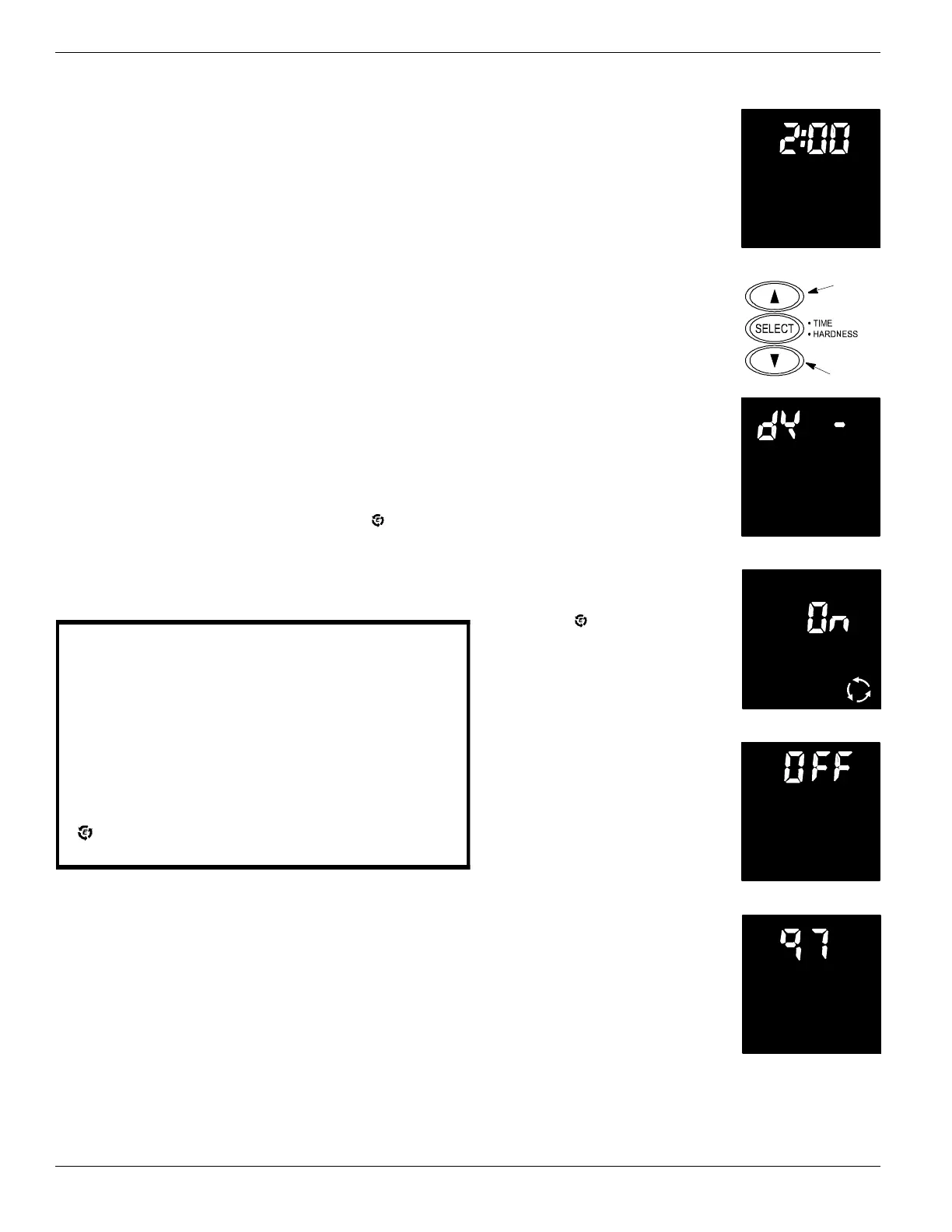
1. Beginning from the present
time display, press and hold in
the SELECT button until 2:00
AM begins to flash, RE-
CHARGE TIME remains
steady.
2. Press the up or down button
to display the desired start time.
The up button moves the time
ahead; the down button moves
the time backward. Press the
SELECT button to select time
and move to next setting.
3. dY -- flashes, with RE-
CHARGE remaining steady.
Pressing the up button will in-
crease the number of days, the
down button will decrease the
number of days.
4. Press the SELECT button to select and move to
next setting.
5. On flashes and the efficiency
mode icon
shows in the lower
right hand corner of the screen.
Use the up or down buttons to
toggle the efficiency mode ei-
ther ON or OFF.
6. Press the SELECT button to select and move to
next setting.
7. HEAVY BACKWASH and
flashing OFF shows in the dis-
play. Use the up or down but-
tons to toggle the heavy back-
wash either ON or OFF.
8. Press the SELECT button to select and move to
next setting.
9. Display toggles between 97
Recharge and OFF. Use the up
or down buttons to toggle this
setting either ON or OFF.
10. Press the SELECT button to select and return to
the present time display.
E


 To Next Page