6
3. GETTING STARTED
3.1 Front panel controls and output terminals
Note:most soft keys have two functions. The first function of the key is function entry (i.e. + Vset, -Iset,
Tracking etc.)The second function for the soft keys is data entry (ji. E. 0~9).
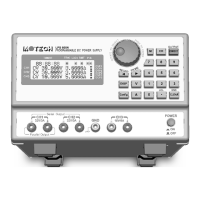
REFER TO THE FIGURE A.
(1) LCD display : Displays alphanumeric information with status annunciators. A detailed
listing of descriptions is presented in section 3.2.
(2) Power on/off : Powers on the unit.
(3) + Vset(7) : + output control key used to display or alter the present voltage setting.
Numeric entry key for number seven.
(4) + lset (8) : + output control key used to display or alter the present voltage setting.
Numeric entry key for number seven.
(5) + ▲ (up) (9) : + output control key used to increase the voltage settings when the supply is
in the CV mode or the current settings when the supply is in the CC mode. It
will change voltage or current by 10mV, or 1mA respectively. If the key is
pressed and held, it will continually increase the setting until it is released.
Numeric entry key for number nine,
(6) + ▼ (down) : + output control key used to decrease the voltage settings when the
supply is in the CV mode or the current settings when the supply is in the
CC mode by 10mV or 1mA per step. If the key is pressed and held, it will
continually decrease the setting until it is released,
(7) - Vset (4) : - output control key used to display or alter the present voltage setting.
Numeric entry key for number four.
(8) - Iset (5) : - output control key used to display or alter the present voltage setting.
Numeric entry key for number five.
(9) - ▲ (up) (6) : - output control key. The function is as same as positive channel.
Numeric entry key for number six.
(10) - ▼ (down) : - output control key. The function is as same as positive channel.
(11) TRACK(1) : Mode control key which toggles the tracking mode on or off.
(12) “0” : Numeric entry key for zero.
(13) 5V/3.3V(2) : 5V or 3.3V output selecting key.
Numeric entry key for number two.
(14) ”.” : 5V or 3.3V output control key which toggles the output on or off. Decimal


 To Next Page