ADJUSTMENTS AND MAINTENANCE – FOLDING WHEELCHAIRS | USER MANUAL
27
T 1 866 650-6555 F 1 888 966-6555 Email info@motioncomposites.com
– Reinstall axle bushing, the lock washer and nuts at the desired
position on the T2 mounting plate.
– Adjust the toe-in toe-out of the rear wheels.
– Tighten the nut (1) on the right and left sides of the wheelchair’s
mounting plate.
8.11.7 ADJUSTING THE CENTER OF GRAVITY
– Remove the rear wheel.
MICROADJUSTABLE AXLE PLATE (VELOCE, C2, A7, HELIO KIDS,
XC2, HELIO)
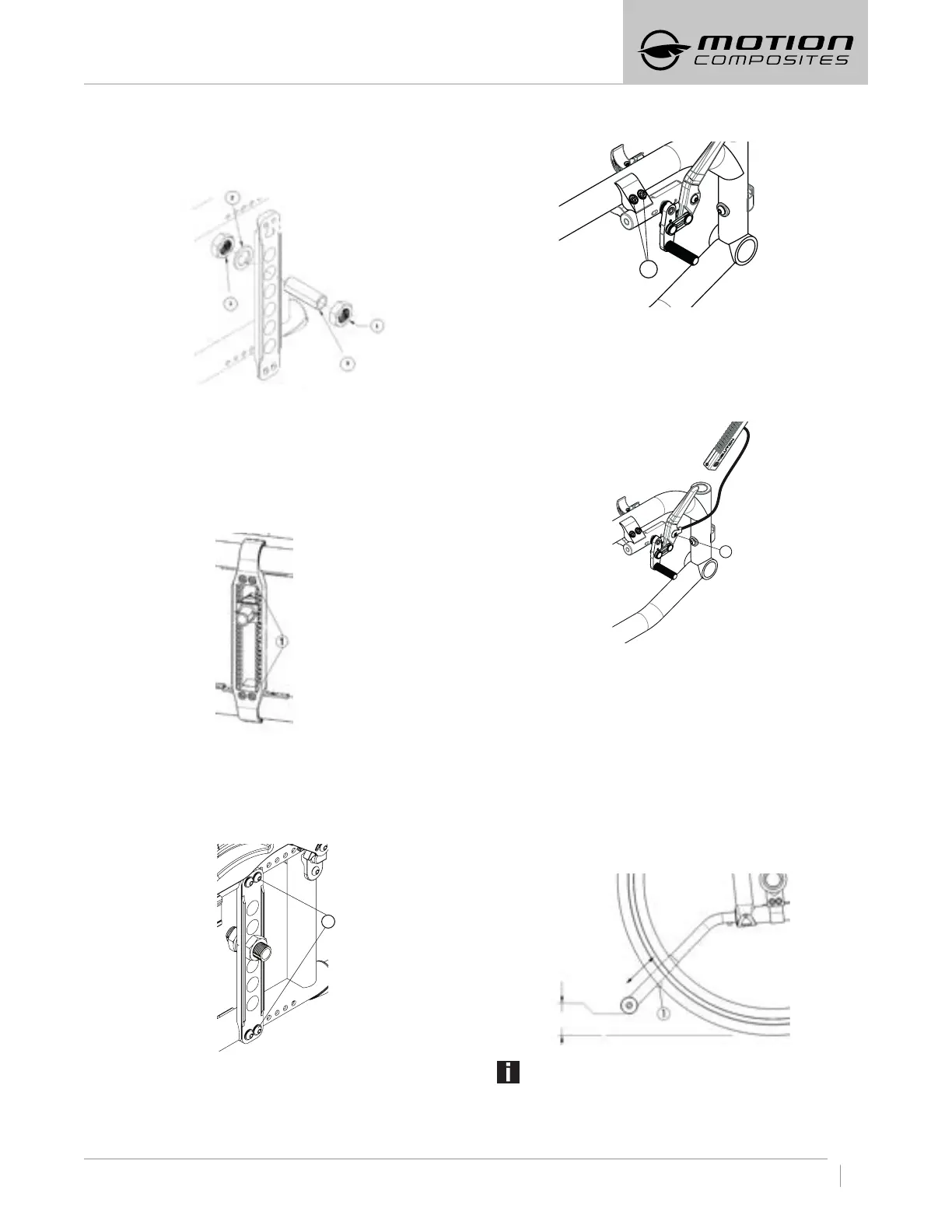
– Remove the 4 bolts (1) on the axle plate.
– Move the axle plate to the desired position
– Reinstall the 4 bolts (1) on the axle plate and torque to 12 Nm.
STANDARD AXLE PLATE (A6 AND MOVE)
– Remove the 4 bolts (1) on the axle plate
– Move the axle plate and double nut plate on the opposite side of
the frame tube to the desired position.
– Reinstall the 4 bolts (1) on the axle plate and torque to 7 Nm.
1
8:12 WHEEL LOCKS
8.12.1 REPLACING/ADJUSTING THE WHEEL LOCK
– Loosen the two screws (1).
– Slide the wheel lock system to the desired position.
– Tighten screws (1) firmly. Final tightening should be done manually.
– Once engaged, the wheel lock stem should embed 3 mm into
the tire.
1
8.13 WHEEL LOCK EXTENSIONS
8.13.1 REPLACING/ ADJUSTING WHEEL LOCK EXTENSIONS
– Loosen screw (1) completely.
– Align eyelet (2) with the mounting hole.
– Re-tighten lever screw (1) on the wheel lock.
1
8.14 ANTITIPPERS
8.14.1 ADJUSTING THE HEIGHT OF ANTITIPPERS
Both anti-tippers must be used with your wheelchair at all times.
Though optional, Motion Composites strongly recommends ordering
anti-tippers as they are an important safeguard for the wheelchair
user. Always use anti-tippers.
– The anti-tippers should be between 4 cm to
5.1 cm (1½ in. to 2 in.) off the ground.
– Improper spacing may result in wheelchair hang ups over
obstacles or preventing the wheelchair from tipping over.
– Press the push-button (1) and slide anti-tippers’ extensions to
the desired length.
– Ensure the button snaps back into place.
INFORMATION
If you are unable to adjust the current anti-tippers
to the proper height, contact your Motion Composites dealer
to replace your anti-tipper for another size.


 To Next Page