Chapter 3 Using the System 41
Using the SIM card slot
The SIM card slot holds one SIM (Subscriber Identity Module) card. A SIM card is a smart
card, about the size of a postage stamp, that stores information about your wireless
account.
You need to use a SIM card only if you are using Mobile Broadband on a GSM/UMTS/HSPA
network. Contact your service provider for details.
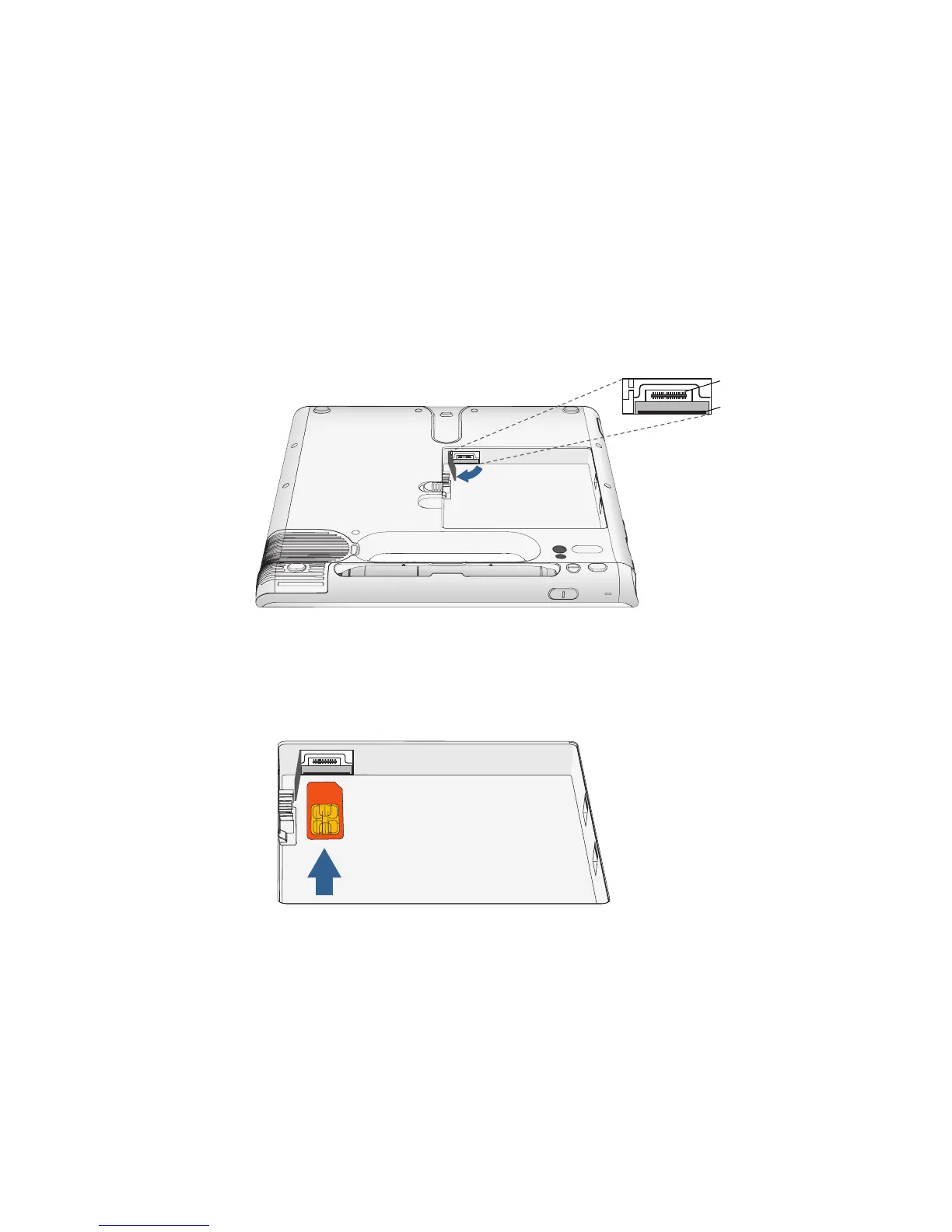
To insert a SIM card
1. Turn off the system and remove the battery (page 35).
2. Locate the SIM slot door and open it.
Note: The SIM slot and a diagnostic port are behind the SIM slot door. The SIM slot is
below the diagnostic port.
3. Place the SIM card label side down on the battery tray. Ensure that the notch on the SIM
card is in the upper right corner.
4. Slide the SIM card into the SIM card slot until it clicks into place. You may need to use a
paper clip to push the SIM card all the way in.
To remove a SIM card
1. Turn off the system and remove the battery (page 35).
2. Open the SIM slot door.
3. Press the card in slightly until it pops out. You may need to use a paper clip to push the
SIM card in to release it.
SIM slot
Diagnostic port



 To Next Page