EasyManua.ls Logo

Motomaster 011-1975-8 - User Manual

Motomaster 011-1975-8
16 pages
Print Icon
To Next Page IconTo Next Page
Loading...
Model no. 011-1975-8
INSTRUCTION
MANUAL
Classic Series Battery Charger
IMPORTANT SAFETY INSTRUCTIONS.
SAVE THESE INSTRUCTIONS.
This manual contains important safety and operating instructions.
®/MD
Question and Answer IconNeed help?

Do you have a question about the Motomaster 011-1975-8 and is the answer not in the manual?

Summary

Important Safety Instructions

Warranty

Introduction

Important Safety Instructions

Crucial safety precautions and warnings to be read before using the charger.

Connecting Your Battery

Follow These Steps When Battery Is Installed in Vehicle

Instructions for connecting the charger to a battery installed in a vehicle.

Controls and Indicators

A. Digital Display

Details the information shown on the digital display, including Volts, Amps, and Battery State of Charge.

B. Charge Status Indicators

Describes the meaning of the CHARGING, CHARGED/MAINTAINING, and Fault LEDs.

C. Charging Modes

Overview of the different charging modes available on the charger.

Charging Your Battery

Understanding Factors That Affect Charging Time

Understanding the Multi-Stage Charging Process

Maintenance and Care

Troubleshooting;Fault Codes

Technical Specifications

Overview

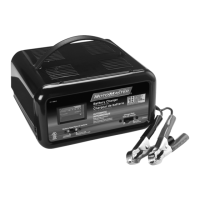
This MotoMaster Classic Series Battery Charger is an advanced device designed to make battery charging faster, easier, and safer, while also helping to maximize the performance and life of your batteries. It is suitable for use with all types of 12-volt lead-acid batteries, including Wet (flooded), Maintenance-free (MF), Calcium (Ca), Enhanced Flooded (EFB), Absorbed Glass Mat (AGM), and Gel batteries. The charger is capable of charging batteries rated from 10 to 300 Amp-hours and maintaining batteries from 10 to 400 Amp-hours.

Usage Features:

The charger features a digital display that alternates between showing Volts (V), Amps (A), and the Battery State of Charge (%). It can also display Fault Codes if a charging error is detected. The actual charging voltage will be displayed, which can reach up to 14.4 V, a normal and necessary level for effectively charging a 12-volt battery. The actual charging amperage will also be displayed. While you can select 2 A, 8 A, or 15 A charge modes, these are maximum currents, and the battery charger will automatically reduce the actual current delivered to the battery based on feedback and other factors.

The approximate battery state of charge is displayed, with "LO" indicating a charge below 50%. Above 50%, the percentage will display in 10% increments from 60% to 90% capacity. Once fully charged, the display will read "100%". Approximately 30 minutes after reaching full charge, the battery charger will enter a power-saving mode, and the digital display will turn off.

The charger continuously monitors charge progress and collects feedback from the battery. In the event of an abnormal condition, charging will stop, and a fault code (e.g., "F01") may be displayed, along with an illuminated LED.

Charge status is indicated by LEDs: a CHARGING LED indicates the battery is charging, and a CHARGED/MAINTAINING LED indicates charging is complete and the charger has entered the Maintain stage. An additional LED indicates one of three possible error conditions:

  • Amber (solid): No battery detected. This could mean clamp connections are not clean and solid, or the battery is severely discharged (<1.5 V) and potentially unsafe to charge.
  • Red (flashing): A fault has been detected, and charging has been aborted. You should check the digital display for a Fault Code and refer to the troubleshooting section for solutions.
  • Red (solid): Reverse polarity has been detected. You need to reverse the clamp connections.

There are four charging modes to choose from, which can be cycled through by pressing the MODE button. Charging will automatically begin about 5 seconds after a mode is selected. The charger retains the last selected mode in memory, and if AC power is disrupted, it will restart in the last selected mode once power is restored.

The available charging modes are:

  • 2 A<>15 A Mode: Recommended for most sizes of 12 V lead-acid batteries, especially if you are unsure of your battery's capacity rating. This mode starts at a low, safe current and gradually increases the rate as the battery can accept a higher current, balancing charging time with safe charging to utmost capacity. It charges batteries from 10 to 300 Amp-hours and maintains them from 10 to 400 Amp-hours.
  • 2 A Mode: For charging small to medium 12 V lead-acid batteries (10 to 50 Amp-hours for charging, 10 to 400 Amp-hours for maintenance).
  • 8 A Mode: For charging medium to large 12 V lead-acid batteries (30 to 160 Amp-hours for charging, 30 to 400 Amp-hours for maintenance).
  • 15 A Mode: For faster charging of medium to large 12 V batteries or charging extra-large ones (50 to 300 Amp-hours for charging, 50 to 400 Amp-hours for maintenance).

To charge your battery:

  1. Connect the charger clamps to the battery, following the specific steps outlined for "Connecting Your Battery," whether the battery is installed in a vehicle or outside.
  2. Plug the charger AC plug into an electrical outlet.
  3. Press the MODE button to select a charging program. If no selection is made within 5 seconds, the charger will default to the last selection in memory and automatically begin charging.
  4. Your battery is fully charged when the CHARGED/MAINTAINING LED illuminates and the display reads "100%". The battery is ready to start an engine once it reaches 80%.
  5. To stop charging at any time, disconnect the charger AC plug from the electrical outlet.

The charger employs a multi-stage charging process to optimize battery health and performance:

  • Stage 1 Desulphation: Uses pulses of voltage and current to help recover sulphated or deeply discharged batteries.
  • Stage 2 Soft Start: Gently introduces current to condition deeply discharged batteries and prevent overheating.
  • Stage 3 Bulk: Charges with maximum current to bring the battery to about 80% capacity.
  • Stage 4 Absorption: Charges with constant voltage while reducing current to safely bring the battery to 100% capacity, crucial for maximizing battery performance and life.
  • Stage 5 Analyze: Tests if the battery is holding a charge.
  • Stage 6 Maintain: Monitors battery voltage and provides top-up charging when necessary to keep the battery fully charged.

Maintenance Features:

For maintenance and care, it is recommended to wipe clean the cords and clamps after each use. Store the power and output cables neatly to prevent damage. The charger housing can be cleaned using a damp cloth and a mild cleaning agent. Always unplug the charger when not in use and store it in a cool, dry place.

Motomaster 011-1975-8 Specifications

General IconGeneral
Model Number011-1975-8
Battery TypeLead-Acid
Input Voltage120V AC
Output Voltage12V DC
Charging Current2A

Related product manuals