14 15
ENEN
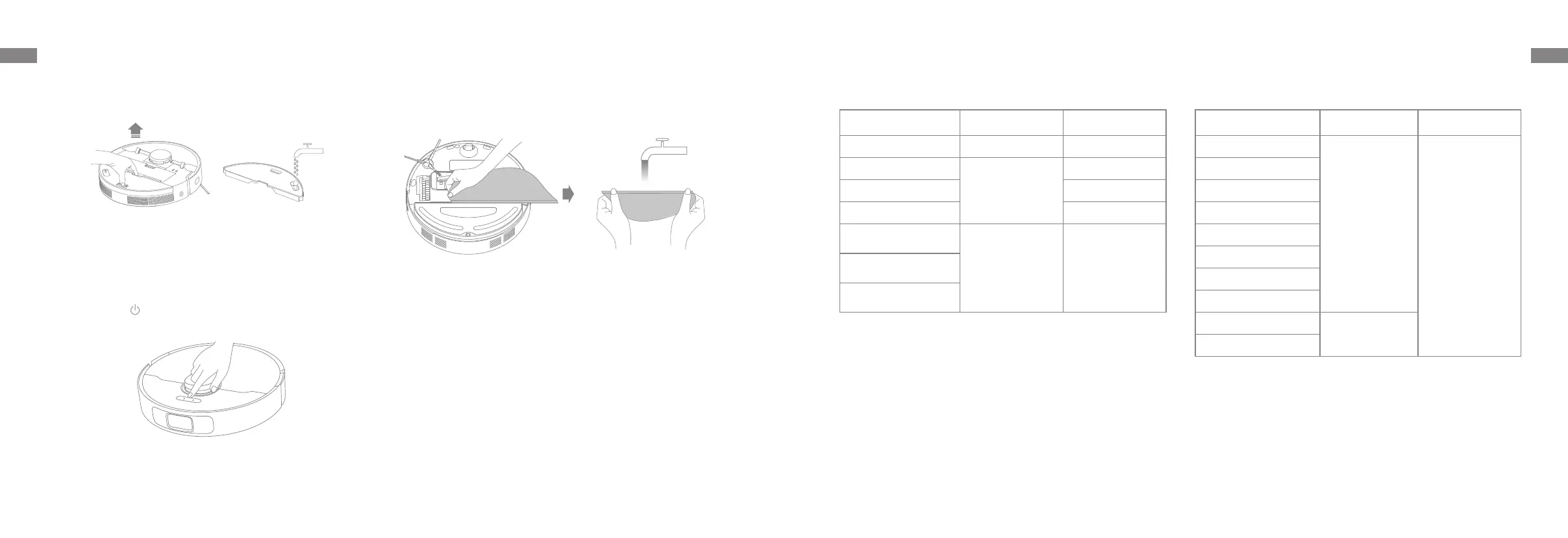
2. Open the cover of the robot and take the water tank out. Fill the water
tank with clean water and then reinstall it.
Note:
• Do not use detergent or disinfectant.
• Do not fill the water tank with hot water as this may cause the water tank
to warp.
How to Use
3. Press the button or use Dreamehome app to start cleaning.
Note:
• It is not recommended to use the mopping function on carpets.
• Use the app to adjust the water flow as required.
4. When the robot finishes a cleaning task and returns to the charging dock,
remove the mop pad and wash it in time. To remove the water tank, press
and hold the release clip, and then take it out.
Note: When the robot is charging or not in use, it's recommended to
remove the water tank and mop pad. Pour out all the remaining water in
the water tank, and clean the mop pad to prevent mildew or odors.
Routine Maintenance
Parts
To keep the robot in good condition, it is recommended to refer to the accessory usage in the app or the following table for routine maintenance.
Part
Maintenance
Frequency
Replacement Period
Mop pad After each use Every 1 to 3 months
Main brush
Once every 2 weeks
Every 6 to 12 months
Side brush Every 3 to 6 months
Dust box's filter Every 3 to 6 months
Charging dock's
signaling area
Once every month /
Charging dock's
charging contacts
Laser Distance Sensor
(LDS)
Part
Maintenance
Frequency
Replacement Period
Robot's charging contacts
Once every month
/
Line laser sensor
Edge sensor
Bumper
Omnidirectional wheel
Carpet sensor
Cli sensors
Bottom of the robot
Dust box
Clean it as needed
Water Tank
Note: The replacement frequency will depend on your usage of the robot. If an exception occurs due to special circumstances, the parts should be replaced.


 To Next Page