28
OPERATION (cont.)
Fan Only Mode Operation
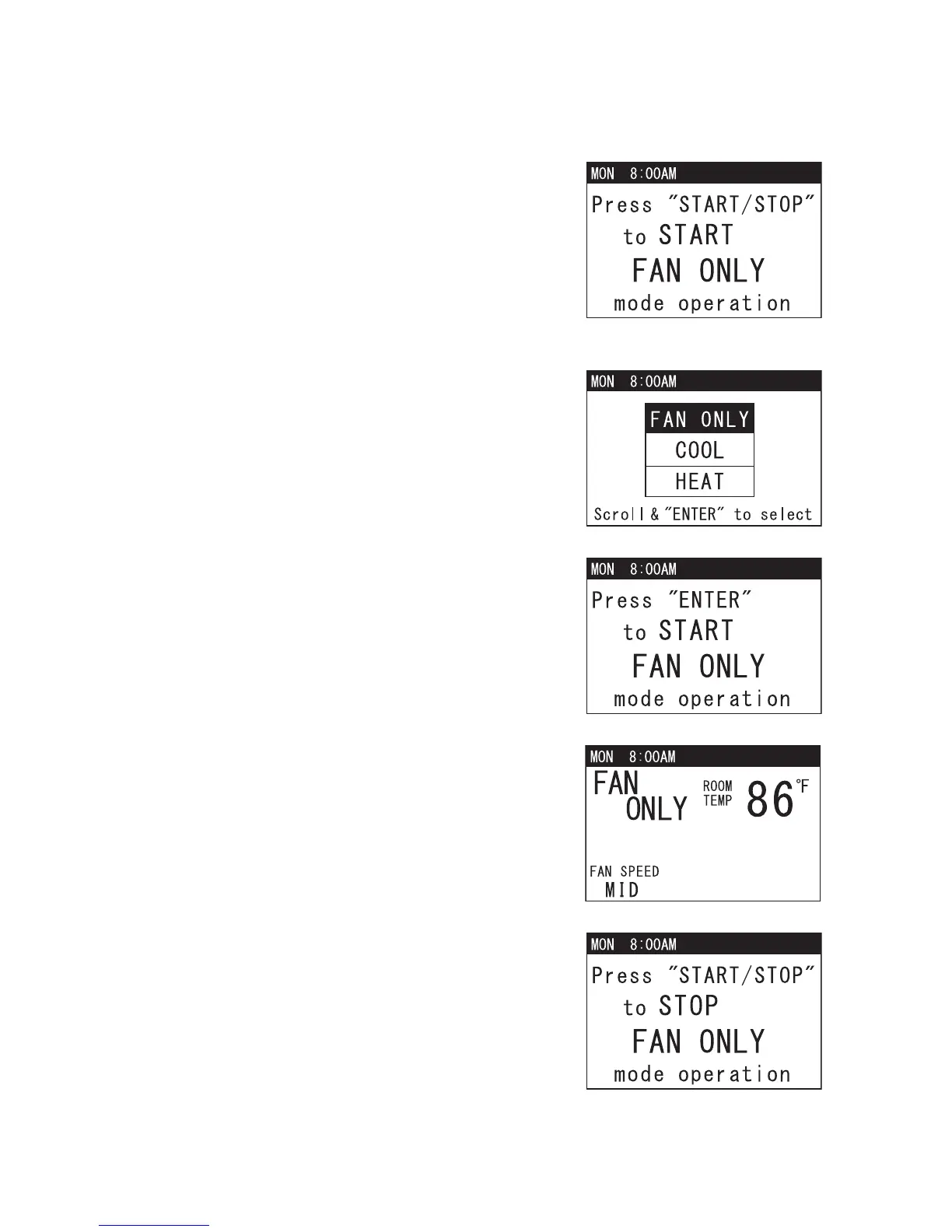
1. If the unit is in standby mode, simply press
MODE button until “FAN ONLY” appears, then
press START/STOP button. LCD displays a
confirmation screen. Press START/STOP
button once again to start FAN ONLY mode
operation. LED color changes from orange to
green.
Note: If no button is pressed for 1 minute, LCD
automatically displays the previous mode.
2. If the unit is in operation, simply press MODE
button once. The operation status screen
displays the current operation mode. Press
TEMP+ or -TEMP button to go to FAN ONLY,
then press ENTER button to select.
3. LCD displays a confirmation screen as shown
on the right.
4. Use FAN+ or -FAN button to change fan speed
(HI, MID, LO).
5. To stop FAN ONLY mode operation, press
START/STOP button. LCD displays a
confirmation screen. Press START/STOP
button again. LED color changes from green to
orange.










 To Next Page