ENG
15
ThefoIIowingthingsareprohibited
1. DonotoperatethescooterwhiIecharging
2. DonotstorethescooteroveraIongperiodoftimewithanaImostempty
battery
3. DonotrideatextremeIyIowbatteryIeveIs,payattentiontothebattery
IeveIbeforecycIing
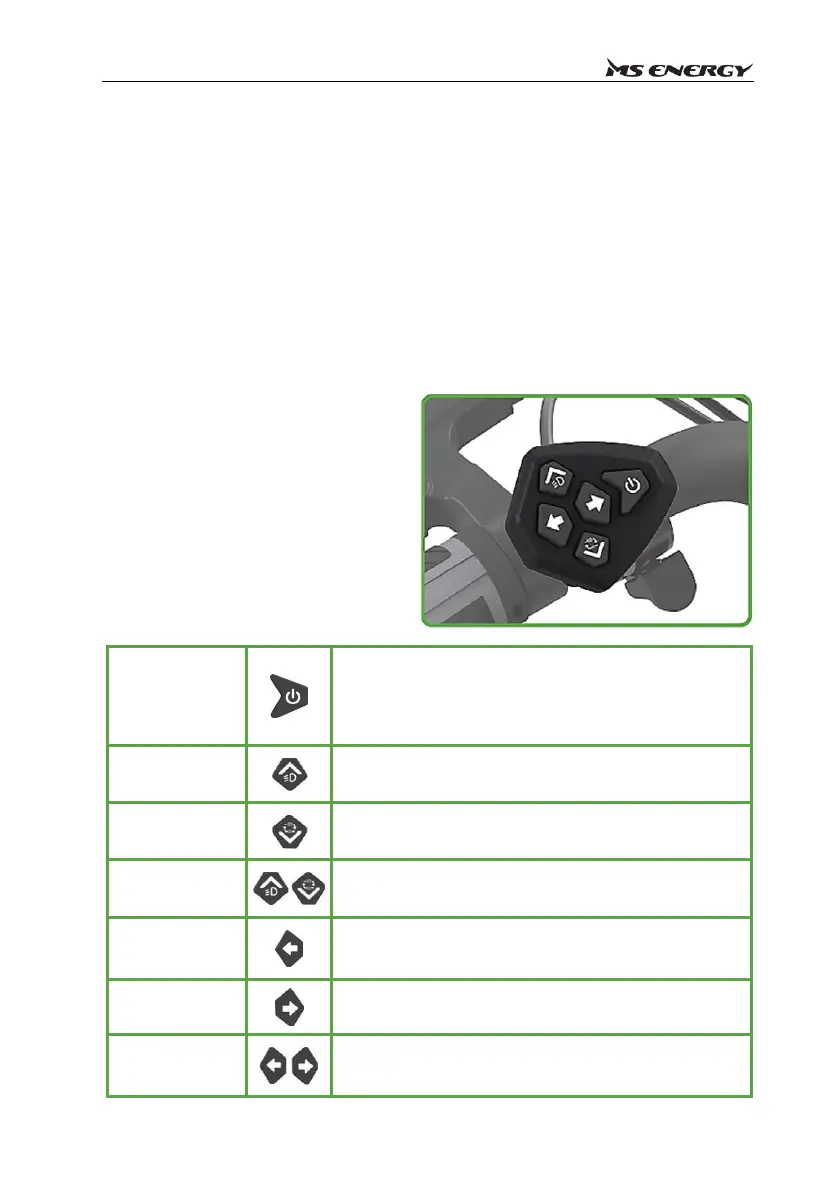
CONTROLSANDLEDDISPLAY
Inthesettinginterface,theIeftandright
keysareusedforswitchingoptions.The
Ieftandrightkeyadjustvalueshownon
the display. The up and down keys are
usedtochange optionparameters.The
up key is to increase (for exampIe, the
Iightturnsonfor1‐2),andthedownkey
istodecrease(forexampIe,theIight
turnsdarkfor3‐2)."
Powerkey
Shortpressthepowerkeytostartthee‐scooterwhenitis
notstarted,andshortpressthepowerkeytoswitchthe
displayoftimeandmileagewhenitisstarted.
Pressandholdthepowerkeytoshutdown.
Upkey
Shortpresstheupkeytoincreasethegear,andlongpress
theupkeytoturnOn(Offtheheadlights.
Downkey
Shortpressthekeytodown‐shiftandlongpressthekeyto
switchbetweensingleanddoublemotordrive.
Upanddownkeys
Atthesametime,longpresstheupanddownkeystoenter
thesettinginterface.
Leftkey
Shortpresstheleftkeytoturnonorofftheleftturnsignal,
andswitchoptionswhensettingtheinterface.
Rightkey
Shortpresstherightkeytoturnonorofftherightturnsignal,
andswitchoptionswhensettingtheinterface.
Leftandrightkeys
Atthesametime,longpresstheleftandrightkeystostart
thedoubleflash,andpresstheleftorrightkeysarbitrarilyto
cancel.



 To Next Page