ENG
16
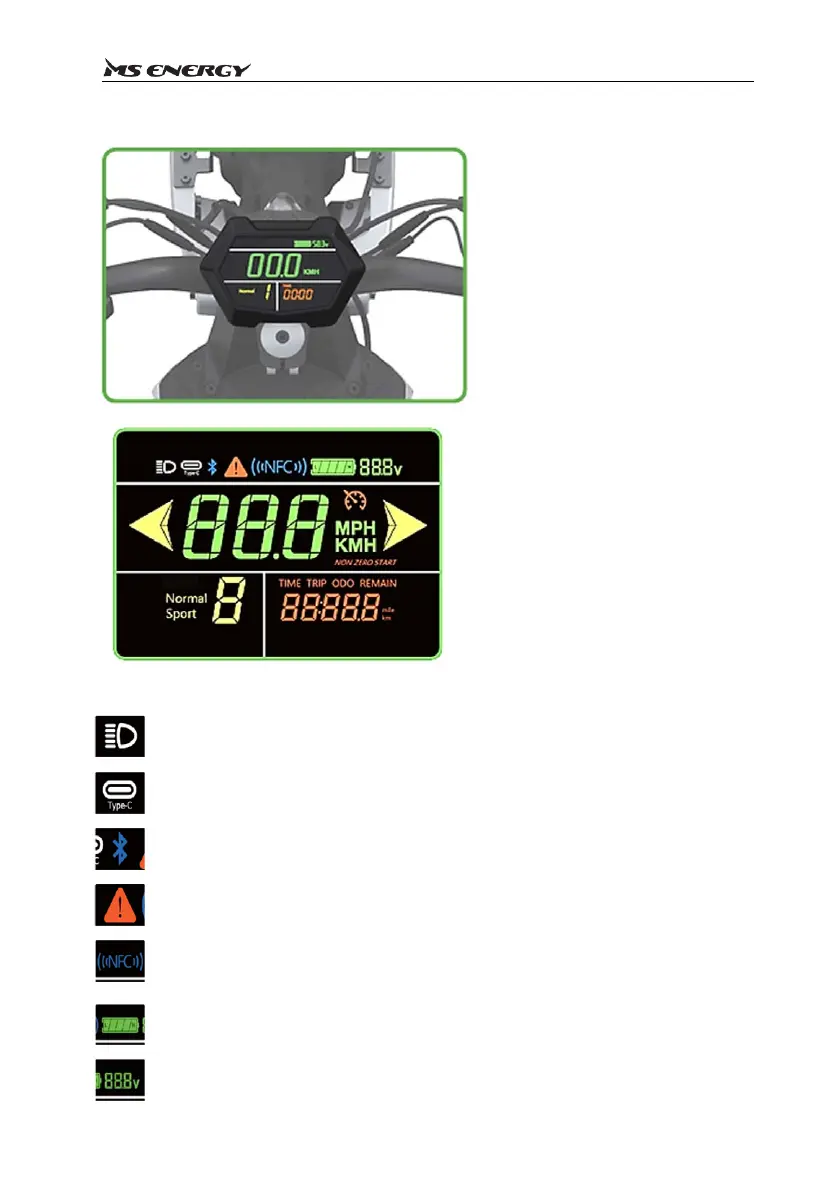
The Ieft figure shows the status
dispIayoftheinstrumentinnormaI
usebydefauIt.Youcanchangethe
status by setting it to obtain the
desiredparametersandstatus.
The bottom Ieft image shows aII
theparametersofthisinstrument.
BeIow,youcanfindintroducethe
specific meanings of the
parameters
Whentheheadlightsareturnedon,thesignonthedisplaywillup,andwhenthey
areturnedoff,itwillnotbedisplayed.
ThesignwillbeonwhenUSB‐Cisbeingusedforcharging
Theindicatorlightsupwhenabluetoothconnectionisinuse.(Currently,the
bluetoothfunctionisnotActivated)
Whenafaultoccurs,thefaultindicatorlightsup
Whentheelectricscooterispoweredon,youneedtoswipeyourcardtoactivate
theelectricscooter,andthepromptsignflashes
Thisistheremainingbatteryicon,eachgridrepresents20%ofthebattery.When
onlyonegridisleft,payattentiontocharging
Thisisthebatteryvoltagesign














 To Next Page