47
3103-1001 Rev. 0
4.2.5 UCO Enables
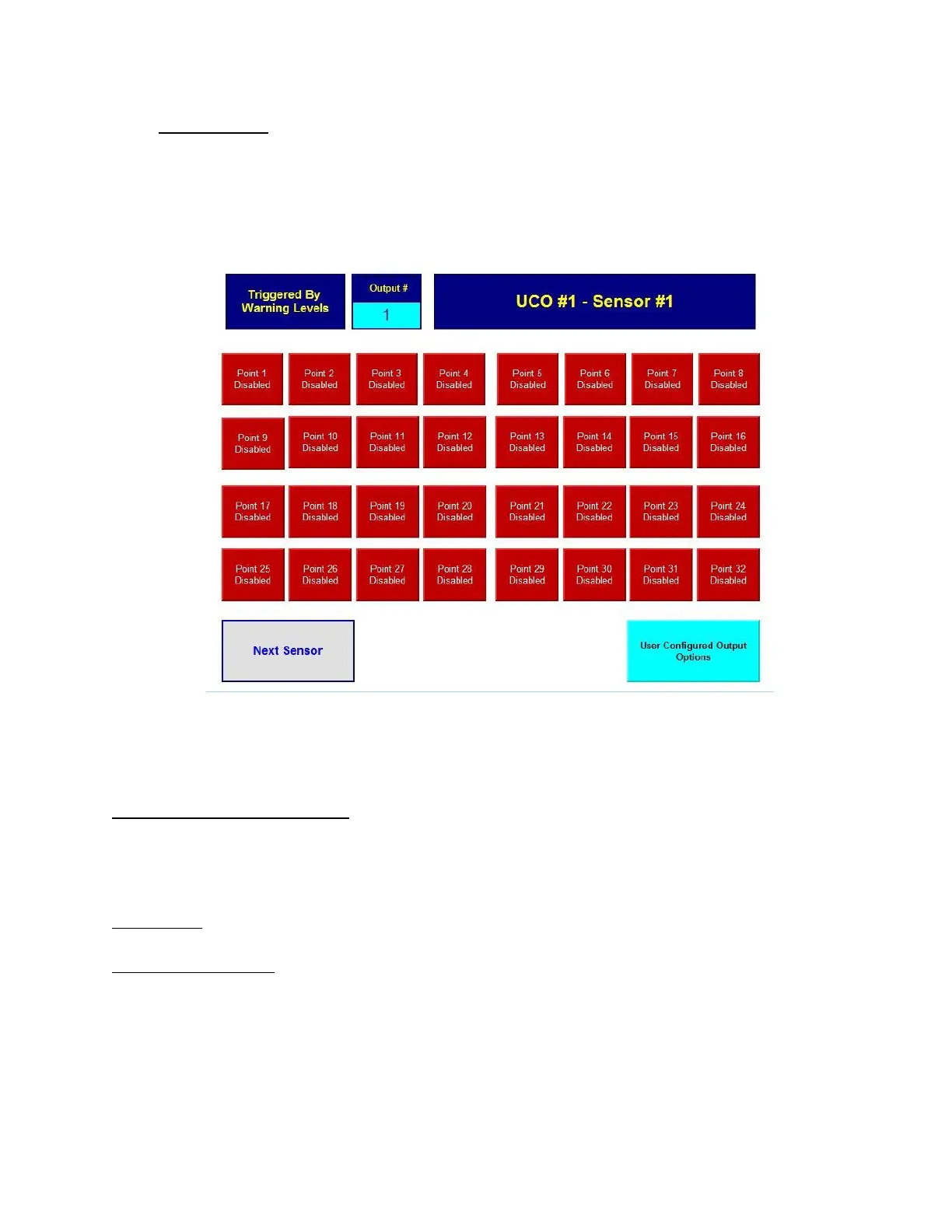
The UCO Enables screen allows the user to select which points will cause each of the outputs to
activate. For each output the user may choose any of the 16 [32] sample points associated with each
of the 4 sensors; a large amount of flexibility. A logical OR relationship exists among the available
sample point inputs. Enable push buttons close the link between the inputs and an output.
Figure 26: UCO Enable
The UCO Enables screen consists of the following:
"Triggered By Warning Levels" - This is an indicator which reminds the user what level triggers the
selected output. It can also read "Triggered by Alarm Levels". Remember that outputs 1-8 and 17-
24 are only triggered by warning levels and outputs 9-16 and 25-32 are only triggered by alarm
levels.
"Output #1" - This indicator shows the currently selected output that is being configured.
"UCO#1 - Sensor #1" - This indicator shows which option is being configured and which sensor's
points the push buttons represent. It has 9 states to show UCO#1 Sensors 1-4, UCO#2 Sensors 1-4,
and "Nothing to Enable Both UCO's N/A (not available)".



 To Next Page