20
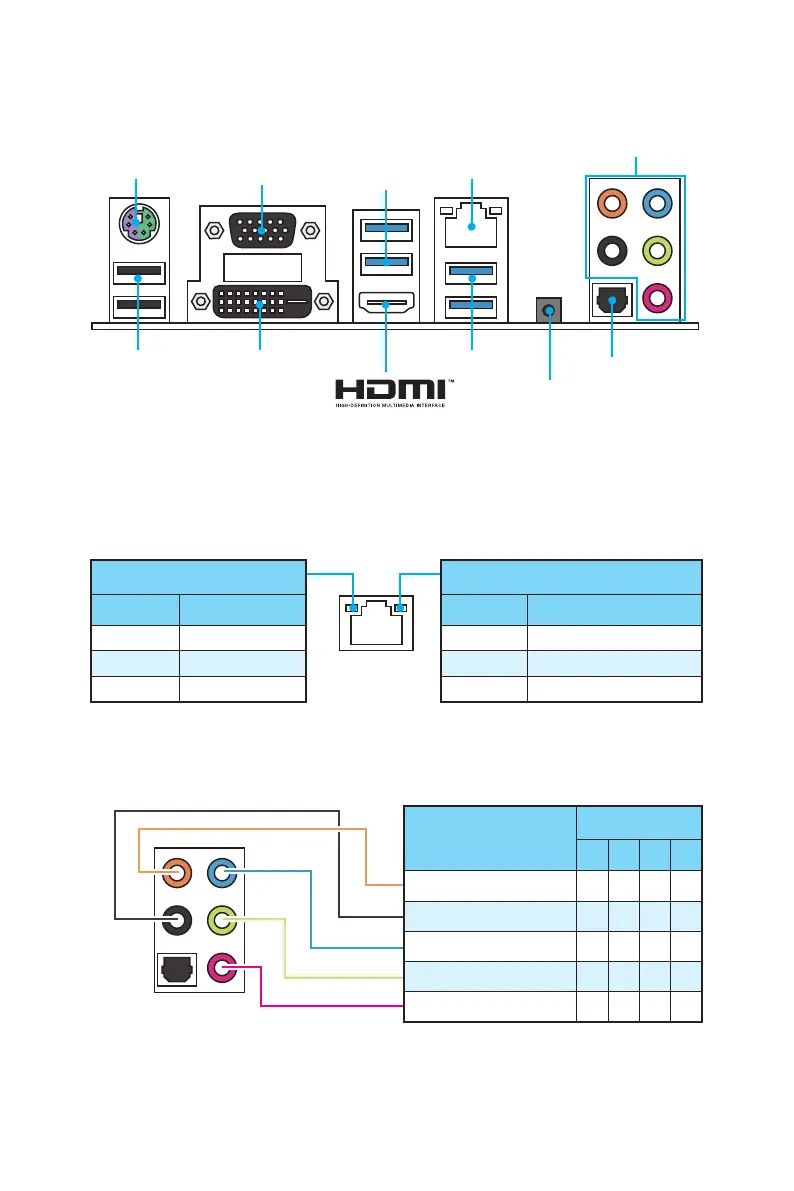
Rear I/O Panel
Rear I/O Panel
PS/2
LAN
USB 2.0
USB 3.1 Gen1
USB 3.1 Gen1
DVI-D
VGA
Link/ Activity LED
Status Description
Off No link
Yellow Linked
Blinking Data activity
Speed LED
Status Description
Off 10 Mbps connection
Green 100 Mbps connection
Orange 1 Gbps connection
LAN Port LED Status Table
Audio Ports Configuration
Audio Ports
Optical S/PDIF-Out
Clear CMOS
y Clear CMOS button - Power off your computer. Press and hold the Clear CMOS
button for 5 seconds to reset BIOS to default values.
Audio Ports
Channel
2 4 6 8
Center/ Subwoofer Out ● ●
Rear Speaker Out ● ● ●
Line-In/ Side Speaker Out ●
Line-Out/ Front Speaker Out ● ● ● ●
Mic In
(●: connected, Blank: empty)



 To Next Page