72
Software Description
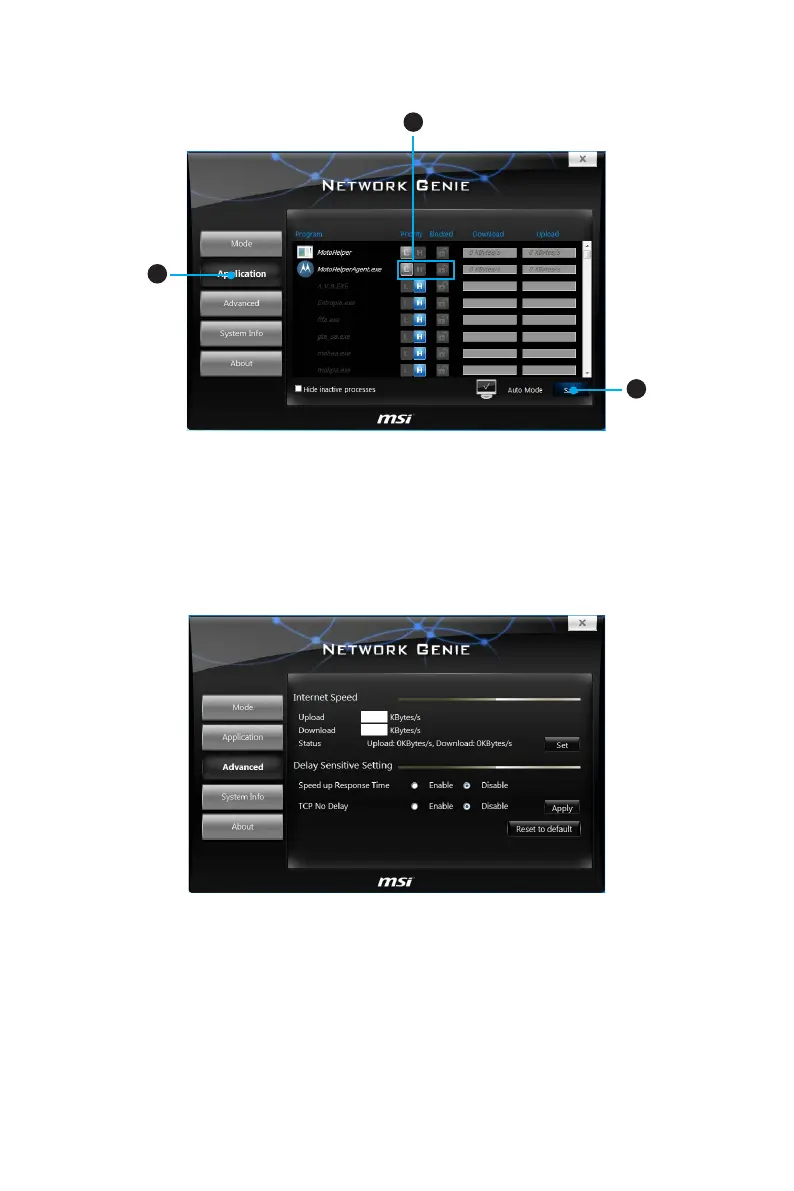
Configuring Application’s Network Priority
2
1
3
1. Go to Application tab.
2. Click L to assign the low network priority to the application, and H to hight. You
can also click the Lock icon to block an application network connection.
3. Click the Save button to store your settings.
Configuring Network Speed
There are two parts in the Advanced tab, one is Internet Speed, and another is Delay/
Sensitivity Settings.
y Internet Speed - allows you to set the maximum available bandwidth to the upload/
download speed manually or just leave blank for no limit.
y Delay/Sensitivity Settings - allows you to enable Speed up Response Time and No
TCP Delay to reduce the latency of the high priority applications.




 To Next Page