En-15
Installation Guide
English
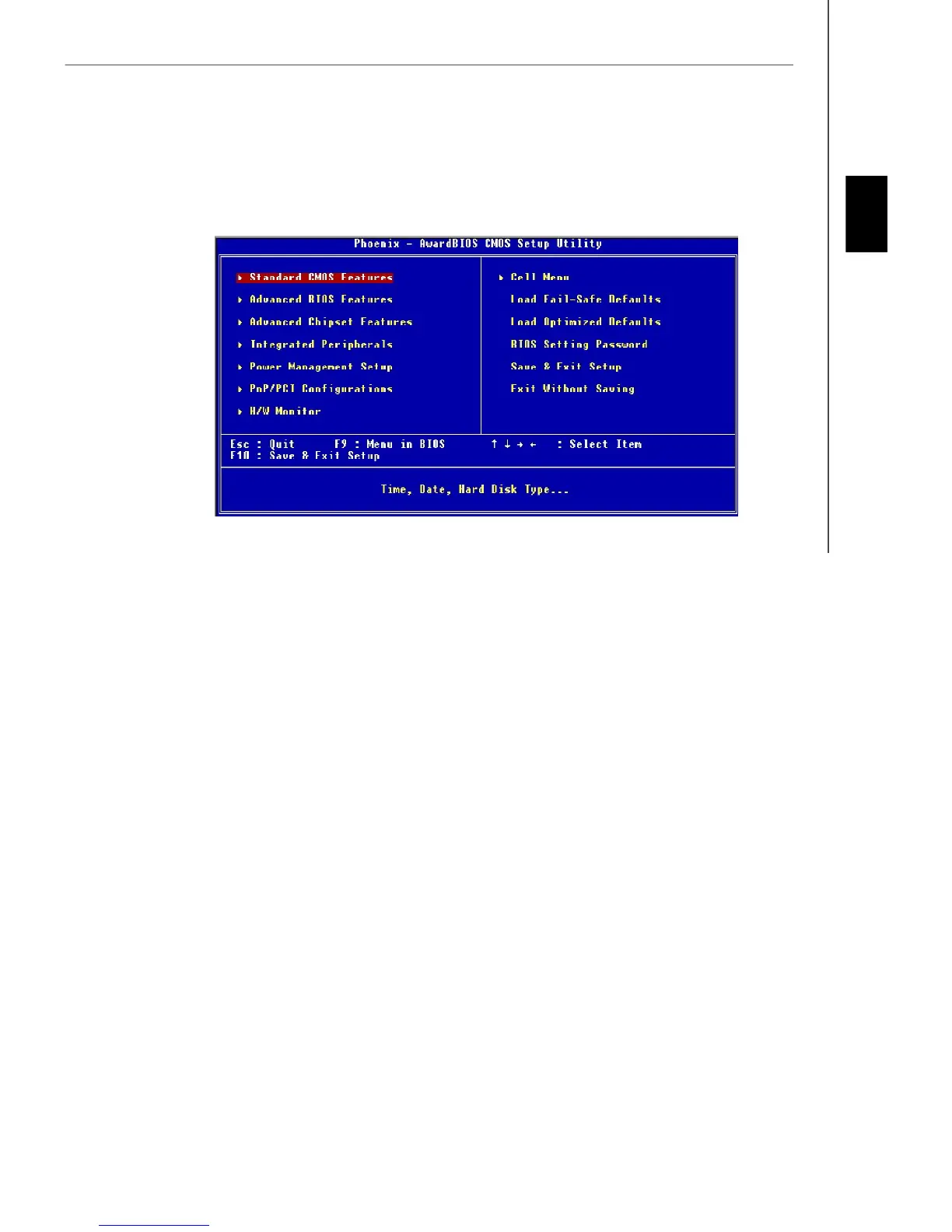
Standard CMOS Features
Use this menu for basic system configurations, such as time, date etc.
Advanced BIOS Features
Use this menu to setup the items of special enhanced features.
Advanced Chipset Features
Use this menu to change the values in the chipset registers and optimize your system’s performance.
Integrated Peripherals
Use this menu to specify your settings for integrated peripherals.
Power Management Setup
Use this menu to specify your settings for power management.
PnP/PCI Configurations
This entry appears if your system supports PnP/PCI.
H/W Monitor
This entry shows your PC health status.
Cell Menu
Use this menu to specify your settings for fequency/voltage control and overclocking.
Load Fail-Safe Defaults
Use this menu to load factory default settings into the BIOS for stable system performance operations.
Load Optimized Defaults
Use this menu to load the default values set by the mainboard manufacturer specifically for optimal performance of the
mainboard.
BIOS Setting Password
Use this menu to set the Password.
Save & Exit Setup
Save changes to CMOS and exit setup.
Exit Without Saving
Abandon all changes and exit setup.
The Main Menu
Once you enter AMI
®
or AWARD
®
BIOS CMOS Setup Utility, the Main Menu will appear on the screen. The Main Menu
allows you to select from ten setup functions and two exit choices. Use arrow keys to select among the items and press
<Enter> to accept or enter the sub-menu.


 To Next Page