4
2. Product Overviews
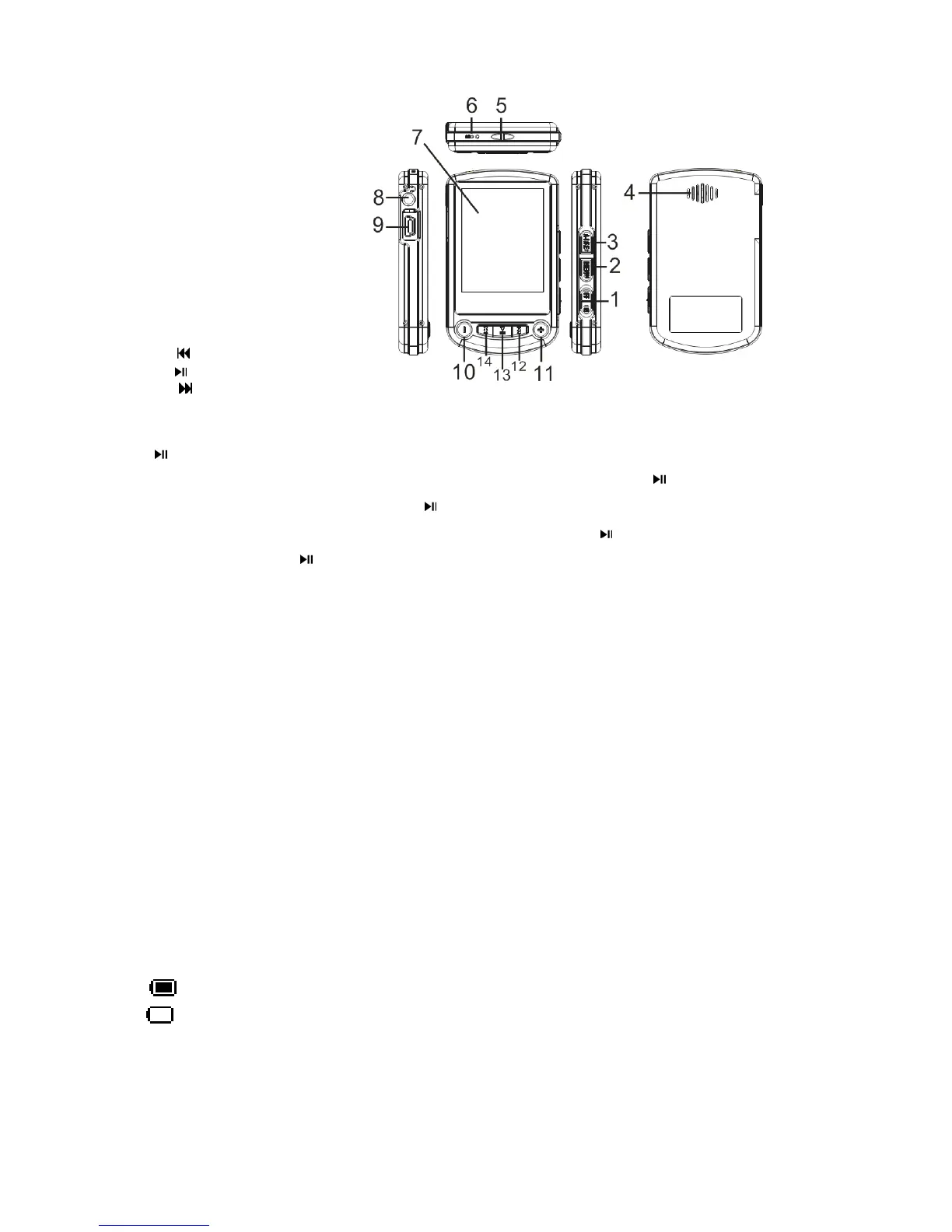
2.1 Player Introduction
1) Power ON/OFF Key
2) Menu Key
3) A-B repeat/REC Key
4) Speaker
5) Strap line hole
6) MIC
7) Display
8) Earphone Jack
9) USB Jack
10) - Volume Down
11) + Volume Up
12)
Last /Backward
13)
Play/Pause
14)
Next/Forward
2.2 Function Keys
1)
Key
Turn on:Please put the power ON/OFF switch to ON status ,Long pressing
key to turn on.
Play Music:In Music mode, short press “
” to play music.
Pause function:During the playing of music and video, short press "
" to pause.
Turn off:Long press "
" to turn off player.
2) key:During the playing of music and video, short press "" to skip to last one,
long press "" to fast play backward.
3) key: During the playing of music and video, short press "" to skip to next one,
long press "" to fast play forward.
4) + Volume Up key: Under the status of play or stop, short press “+” to add volume, long press “+”
to start outer speaker.
5) - Volume Down: Under the status of play or stop, short press “-” to reduce volume, long press
“-” to shut off outter speaker.
6) A-B repeat/REC key: Under the status of playing music, short press this key to select “A-B” repeat
function, long press this key to display Lyrics. In the REC mode, short press this key to start
recording, short press again to pause.
7) Menu Key: Press “Menu” key to enter all modes.
8) Power ON/OFF switch: put the power switch to “ON” to power on, put the power switch to “OFF”
to power off.
2.3 Battery
The power of battery shows full, and it reduces gradually by use.
When the power runs out, the icon shows blank, user should recharge in time.
Remark: In the power save mode, the first press to keys to activate the display, the second press to
select the keys’ function.



 To Next Page