EasyManua.ls Logo

Multilin 139 series - Problem Troubleshooting Guide

Default Icon
46 pages
Print Icon
To Next Page IconTo Next Page
To Previous Page IconTo Previous Page
Loading...
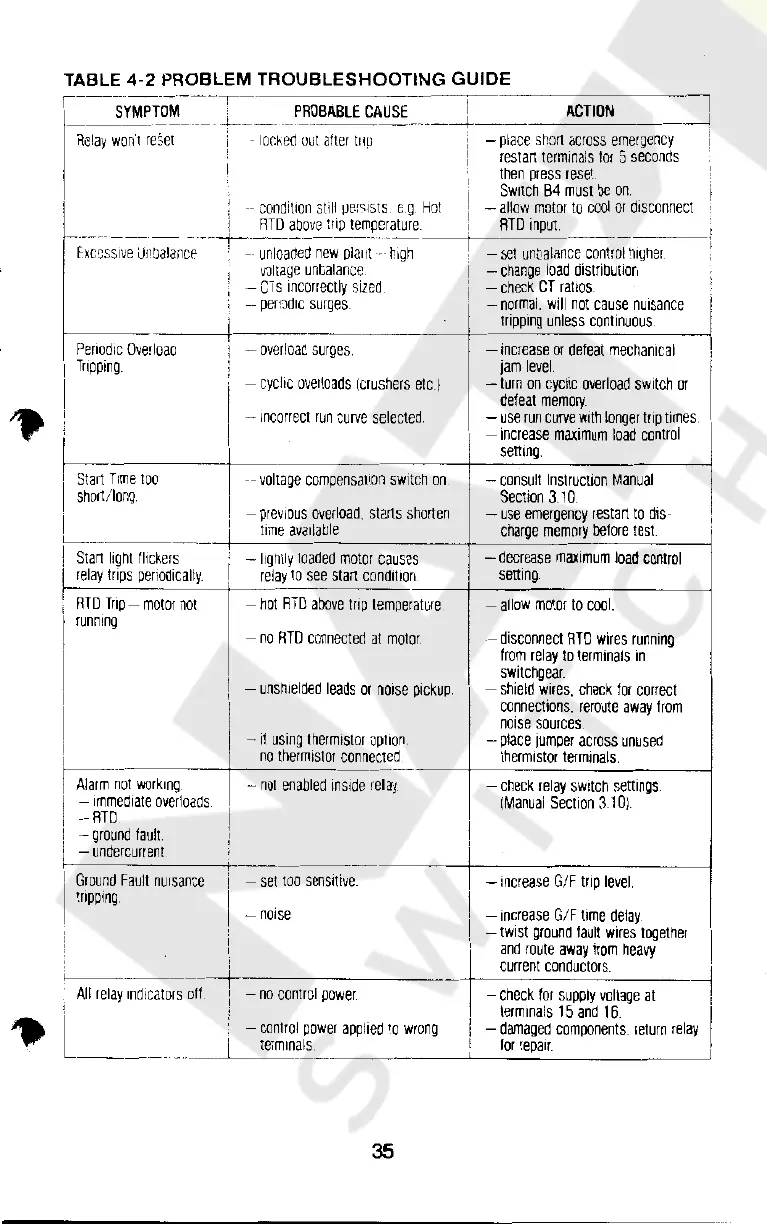
TABLE
4-2
PROBLEM
TROUBLESHOOTING
GUIDE
f
---SYMPTO~=~-:~-
PROBABLE
CAUSE_
_j_
----AC-T-IO_N
___
_J
Relay
won't
reSet
!.
1
-
1or.ked
out
alter
111µ
-
place
short
across
emergency
restail
terminals
tor
5
seconds
then
press
reset
Switch
84
must
be
on.
.
--
condition
still
µer:::1sts
G.Q.
Hot
-
allow
motor
to
cool
or
disconnect
I
RTD
above
trip
temperature
ATD
input
-·--···
-
--
- - -
--+---
----------
--+----~---
f:xccss1ve
Unbalancf
·
--
unloaded
new
pla11t
-
high
'
i
Periodic
Overloaa
'
'
Tripping
'
I
I
'
k--
I
I
i
Start
Time'
IOO
short/long
!
I
I
'---
I,
Start
light
flickers
I
relay
trips
penodically
I
I
RTD
Trip-
motor
not
I
running
I
I
I
I
I
I
I
I
Alarm
~01
working
I
-
1mmed1ate
overloads
i
-RTD
I
-
ground
fault
:
-
undercurrent
I
Ground
Fault
nuisance
i
I
tripping
I
i
I
-
voltaye
unbalance
-CTs
incorrectly
sized
d
--
per~ci
1c
surges
-
overload
surges
-
cyclic
overloads
(crushers
etc.)
-
incorrect
run
curve
selected
--
voltage
compensation
switch
on
-
previous
overload,
starts
shorten
time
available
-
lightly
loaded
motor
causes
relay
to
see
start
cond1t1on
-
hot
RTD
above
trip
temperature
-
no
RTD
connected
at
motor_
-
unshielded
leads
or
nmse
pickup.
-
11
using
thermistor
option
no
thermistor
connected
-
not
enabled
inside
relay
-
set
too
sensitive
-
noise
-
set
unt)aiance
control
higher
-
change
load
distribu1mn
-
check
CT
ral!os
-
norma.
w1
not
cause
nuisance
I
tripping
unless
continuous
I
II
-
increase
or
defeat
mechanical
!
jam
level.
-
turn
on
cyclic
overload
switch
or
defeat
memory_
-
use
run
curve
with
longer
trip
times
-
increase
maximum
load
control
setting.
-
consult
Instruction
Manual
Section
310
-
use
emergency
restart
to
dm-
charge
memory
before
test
I
-
decrease
maximum
load
control
setting
-
allow
motor
to
cool.
-
disconnect
RTD
wires
running
from
relay
to
terminals
in
switchgear.
-
shield
wires.
check
for
correct
connections.
reroute
away
from
nmse
sources
-
place
jumper
across
unused
thermistor
terminals.
-
check
relay
switch
settings
[Manual
Section
31
Di
I
I
I
-
increase
G/F
trip
level
I
-
increase
G/F
time
delay
-
twist
ground
fault
wires
together
I
and
route
away
from
heavy
· ,
current
conductors.
_J
,
All
relay
~n-d1-ca-to~~1ft
___
n_o_c_o_nt_ro_l
_po_w_e_1
____
--+-_-c-he_c_k-fo-1-su_p_p_ly-vo-lt-a-ge_a_t__
!
-,.
L.
.
.
______
I
-
control
power
applied
to
wrong
1erm111als
35
terminals
15
and
16
I
-
damaged
companents.
return
relay
.
for
repair.
.
Courtesy of NationalSwitchgear.com

Related product manuals