www.multispanindia.com
Page-2
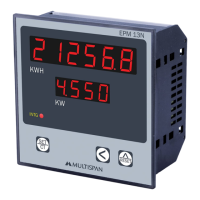
1)PressKey.
2)Nowwithoutreleasingthekeyswitch
ontheinstrument.
3)SelectrequiredCTprimarywithandkey.
4)TosavetheCTRatioswitchOffinstrumentpowersupply.
PowerManagement
BuildingManagementSystem
QualityControlSystem
PlantMaintence
EnergyAudit
ControlPanels
Gensets
PowerDistributionSwitchboards
1)PressKeyfor10seconds.
2)ThenreleaseandpressresetkeyagintoresetKWHitwillshowdonemessage.
CT
SET
EPM-13N
CTPRIMARYSELECTION:
RESETTINGkWh.
APPLICATION:


 To Next Page