EasyManua.ls Logo

MULTISPAN EM-10 - User Manual

MULTISPAN EM-10
4 pages
Print Icon
To Next Page IconTo Next Page
Loading...
PowerSupply
Frequency
ActivePower
(KW)
ActivePower
(KWh)
Operating
Temperature
Wiring
System
Relative
Humidity
230VAC,50Hz,Approx4VA
45To65Hz
0000-9999KW
0-999999KWH
0°CTo50°C
3Ph-4W
Upto95%RHNonCondensing
5AmporhigherthroughexternalCT
Model
Size(mm)
Display
PanelCutout
VoltageInput
CurrentInput
96(H)X96(W)X50(D)mm
6Digit/Line7seg0.56,redLEDDisplay
92X92mm
250VAC
EM-10
Protection
Level

(Asperrequest)
IP-65(Frontside)AsperIS/IEC60529:2001
www.multispanindia.com
Page-1
EM-10
OPERATINGMANUAL
3PHASEENERGYMETER
EM-10
TechnicalSpecification
EM 10
RESET
KWH
KW
CT
R
Y
B
kWh
. 
1)PressKey&poweronunittodisplay(CTratiomode)onimmediately
releasingkey,unitallowstoeditCTratioupto4000/5.
2)CTratiochangebyusing&keypresskeytoincreaseCTratioand
decreaseCTratiopresstosavechangespowerofftheunit,andnormally
powerontheinstrument.

1)PressKeyfor10secondthandisplayshowthanpresskey
thendisplayshowthanwaitkwhisreset.


CT
CT
CT
RESET
RESET
RESET
RESET
KWH
KWH
KWH
KWH
CTPRIMARYSELECTION:
RESETTINGkWh.
Question and Answer IconNeed help?

Do you have a question about the MULTISPAN EM-10 and is the answer not in the manual?

Summary

Technical Specifications

Model and Display

Details the EM-10 model and its 6-digit red LED display.

Physical Dimensions

Specifies the meter's size and panel cutout dimensions.

Electrical Ratings

Outlines voltage input, current input, and power supply specifications.

Operating Conditions

Defines operating temperature and relative humidity ranges.

CT Primary Selection

Entering CT Ratio Mode

Instructions on how to enter CT ratio mode for editing.

Modifying and Saving CT Ratio

Steps to change and save the CT ratio settings.

Resetting kWh

kWh Reset Procedure

Step-by-step guide to reset the kWh reading.

Connection Diagram

Terminal Layout and Specifications

Details terminal numbering, voltage/current range, and system type.

CT Selection and Wiring

Illustrates CT selection and wiring for different phases.

Safety and Installation Guidelines

General Safety Precautions

Mandatory safety instructions for operating personnel and the instrument.

Wiring and Installation Warnings

Guidelines to prevent electric shock and ensure safe wiring.

Mechanical Installation Steps

Instructions for panel cutout, fitting the unit, and terminal wiring.

Maintenance Recommendations

Advice on cleaning and component replacement.

Summary

Technical Specifications

Model and Display

Details the EM-10 model and its 6-digit red LED display.

Physical Dimensions

Specifies the meter's size and panel cutout dimensions.

Electrical Ratings

Outlines voltage input, current input, and power supply specifications.

Operating Conditions

Defines operating temperature and relative humidity ranges.

CT Primary Selection

Entering CT Ratio Mode

Instructions on how to enter CT ratio mode for editing.

Modifying and Saving CT Ratio

Steps to change and save the CT ratio settings.

Resetting kWh

kWh Reset Procedure

Step-by-step guide to reset the kWh reading.

Connection Diagram

Terminal Layout and Specifications

Details terminal numbering, voltage/current range, and system type.

CT Selection and Wiring

Illustrates CT selection and wiring for different phases.

Safety and Installation Guidelines

General Safety Precautions

Mandatory safety instructions for operating personnel and the instrument.

Wiring and Installation Warnings

Guidelines to prevent electric shock and ensure safe wiring.

Mechanical Installation Steps

Instructions for panel cutout, fitting the unit, and terminal wiring.

Maintenance Recommendations

Advice on cleaning and component replacement.

Overview

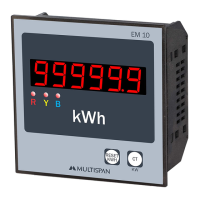
The Multispan EM-10 is a 3-phase energy meter designed for accurate measurement and display of electrical parameters in industrial and commercial applications. It features a compact design with a 96x96mm panel cutout, making it suitable for integration into various control panels. The device is equipped with a 6-digit/line, 7-segment, 0.56-inch red LED display for clear visibility of readings.

Function Description:

The EM-10 primarily functions as an energy meter, measuring and displaying both active power (KW) and active energy (KWH). It is designed for 3-phase, 4-wire systems and can operate with a voltage input of up to 250V AC. Current measurement is achieved through external Current Transformers (CTs), allowing for flexibility with various current ratings (5 Amp or higher). The device supports a wide range of CT ratios, selectable up to 4000/5 Amp AC.

Important Technical Specifications:

  • Model: EM-10
  • Display: 6 Digit/Line, 7-segment, 0.56-inch red LED Display
  • Size (H x W x D): 96mm x 96mm x 50mm
  • Panel Cutout: 92mm x 92mm
  • Voltage Input: 250V AC
  • Current Input: 5 Amp or higher through external CT
  • Active Power (KW) Range: 0000-9999 KW
  • Active Power (KWH) Range: 0-999999 KWH
  • Power Supply: 230V AC, 50 Hz, Approx 4VA
  • Frequency: 45 To 65 Hz
  • Wiring System: 3Ph-4W
  • Protection Level: IP-65 (Front side) as per IS/IEC 60529: 2001
  • Operating Temperature: 0°C To 50°C
  • Relative Humidity: Up to 95% RH Non Condensing
  • Current Range: 0.1 to 5A AC
  • Voltage Range (P-P): 50-500V AC
  • Voltage Range (P-N): 30-300V AC
  • Accuracy Class: 1.0
  • CT Selection: Up to 4000/5 Amp AC CAT III

Usage Features:

  • CT Primary Selection: The EM-10 allows users to configure the CT ratio. To enter CT ratio mode, press and hold the "RESET KWH" key while powering on the unit. The display will show "Ct rAt". Users can then adjust the CT ratio up to 4000/5 using the "RESET KWH" and "CT KW" keys. Pressing the "CT KW" key increases the ratio, while pressing the "RESET KWH" key decreases it. To save the changes, power off the unit and then power it back on.
  • Resetting kWh: The accumulated kWh reading can be reset. To do this, press and hold the "RESET KWH" key for 10 seconds. The display will show "r-5Et". Then, press the "CT KW" key, and the display will show "r5t don". After a brief wait, the kWh will be reset.
  • Safety Precautions: The manual emphasizes strict adherence to safety guidelines. It warns against handling the equipment in ways not specified by the manufacturer, which could impair protection. Users are advised to read the complete instructions before installation and operation. A "WARNING: Risk of electric shock" is prominently displayed.
  • Wiring Guidelines: To prevent electric shock, the power supply to the equipment must be OFF during wiring. Terminals should not be touched when power is supplied. For electromagnetic interference reduction, wires with adequate rating and twists of equal size should be used with the shortest possible connection. Cable for power source connection should have a cross-section of 1mm or greater and insulation capacity of at least 1.5kV. Using a standard power supply cable is recommended for better anti-noise effect.
  • Installation Guidelines: As a built-in type equipment, the terminals become inaccessible after installation. Metal pieces, wire clippings, or metallic fillings should be prevented from entering the product to avoid safety hazards. A circuit breaker or mains switch must be installed between the power source and supply terminal for ON/OFF function, and it should be conveniently accessible. The instrument should be used and stored within the specified ambient temperature and humidity ranges.
  • Mechanical Installation: The manual provides a detailed diagram for panel cutout dimensions (92mm x 92mm). The unit should be fitted into the panel using the provided clamp. It should not be installed near heating sources, caustic vapors, oil steam, or other unwanted process by-products. Crimp terminals (M3.5 screws) should be used for wiring the terminal block, tightened with a torque of 1.2 N.m. Unused terminals should not have anything connected to them.

Maintenance Features:

  • Regular Cleaning: The equipment should be cleaned regularly to prevent blockage of ventilating parts.
  • Cleaning Agent: Use a clean, soft cloth for cleaning. Isopropyl alcohol or any other cleaning agent should not be used.
  • Component Replacement: The fusible resistor must not be replaced by the operator.

The EM-10 is a robust and user-friendly energy meter, designed for reliable performance in demanding electrical environments, with clear instructions for safe installation, operation, and maintenance.

MULTISPAN EM-10 Specifications

General IconGeneral
BrandMULTISPAN
ModelEM-10
CategoryMeasuring Instruments
LanguageEnglish

Related product manuals