1. Construction
2. Battery installation
The battery is connected to the handset as factory default. To change the battery you must unscrew the plate on
the back of the handset to access the battery compartment.
4
5
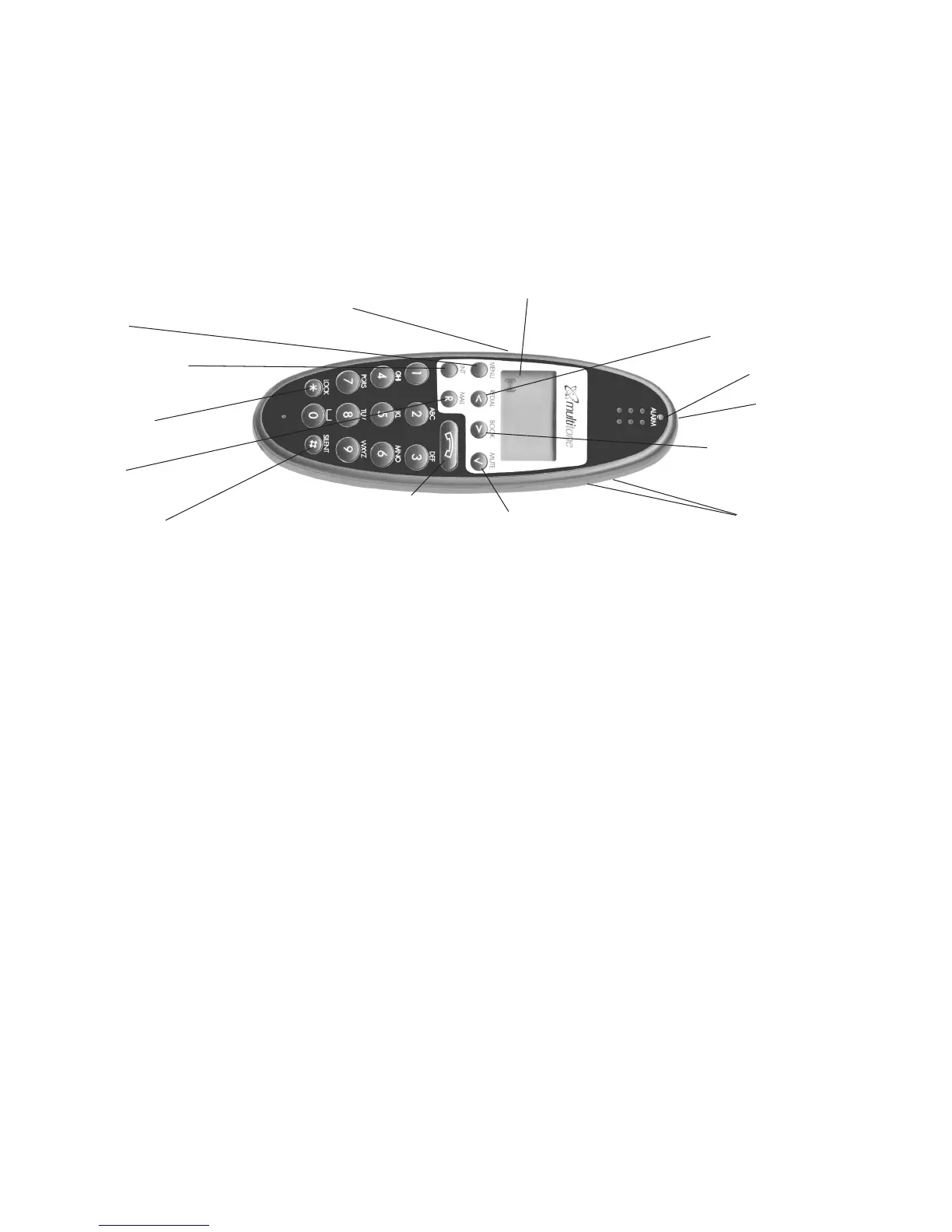
Key for internal calls
(not used on CS600 or CS100)
Loud speaking (only CH74)
Keyboard LOCK
(Menu*)
MENU key
Display with backlight
Recall key
(MAIL key)
SILENT (Menu#)
ON/OFF HOOK key-
also used as turn ON key
CONFIRMATION key -
MUTE microphone.
MUTE ringer when ringing.
Long key press turns OFF.
Right arrow key, save number.
Telephone book menu from
standby text
Left arrow key, Redial menu
from standby text
Volume up/down
LED
Alarm key
Headset Connector
(only CH74)
Do not remove the battery cover using a sharp instrument as this is likely to damage the plastic or rubber seal.
Insert a small screwdriver into the slot located just below the screw location. Lift gently upwards, Do Not Lever and when the cover
lifts, pull gently upwards to release the locating lugs.
To refit the cover locate the lugs on the lower end of the battery cover into the holes and press gently down to
reseat the cover. Refit the screw plate ensuring the locating lugs is in the hole.


 To Next Page