CoreMC™ 2 Reference Guide - http://musiccomputing.com/support 13 | P a g e
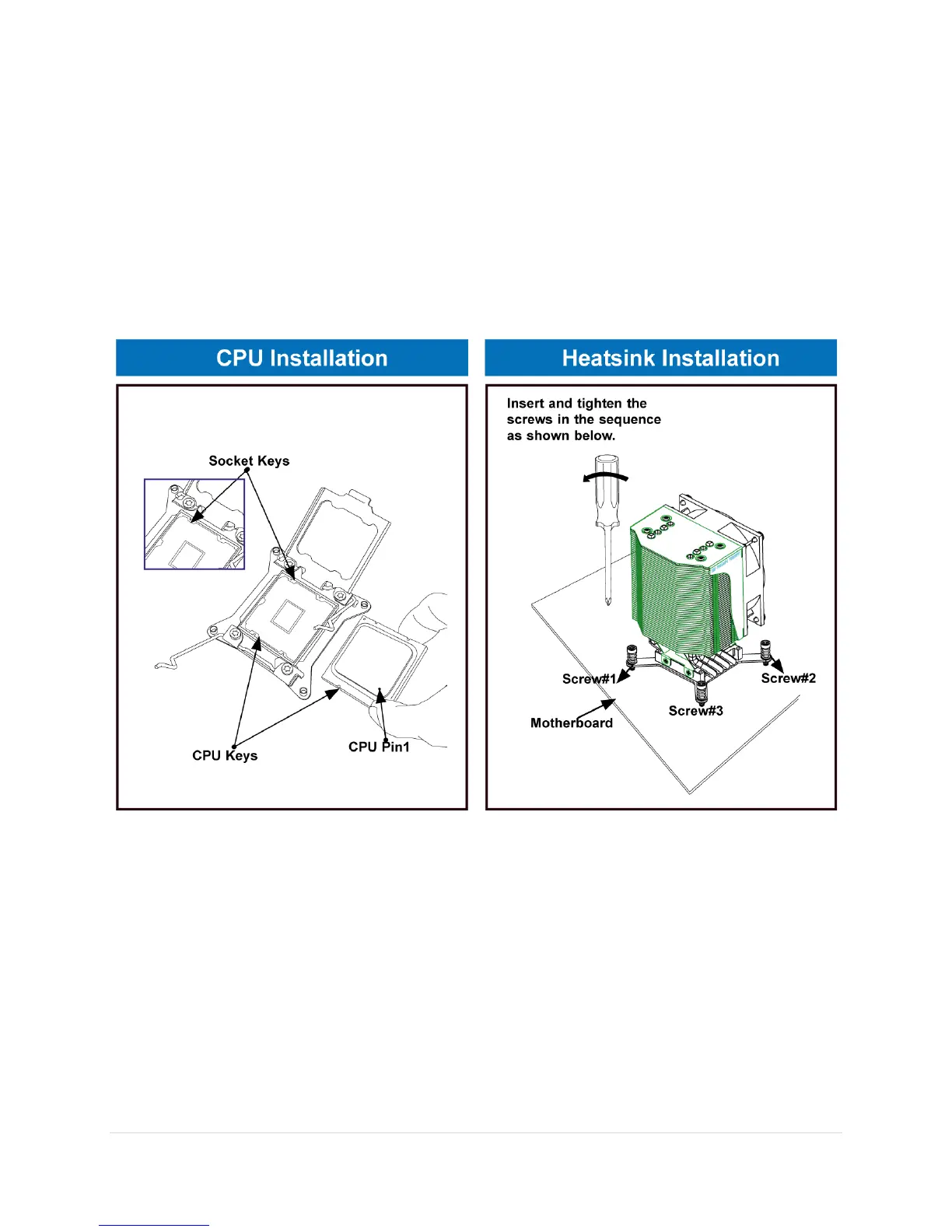
7.1 Processor and Heat Sink Installation Reference
If you need assistance, and to avoid any warranty issues please contact Music
Computing Support before attempting any system changes.
CoreMC™ 2 uses up to two Dual Intel® E5-2600v3 Series Processors (Socket R3-
LGA 2011); each processor supports dual full-width Intel QuickPath Interconnect
(QPI) links (of up to 9.6 GT/s one direction per QPI.
Warning: When handling the processor package, avoid placing direct pressure on
the label area. Also, improper CPU installation or socket/pin misalignment can
cause serious damage to the CPU or the motherboard that will require RMA repairs.
Be sure to read and follow all instructions thoroughly before installing your CPU and
heatsink.
Make sure that you install the processor into the CPU socket before you install the CPU heatsink.
• If you buy a CPU separately, make sure that you use an Intel-certified multi-directional
heatsink only.
• When receiving a server board without a processor pre-installed, make sure that the plastic
CPU socket cap is in place and none of the socket pins are bent; otherwise, contact your Music
Computing immediately.
• Contact Music Computing for updates on CPU support.



 To Next Page