CoreMC™ 2 Reference Guide - http://musiccomputing.com/support 18 | P a g e
7.4 Removing a CPU Heatsink
Warning: We do not recommend that the CPU or the heatsink be removed.
However, if you do need to uninstall the heatsink, please follow the instructions
below to uninstall the heatsink to prevent damage done to the CPU or the CPU
socket.
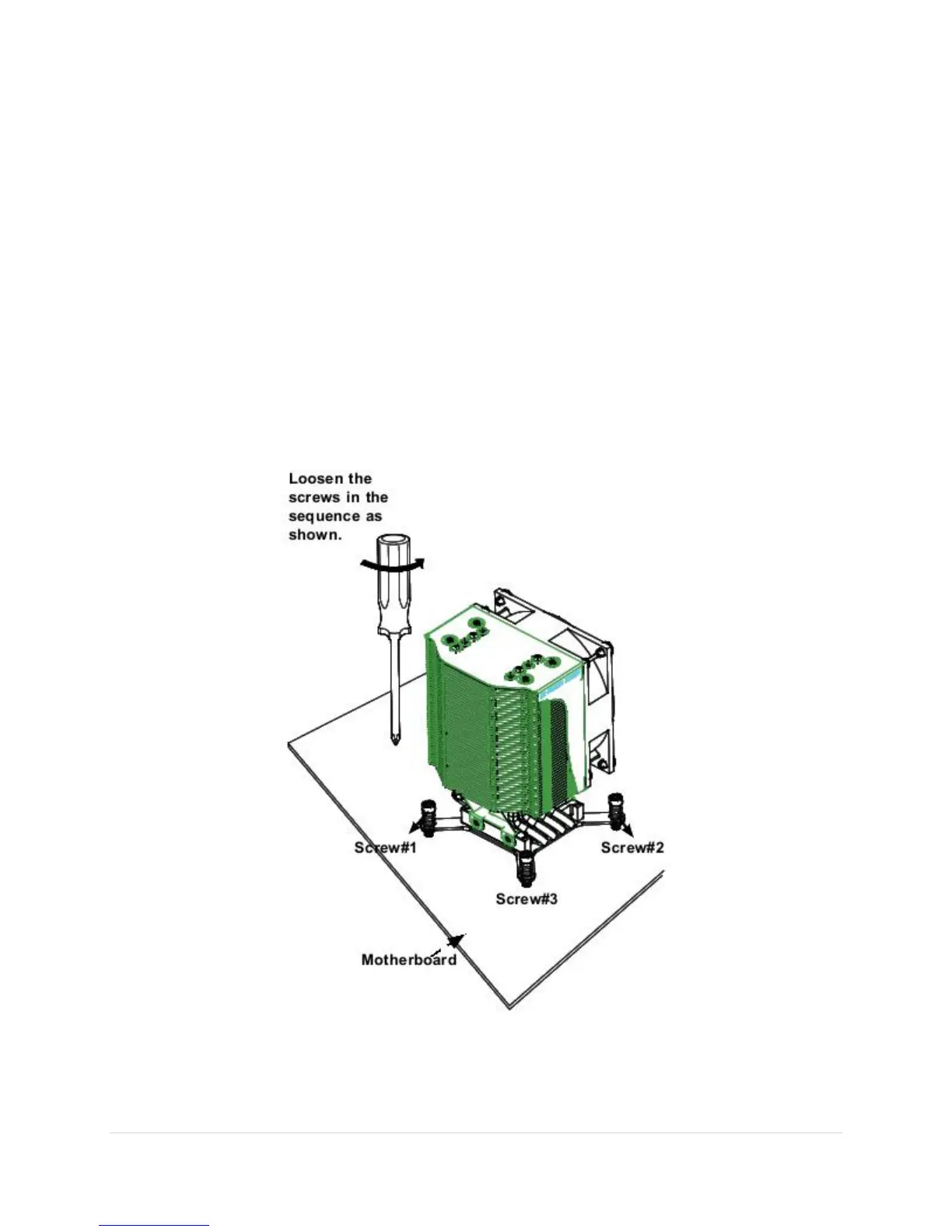
1. Unscrew the heatsink screws from the motherboard in the sequence as
shown in the illustration below.
2. Gently wriggle the heatsink to loosen it from the CPU. (Do not use excessive
force when wriggling the heatsink!)
3. Once the CPU is loosened, remove the heatsink from the CPU socket.
4. Remove the used thermal grease and clean the surface of the CPU and the
heatsink, Reapply the proper amount of thermal grease on the surface before
reinstalling the CPU and the heatsink.



 To Next Page