3. If the password is incorrect, you need to do a factory reset. Follow the steps for
Cobblestone Wi-Fi password protection again, and then do this process to
double check the password.
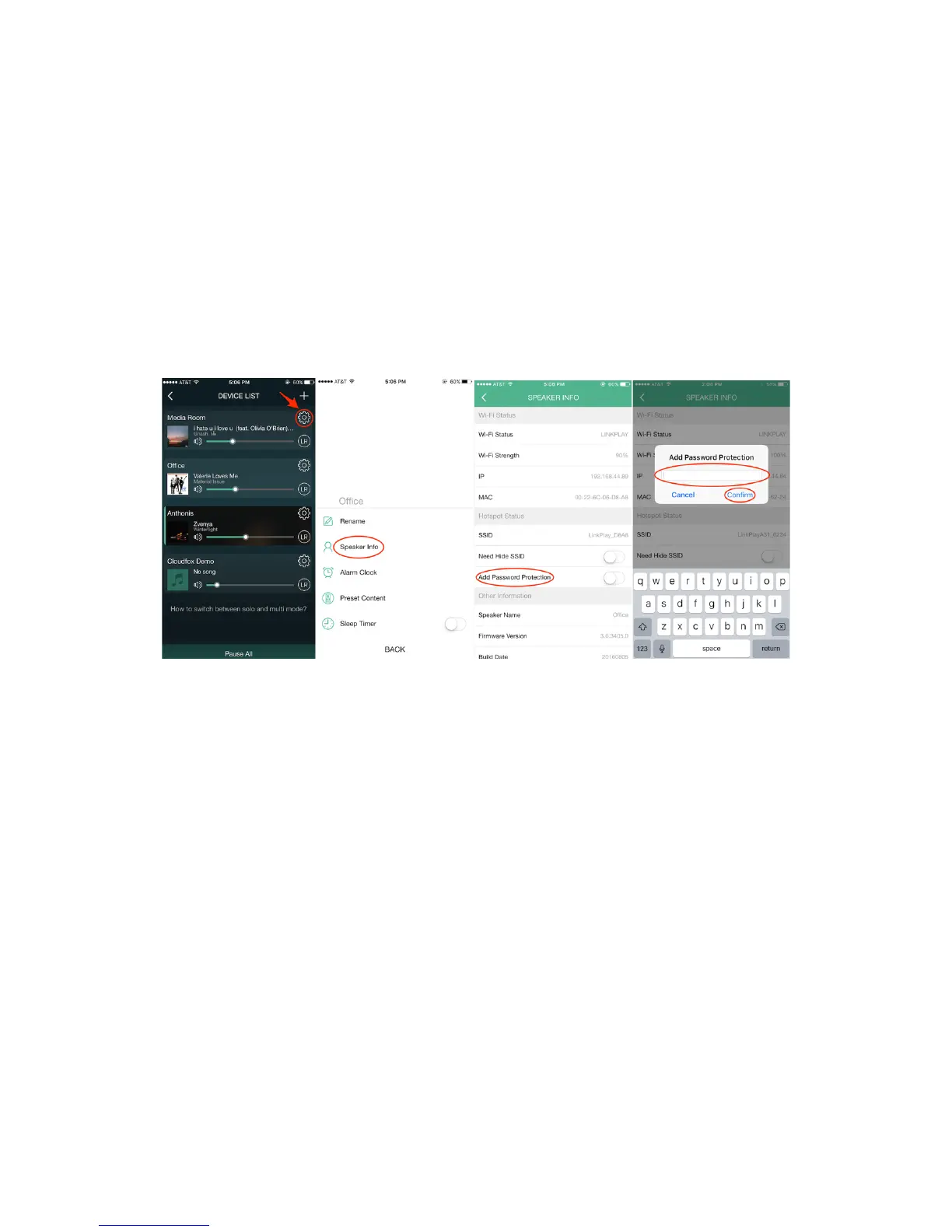
Cobblestone Wi-Fi Password Protection
1. Open your MUZO Player app to “Device List”
2. Select the settings button for the Cobblestone you want to add a password to.
3. Select “Speaker info.”
4. Choose “Add Password Protection”
5. Create password and select confirm.
Hide Cobblestone SSID
At this point we do not allow the ability to switch off the hotspot, however we do
provide the ability to hide your Cobblestone SSID. Also, please note that this feature
works for iOS users only. However, we are looking into adding this feature for Android
users in the near feature. Please follow the steps below:
1. Go to “Device List” page
2. Select the gear icon on the Cobblestone you want to add a password to
3. Select "Speaker Info"
4. Select "Need Hide SSID"


 To Next Page