17
EN
M1.1.MV900-1500-2000IL.NLFREN - 09122019
5 Operation
5.1 Control panel and display
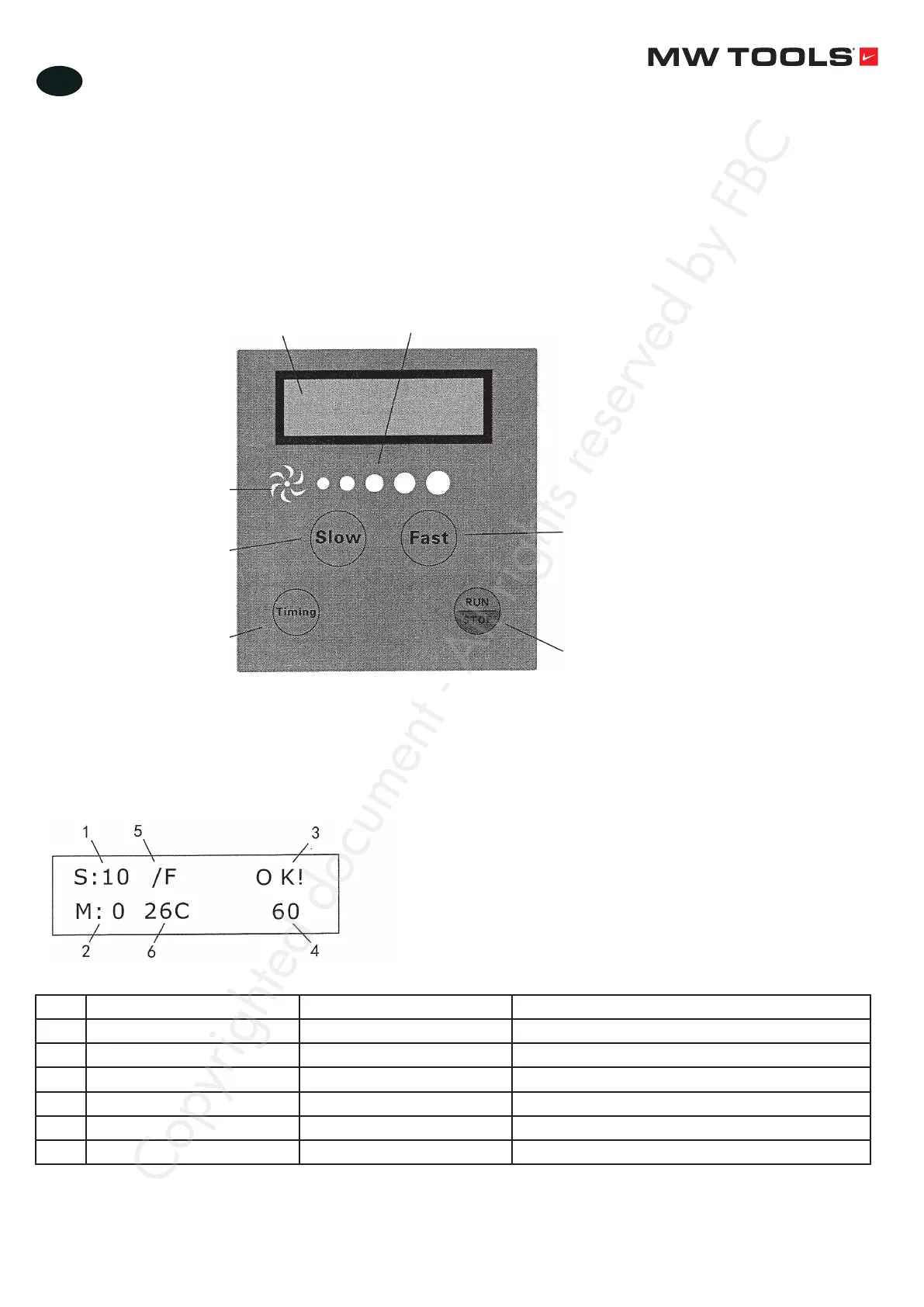
The screen on the control panel displays various kinds of data, parameters, warnings, etc.
• Name and functions of each section
Data display Speed display
Shows the fan is
running or not
Deceleration key
Acceleration key
RUN/STOP key
Timing button: Press this
key and than press the
key ‘Slow’ or ‘Fast’ to
adjust the fan operating
time
• Data display
Nr. Display Name Function
1 S:10 Gear numerical Displays the gear value
2 M:0 Timing time Displays how long time the fan is turned off
3 OK!/STOP!/E-IPM/AUTO START/STOP/FAIL Shows the fan state
4 60 Speed Shows the speed
5 /F /R Positive / Reversed /F is positive, /R is reversed
6 26C Indoor temperature Displays the room temperature
Copyrighted document - All rights reserved by FBC


 To Next Page