FRONT
BACK
Thank you for your purchase of the DX-2 Dual
Capsule Variable Dynamic Instrument Microphone. Please
take a moment to familiarize yourself with proper operation and
orientation of the DX-2 Microphone.
The broad fl at side is the FRONT of the microphone,
and the curved side is the BACK of the microphone. For optimal
sound pickup, the FRONT (fl at side) of the microphone should
always be pointed toward the sound source.
The MXL DX-2 Microphone is the fi rst of it’s kind to
feature a CROSSFADE variable control knob. Adjusting this
knob will blend tonal pickup between two distinctly different
sounding capsules. CAPSULE 1’s super cardioid large capsule
design will capture the warmth and fullness of your instrument,
while CAPSULE 2’s cardioid smaller capsule offers superb mid-
range and high-end detail.
With the CROSSFADE variable control knob turned
fully to the bottom-left 7 o’clock position, only CAPSULE 1
will be completely engaged. At the vertical 12 o’clock position,
CAPSULE 1 and CAPSULE 2 are both equally engaged. Turning
the knob further clockwise will continue blending CAPSULE 1
with CAPSULE 2, until the knob reaches the rightmost 5 o’clock
position, at which point, only CAPSULE 2 will be fully engaged.
The sturdy XLR connector allows the
DX-2 to hang directly in front of guitar cabinets,
eliminating the need for a mic stand. (TIP: Try
looping the mic cable around the amp handle
so the mic maintains its position once optimal
placement has been determined.)
QUICKSTART GUIDE
DUAL CAPSULE
VARIABLE DYNAMIC
INSTRUMENT MICROPHONE
MXL Microphones | www.mxlmics.com | support@mxlmics.com | (800) 800 6608 | Torrance, CA

 Need help?
 General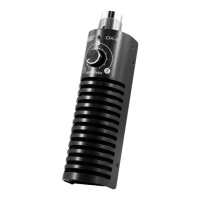

 To Next Page