M307 | MXR
®
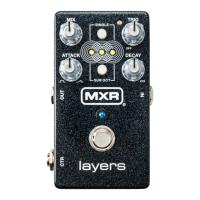
Layers
™
Pedal 5
Advanced Operation
USE A KEYBOARD SUSTAIN PEDAL OR
OTHER EXTERNAL SWITCH TO TRIGGER
LAYERS
A keyboard sustain pedal or other external switch can be
used to trigger layers instead of the built-in footswitch if
the built-in footswitch is inaccessible (e.g. during desktop
use) or a different tactile response is desired. First, set
the CTR switch to its TAP/EXP (left) position. Next, run
a standard instrument cable from the external pedal/
switch to the MXR Layers Pedal’s CTR jack. Note that the
external pedal/switch must be a normally-open discrete
switch and not a continuous TRS switch.
USE AN EXPRESSION PEDAL TO BLEND
BETWEEN TWO SETTING CONFIGURATIONS
An expression pedal such as the DVP5 Volume (X)™8
Pedal can be used to toggle and sweep between two
different setting configurations. First, set the CTR switch
to its TAP/EXP (left) position. Next, run a TRS cable from
the expression pedal to Layers Pedal’s CTR jack. Set
rocker to its heel-down position. Adjust knobs, and set
mode buttons as desired. Move rocker to its toe-down
position. Adjust knobs and mode buttons as desired to
a different setting configuration. Moving the rocker back
and forth will transition smoothly between the sounds
created by the two settings.
Note that SINGLE button Advanced Settings are
expression controllable while SUB OCT button Advanced
Settings are not (see Advanced Settings).
STEREO INPUT
To operate in Stereo Input mode, remove the MXR Layers
Pedal’s bottom plate, locate the MONO/STEREO input
switch, and set it to the STEREO (left) position. It is
recommended to also enable Stereo Output when
using the Stereo Input feature.
STEREO OUTPUT
To operate in Stereo Output mode, run a TRS splitter
cable from the Layers Pedal’s OUTPUT jack to your
chosen inputs, and set the CTR switch to its TAP/EXP
(left) position. Next, press and hold the SUB OCT button,
and rotate the DECAY knob fully clockwise to select
Stereo Output mode. Center LEDs will flash to confirm.
To change back to Mono Output mode, follow the same
steps, and rotate the DECAY knob counterclockwise.
With Stereo Output enabled, the three layers will be
panned left, center, and right, represented visually by the
layers LED positions. When modulation is enabled (see
Advanced Settings), it is possible to auto pan the layers
across the stereo field.
DRY/WET SPLIT
The MXR Layers Pedal can split its dry and wet signals
to run each signal into its own effect chain or to operate
within a dry/wet stereo rig. First, set the CTR switch to its
AUDIO (right) position. Run the wet signal from the OUT
jack and the dry signal from the CTR jack to your chosen
inputs. Note: Stereo Input and Stereo Output modes must
be disabled for Dry/Wet Split mode to work properly.


 To Next Page