M307 | MXR
®
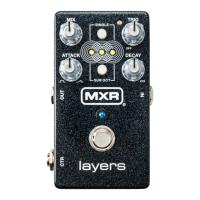
Layers
™
Pedal 6
CONTROL SINGLE SUB OCT
MIX MODULATION AMOUNT
Sets the depth and rate of the modulation
effect. As the MIX knob is rotated clockwise,
rate increases and depth decreases. Setting
the knob to its minimum position turns the
modulation effect off.
MUTE DRY SIGNAL
Rotate clockwise to mute dry signal or
counterclockwise to restore dry signal.
SINGLE LED will flash to confirm. Note that
no sound will be heard if MIX knob is fully
counterclockwise and that CTR jack will be
completely muted if in dry/wet split mode.
TRIG DELAY TIME
Adjusts time between repeats. Setting the
knob to its minimum position turns the delay
off. Delay regen is tied to the DECAY knob.
DRY SIGNAL DELAY SEND
Rotate clockwise to increase amount of
dry signal sent to delay effect.
ATTACK MODULATION BLEND
The modulation effect consists of chorus
and tremolo. Fully counterclockwise provides
only the chorus effect, while fully clockwise
provides only tremolo. The midpoint setting
provides an equal blend of both. With Stereo
Output enabled, the tremolo effect will pan
layers across the stereo field.
ROOT NOTE SUB OCTAVE
Rotate clockwise to engage Root Note
Sub Octave mode or counterclockwise to
disengage it. SUB OCT LED will flash to
confirm. With SUB OCT button engaged, this
mode will only apply the sub octave effect to
the lowest frequencies of a layer.
DECAY DIFFUSION
Rotate clockwise to add diffusion to the layers
for a textural effect. Fully counterclockwise
turns the diffusion effect off.
STEREO OUTPUT
Rotate clockwise to engage Stereo Output
or counterclockwise to disengage it. Center
LEDs will flash to confirm.
SUB OCT TAP TEMPO
Tap SUB OCT button while holding SINGLE
to set delay time.
N/A
RESTORE DEFAULTS
To return all parameters to their default settings, simply
press and hold SINGLE and SUB OCT buttons for five
seconds—the main LED will flash to confirm.
INTRODUCTION
By pressing and holding the SINGLE or SUB OCT buttons
while adjusting any of the pedal’s knobs, you can fine-
tune various functions. These functions allow you to add
modulation and/or delay to your layers, route your dry signal
through a delay, enable Stereo Output, and more. The MXR
Layers Pedal’s delay and modulation effects are based on
those of the MXR Joshua
®
Ambient Echo but with darker
tonality to allow your layers to stand out.
Advanced Settings


 To Next Page